--Ads--
J2ME Draw Triangle


As you already aware of the canvas class and it's use in J2ME application, we
are using canvas class to draw the triangle on the screen. In this example you
will learn how to draw a triangle and filling it with particular color.
Output of the draw triangle application will look like as follow...
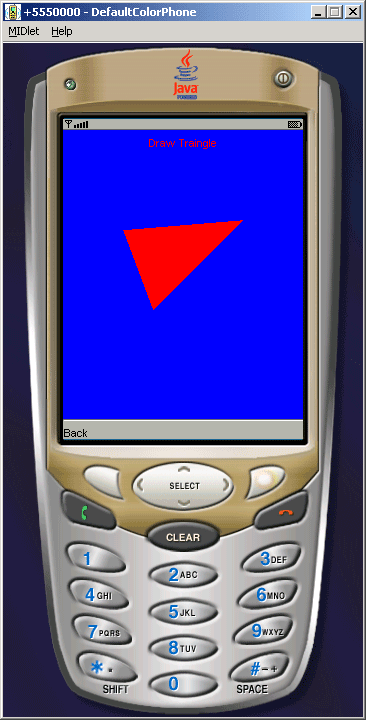
Source code to draw a triangle in J2ME
file name DrawTraingle.java
import javax.microedition.midlet.*;

import javax.microedition.lcdui.*;


public class DrawTraingle extends MIDlet implements CommandListener{

  private Display display;

  private List list;

  private Command ok, exit;

  private CanvasDraw canvasDraw;


  public DrawTraingle(){

  canvasDraw = new CanvasDraw();

  display = Display.getDisplay(this);

  list = new List("DrawTraingle", List.IMPLICIT);

  ok = new Command("Draw", Command.OK, 2);

  exit = new Command("Exit", Command.EXIT, 2);

  list.append("Draw Triangle", null);

  list.addCommand(ok);

  list.addCommand(exit);

  list.setCommandListener(this);

  }


  public void startApp(){

  display.setCurrent(list);

  }


  public void pauseApp(){}


  public void destroyApp(boolean unconditional){

  notifyDestroyed ();

  }


  public void commandAction(Command c, Displayable d){

  int listItemIndex = list.getSelectedIndex();

  if(c == ok){

  display.setCurrent(canvasDraw);

  }else if(c == exit){

  destroyApp(true);

  }

  }


  class CanvasDraw extends Canvas implements CommandListener{

  Command back;


  public CanvasDraw(){

  back = new Command("Back", Command.BACK, 1);

  addCommand(back);

  setCommandListener(this);

  }


  public void paint(Graphics g){

  g.setColor(0, 0, 255);

  g.fillRect(0,0, getWidth (), getHeight ());

  g.setColor(255, 0, 0);


  g.drawString("Draw Traingle", getWidth () / 2, 5, Graphics.HCENTER | Graphics.TOP);

  g.fillTriangle(getWidth() / 4, 100, 90, 180, 180, 90);

  }


  public void commandAction (Command c, Displayable d){

  if(c == back){

  display.setCurrent(list);

  }

  }

  }

}
|
Download Source Code