
Running First Hibernate 3.0 Example


Hibernate is free open source software it can be download from http://www.hibernate.org/6.html. Visit the site and download Hibernate 3.0.
This is very easy to follow tutorial and you can create your first project very easily. In this example we are connecting our program to MySQL database and then performing insert operation.
The Entity class in this application is Contact.java, which is mapped to the contact table of database.
After running the code example you may check your MySQL database to confirm the new record which is added into table.
Prerequisite:
Here are few prerequisite to run the application.
- Java installed and configured on your computer
- Eclipse IDE installed
- MySQL Installed and running.
- Creation of Database: Database hibernatetutorial must be created before running the example.
You can download the Hibernate and install it yourself. But I have provided very thing in one zip file. Download the example code and library from here and extract the content in your favorite directory say "C:\hibernateexample". Download file contains the Eclipse project. To run the example you should have the Eclipse IDE on your machine. Start the Eclipse project and select Java Project as shown below.

Click on "Next" button. In the new screen, enter "hibernateexample" as project name and browse the extracted directory "C:\hibernateexample".
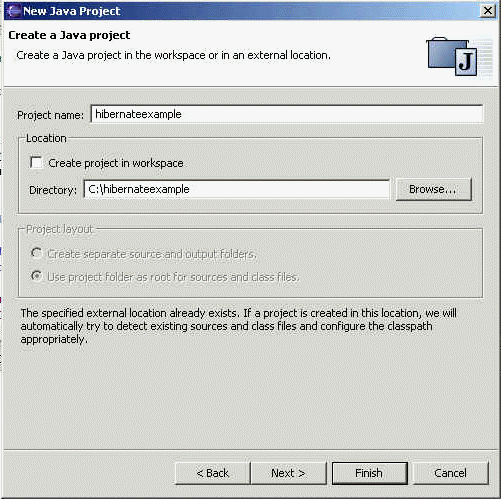
Click on "Next" button. In the next screen leave the output folder as default "hibernateexample/bin" .

Click on the "Finish" button.
Now Open the FirstExample.java in the editor as show below.
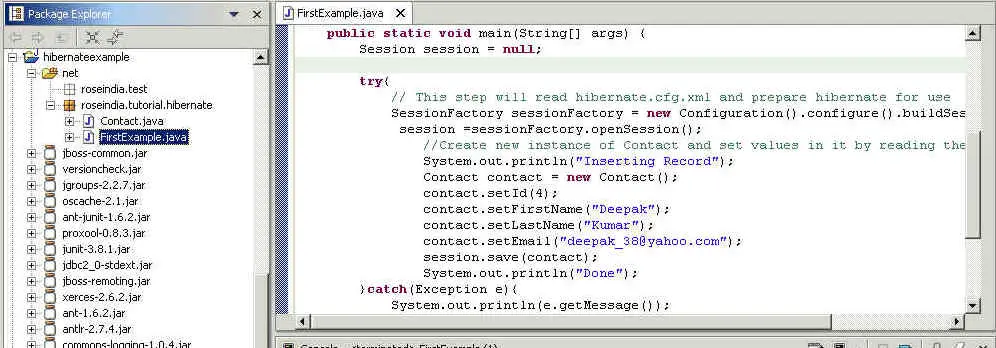
Copy contact.hbm.xml, and hibernate.cfg.xml in the bin directory of the project using windows explorer. You may have to change the database username and password if credential is different in hibernate.cfg.xml file. To run the example select Run-> Run As -> Java Application from the menu bar as shown below.

This will run the Hibernate example program in Eclipse following output will displayed on the Eclipse Console.

In this section I showed you how to run the our first Hibernate 3.0 example.