Frameworks| Hibernate| Struts| JSF| JavaFX| Ajax| Spring| DOJO| JDO| iBatis| Questions?


Search Tutorials:
 

Software Solutions and Services


  JDO Tutorials
  EAI Articles
  Struts Tutorials
  Java Tutorials
  Java Certification
  Java Applet
Questions
Comments
 
Install Dojo 
 

In this section we will learn how to download and install Dojo in your web application. You can easily add Dojo support into your existing application.


Install Dojo


In this section we will learn how to download and install Dojo in your web application. You can easily add Dojo support into your existing application.

This section covers:

  • Download and install for new development
  • Download and install Dojo into existing application 

Downloading Dojo

You can download the latest version of Dojo from its official site http://dojotoolkit.org/. The latest version of Dojo was Dojo Toolkit 1.1.1 at the time of wiring of the tutorial.

Download the Dojo toolkit directly from http://dojotoolkit.org/downloads.
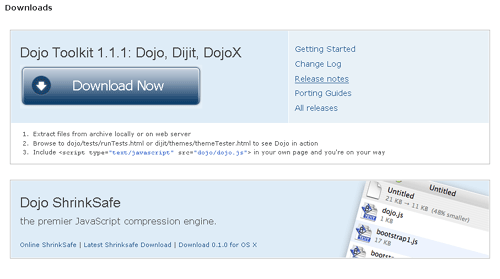
In our case the downloaded file was dojo-release-1.1.1.tar.gz.

Installing Dojo

First choose the directory in your computer where you want to install the Dojo for this tutorial. Let's assume that the directory is c:\mydojo. Now move the downloaded file into the "c:\mydojo" directory and unzip it using WinZip tool or winrar tool. You will get a new directory called "dojo-release-1.1.1". Here is the screen shot from my computer:

Now you ready to start the development. In next section I will show you how to develop simple "Hello World" Dojo application.

Installing Dojo into existing application

Installing Dojo into existing application is also a very easy task. You have to just copy the directory "dojo-release-1.1.1" into your existing project. You can rename the directory "dojo-release-1.1.1" to dojo for easy programming.

Now get ready to develop "Hello World" application in next section.


» View all related tutorials
Related Tags: c dojo io accordion this ai container learn ear e il section in nt out j do s is ll

Leave your comment:

Name:

Email:

URL:

Title:

Comments:


Enter Code:

Audio Version
Reload Image
 

Note: Emails will not be visible or used in any way, and are not required. Please keep comments relevant. Any content deemed inappropriate or offensive may be edited and/or deleted.

No HTML code is allowed. Line breaks will be converted automatically. URLs will be auto-linked. Please use BBCode to format your text.

Add This Tutorial To:
  Del.icio.us   Digg   Google   Spurl   Blink   Furl   Simpy   Y! MyWeb 
Training Courses
Tell A Friend
Your Friend Name
Website Designing Services
 
Web Designing Packages From $150!
 
Website Designing Company Web Hosting
 
Website Designing Quotation
 
Search Tutorials:


Home | JSP | EJB | JDBC | Java Servlets | WAP  | Free JSP Hosting  | Search Engine | News Archive | Jboss 3.0 tutorial | Free Linux CD's | Forum | Blogs

About Us | Advertising On RoseIndia.net  | Site Map

India News

Indian Software Development Company | iPhone Development Company in India | Flex Development Company in India | Java Training Delhi | Java Training at Noida |

Send your comments, Suggestions or Queries regarding this site at roseindia_net@yahoo.com.

Copyright © 2008. All rights reserved.