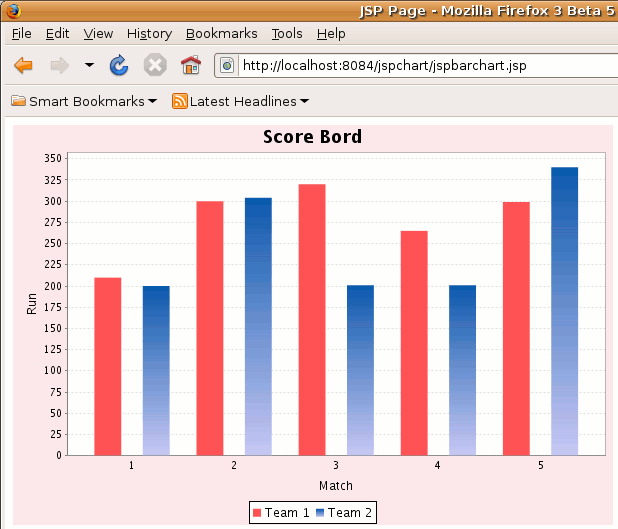
<%@page contentType="text/html" pageEncoding="UTF-8"%>


<%@ page  import="java.awt.*" %>

<%@ page  import="java.io.*" %>

<%@ page  import="org.jfree.chart.*" %>

<%@ page  import="org.jfree.chart.axis.*" %>

<%@ page  import="org.jfree.chart.entity.*" %>

<%@ page  import="org.jfree.chart.labels.*" %>

<%@ page  import="org.jfree.chart.plot.*" %>

<%@ page  import="org.jfree.chart.renderer.category.*" %>

<%@ page  import="org.jfree.chart.urls.*" %>

<%@ page  import="org.jfree.data.category.*" %>

<%@ page  import="org.jfree.data.general.*" %>


<%

  final double[][] data = new double[][]{

  {210, 300, 320, 265, 299},

  {200, 304, 201, 201, 340}

 };


  final CategoryDataset dataset =

   DatasetUtilities.createCategoryDataset(


  "Team ", "", data);


  JFreeChart chart = null;


  BarRenderer renderer = null;

  CategoryPlot plot = null;


  final CategoryAxis categoryAxis = new CategoryAxis("Match");

  final ValueAxis valueAxis = new NumberAxis("Run");

  renderer = new BarRenderer();


  plot = new CategoryPlot(dataset, categoryAxis, valueAxis,

  renderer);
  plot.setOrientation(PlotOrientation.VERTICAL);

  chart = new JFreeChart("Srore Bord", JFreeChart.DEFAULT_TITLE_FONT,


  plot, true);


  chart.setBackgroundPaint(new Color(249, 231, 236));


  Paint p1 = new GradientPaint(

 0.0f, 0.0f, new Color(16, 89, 172), 0.0f, 0.0f, new Color


(201, 201, 244));
  renderer.setSeriesPaint(1, p1);


  Paint p2 = new GradientPaint(

  0.0f, 0.0f, new Color(255, 35, 35), 0.0f, 0.0f, new Color


(255, 180, 180));
  renderer.setSeriesPaint(2, p2);


  plot.setRenderer(renderer);


  try {

  final ChartRenderingInfo info = new ChartRenderingInfo


(new StandardEntityCollection());

 final File file1 = new File("../webapps/jspchart/web/barchart.png");

  ChartUtilities.saveChartAsPNG(file1, chart, 600, 400, info);

  } catch (Exception e) {

 out.println(e);

  }

%>


<html>

  <head>

  <meta http-equiv="Content-Type"

   content="text/html; charset=UTF-8" >

  <!meta  http-equiv="refresh" content="1">

  <title>JSP Page</title>

  </head>


  <body>

  <IMG SRC="barchart.png" WIDTH="600"

  HEIGHT="400" BORDER="0" USEMAP="#chart">

  </body>

</html>
|