
jQuery Hello World example


This section we are going to create our first jQuery application called
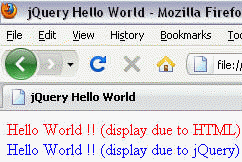
"Hello World jQuery". This application will simply display "Hello World !! (display due to jQuery)"
message in browser.
After completing the example you will be able include the jQuery library in your application and use it to do simple functions.
Let's start developing the Hello World application in jQuery.
Setting up jQuery
For start , we require the jQuery library. You can get it using the following link :
http://code.jquery.com/jquery-1.4.2.js
When you click on the following link it will open a page containing jQuery library script. This file is around 70kb.You need to save this as "jquery-1.4.2.js". Now we are ready to use jQuery inside your html page.
The jQuery library is the most used library for making the dynamic web pages and web application in modern time. This library is used client side with all the web application development frameworks like Java Frameworks, .NET, PHP, Perl etc...
Video Tutorial of jQuery Hello World:
Hello World Example(HelloWorld.html)
Below is the full source code of the HTML page which displays the message using the jQuery:
|
Description of the program
The first and most important thing is to include jQuery library as:
<script type="text/javascript" src="jquery-1.4.2.js"></script>
If you are using the above tag as it is , you need to save the "jquery-1.4.2.js" in the same folder in which you saved your html page. You can also save it in another folder but in that case you need to provide the relative path.
Look precisely the below code :
<script type="text/javascript"> |
For using jQuery script ,we write it inside <script> tag. The below code checks whether the page loading is finished (DOM elements are ready or fully loaded) and if page loading is finished then it executes the code in the block.
$(document).ready(function(){

// Your code here

});
The code given below set the message at div "flag" in html form :
$("#flag").html("Hello World !! (display due to jQuery)");});
OUTPUTWhen page loaded it will show :
Learn from experts! Attend jQuery Training classes.