
Have you ever wondered how websites actually exist on the internet? It's pretty amazing when you think about it - how you can access information from a computer somewhere across the world with just a click. Well, it's all made possible by these things called web hosting services.

Web hosting can definitely be confusing to learn about at first. There's a lot of techy terminology thrown around. But don't worry! In this article, I'm going to walk you through the basics in a friendly way. I'll use lots of analogies and examples to help explain some of the more complex parts.
By the end, you'll have a solid high-level understanding of what web hosting is, how it works, and what some of the most important things to look for are when picking a hosting provider. My goal is to help demystify this topic so you feel empowered, whether you're looking to build your first website or transition an existing site over to a new host.
Understanding the Basics of Web Hosting
Web hosting refers to specialized servers that store, manage, and provide access to website files over the internet. Websites require hosting in order to be viewable online, much like a physical building requires land and an address. Web hosts allocate space for your site along with tools for design, content management, email, security, and performance monitoring.
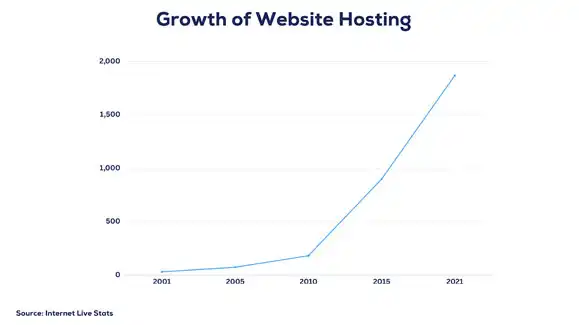
Web hosts store, manage, and provide access to your website files on special computers called servers. Without web hosting, your website would not be accessible on the World Wide Web. As of 2021, there are over 1.8 billion websites online, all of which require hosting.
When choosing a hosting provider, key factors like uptime, bandwidth allocation, security features, and technical support become important considerations. We'll explore these in detail later. First, let's explore the significance of domain names.
Domain Names and Their Significance
If web hosting provides the land for your online presence, the domain name is the address that helps visitors find your home on the internet. Over 360 million domain names were registered across all top-level domains (TLDs) as of 2020.
With so much complicated terminology of web hosting to grasp, it can seem like a daunting task at first. When selecting a domain, go for something short, memorable, and relevant to your brand. Opting for popular TLDs like .com and .net also aids discovery. Now that we've covered domain names, let's delve into the hosting plans that can accommodate them.
Exploring Different Types of Hosting Plans
Shared Hosting: As you may have guessed, this type of hosting means your website shares server resources with other sites. It's the most common approach, used by over 37% of all websites. Shared hosting is relatively affordable and suitable for personal sites and small businesses. However, the resource sharing aspect can negatively impact performance.
VPS Hosting: With this option, your website gets its own dedicated share of
resources through virtualization technology. Compared to shared hosting, VPS
provides more flexibility and improved performance. This makes it an ideal
choice for medium-sized businesses.
Dedicated Hosting: As the name suggests, your website gets the entire server for
its sole use. This offers the maximum control and best performance, but at a
premium price point. Large enterprises typically use dedicated hosting to meet
their needs.
Cloud Hosting: This refers to an interconnected network of servers hosting your website, rather than a single server. Cloud hosting enhances security, scalability, and uptime.
Advanced Hosting Features and Technologies
While server resources are at the core of web hosting, hosting providers now offer a wide array of additional features:
Content Management Systems (CMS): Tools like WordPress that simplify creating and managing website content and design. In 2021, 43% of hosting providers offered support for WordPress.
SSL Certificate: Adds a layer of security by encrypting the connection between your site and visitors. This is denoted by https and the padlock icon in the address bar.
Bandwidth: This determines the total data transfer available for your site, measured in GB/month. More bandwidth supports higher traffic volumes.
Understanding these technologies will allow you to select a hosting plan tailored to your website needs.
Navigating the Hosting Control Panel
The hosting control panel is the central dashboard that allows you to manage every aspect of your website. It is a necessary tool that you will need to become familiar with as a web host. Let's explore some of the key features and functions of control panels:
Managing Domains: The control panel enables you to point your domain names to your hosting account. You can add, remove, redirect, and configure various domains.
Website Files: Access your website's files and folders through the control panel. You can upload, download, edit, delete, and change the files that comprise your site.
Database Management: Many control panels integrate popular databases to store your website's data. You can create and manage databases and user accounts with ease.
Email Accounts: Get tools to configure professional email accounts using your domain name. Control email storage space, spam filters, forwarding, and more.
Performance Monitoring: Keep tabs on your website's uptime, traffic, resource use, and other metrics using the control panel's analytics. Identify and troubleshoot bottlenecks.
Security: Manage SSL certificates, firewall rules, security plugins, and other measures through the control panel to lock down your website.
Automation: Control panels let you schedule backups, updates, emails, and other tasks to happen at set intervals. cPanel and Plesk are two of the most popular control panels provided by web hosts. Taking time to learn the ins and outs of your control panel is key to managing your hosting account. The control panel combined with FTP and database tools equips you to handle all web hosting tasks.
Conclusion
And there you have it! We've covered the essentials around web hosting and related concepts for beginners by explaining terminology and exploring different plans. Don't feel bogged down by the techie phrases - it's actually simpler than it seems.
With this guide's knowledge, you can now confidently choose a reliable hosting provider that fits your website goals and budget. Bring together the right domain name, hosting plan, applications and let your online presence flourish!
I hope demystifying web hosting has shown you how attainable and fulfilling it can be to create your own space on the internet. Feel free to revisit the article or reach out if something seems unclear.
Frequently Asked Questions
0What is a good uptime percentage to look for?
Look for at least 99.9% uptime from any reputable web host. Less than that risks too much downtime.
When should I upgrade from shared hosting?
1Upgrade when your site starts experiencing frequent slow loads or downtime due to exceeding resource limits on shared hosting.
How often do I need to use the control panel?
Check it weekly to ensure everything is running smoothly, like site performance and resource usage. Respond to any notifications.
2What's the easiest security step I should take?
Obtain an SSL certificate to encrypt data between your site and visitors. Most hosts make this easy and free to set up.
What do bandwidth and storage space refer to?
3Bandwidth is how much data transfer is allowed monthly. Storage space is how much room you have for site files and assets. Start with low amounts and scale up as your site grows.