
Internationalization Code Example


In the application given below we will develop a form for users from different countries. So user can select the from language as per suitability and operate further process.
index.jsp:
|
<%@ taglib prefix="c" uri="http://java.sun.com/jsp/jstl/core"%>< html>< head>< title>Select Language</title></ head>< body>< h1>Please select language:</h1>< c:url value="application.jsp" var="engURL"> <c:param name="locale" value="en_US" /></ c:url>< a href="${engURL}"> <img src="english.gif" /> </a>< br />< br />< c:url value="application.jsp" var="chineseURL"> <c:param name="locale" value="zh_HK" /></ c:url>< a href="${chineseURL}"> <img src="chinese.gif" /> </a>< br />< br />< c:url value="application.jsp" var="frenchURL"> <c:param name="locale" value="fr_FR" /></ c:url>< a href="${frenchURL}"> <img src="french.gif" /> </a></ body> |
application.jsp :
|
<%@ page pageEncoding="UTF-8"%><%@ taglib prefix="c" uri="http://java.sun.com/jsp/jstl/core"%> 0<%@ taglib prefix="fmt" uri="http://java.sun.com/jsp/jstl/fmt"%>< html>< c:set var="loc" value="en_US" /> 1< c:if test="${!(empty param.locale)}"><c:set var="loc" value="${param.locale}" /> </ c:if> 2< fmt:setLocale value="${loc}" />< fmt:bundle basename="app"> <head> 3 <title><fmt:message key="newTitle" /></title> </head> <body> 4 <h1><fmt:message key="newTitle" /></h1> <br /> <c:url value="procform.jsp" var="formActionURL" /> 5 <form action="${formActionURL}" method="post"> <table> <tr> 6 <td><fmt:message key="lastName" /></td> <td><input type="hidden" name="locale" value="${loc}" /> <input type="text" name="lastname" size="40" /></td> 7 </tr> <tr> <td><fmt:message key="firstName" /></td> 8 <td><input type="text" name="firstname" size="40" /></td> </tr> <tr> 9 <td><fmt:message key="postalCode" /></td> <td><input type="text" name="postcode" size="40" /></td> </tr> 0 <tr> <td><fmt:message key="password" /></td> <td><input type="password" name="pass" size="40" /></td> 1 </tr> <tr> <td colspan="2" align="center"><input type="submit" 2 value="<fmt:messagekey ='submitForm'/>" /></td> </tr> 3 </table> </form> </body></ fmt:bundle> 4</ html> |
procform.jsp :
<%@ page pageEncoding="UTF-8" %>
<%@ taglib prefix="fmt" uri="http://java.sun.com/jsp/jstl/fmt" %>
<%@ taglib prefix="c" uri="http://java.sun.com/jsp/jstl/core" %>
<fmt:requestEncoding value="UTF-8" />
<html>
<fmt:setLocale value="${param.locale}"  />
<head>
  <fmt:bundle basename="app">
  <title><fmt:message key="appInfo"/></title>
</head>
  <body>
   <h1><fmt:message key="appInfo"/></h1>
   <br>
   <table border="1">
     <tr>
        <td><fmt:message key="lastName"/></td>
        <td>${param.lastname}</td>
     </tr>
     <tr>
       <td><fmt:message key="firstName"/></td>
       <td>${param.firstname}</td>
     </tr>
     <tr>
      <td><fmt:message key="postalCode"/></td>
      <td>${param.postcode}</td>
     </tr>
     <tr>
       <td><fmt:message key="password"/></td>
                <td>${param.pass}</td>
            </tr>
        </table>
    </body>
</fmt:bundle>
</html>
|
app.properties
#import<stdio.h>
#import"MyClass.m"
int main(){
MyClass *class = [[MyClass alloc]init];
printf("Sum is : %d",[class sum : 5 andb : 6 andc:10]);
[class release];
return ;
}
|
app_fr.properties 5
| newTitle=Formulaire de Demande lastName=Pr\u00e9nom firstName=Nom postalCode=Code postal password=Mot de pass\u00e9 submitForm=Valider appInfo=L\u2019information de demadeur |
app_zh.properties
newTitle=\u7533\u8acb\u8868\u683c lastName=\u59d3 firstName=\u540d\u5b57 postalCode=\u90f5\u653f\u7de8\u865f password=\u5bc6\u78bc submitForm=\u63d0\u4ea4\u8868\u683c appInfo=\u7533\u8acb\u4eba\u8cc7\u6599 |
Output : This is first page of the
application
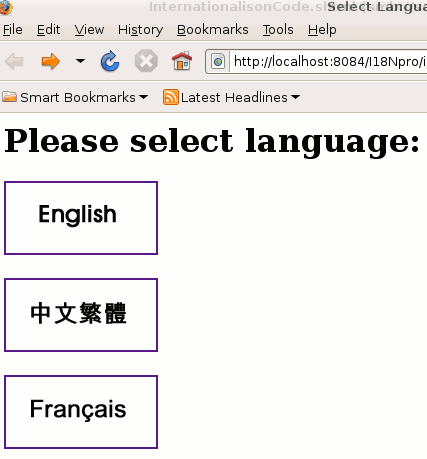
when user selects first (English) option, next page will be....
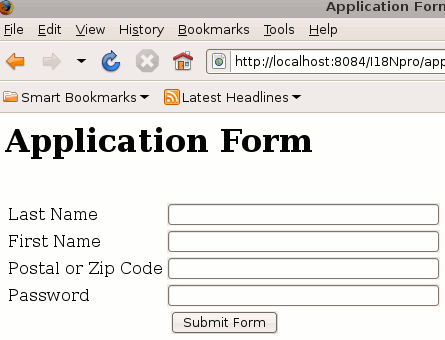
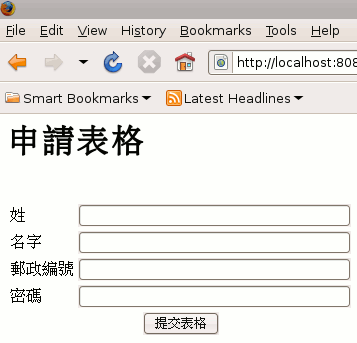
If user when user selects second (Chinese) option, next
page will be....
 6
6