Installing Apache Spark 4.0 on Ubuntu 24.04 and creating first PySpark Program
The first step toward learning Apache Spark 4.0 is to download and install on your own desktop and try it. In this section I will show you how you can get started with Apache Spark 4.0 by downloading, installing and running the first PySpark program.
Prerequisite
- You should have Ubuntu 24.04 desktop installed on the computer or in the VM. I am using Oracle Virtualbox and installed Ubuntu 24.04 as the host VM.
- You should have admin access(sudo access) to your system.
- Internet is required to install Java and Apache Spark 4.0
Installing Java
Apache Spark 4.0 required JDK 17 or 21, so our system should have JDK 17 or JDK 21. In Ubuntu 24.04 OpenJDK 21 can be installed using following sudo command:
sudo apt install openjdk-21-jdk
The above command will install OpenJdk 21 on your Ubuntu 24.04 box.
Downloading Apache Spark 4.0.0
The first version of Apache Spark 4 is 4.0.0 to download it visit https://spark.apache.org/downloads.html. Here is the screen shot of the website:
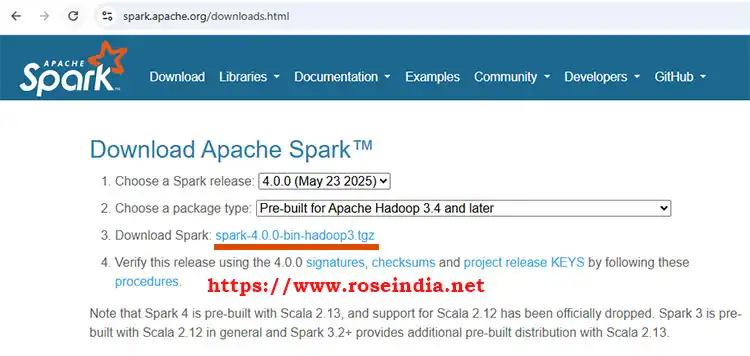
Click on the link shown in image to download Apache Spark 4.0.0 (your version might be latest depending on the time you are reading this tutorial). After it, move to another directory from where you want to run Apache Spark.
Installing Apache Spark 4.0.0
Installing Apache Spark 4.0.0 in standalone mode is easy. You just have to extract the tar.gz file.
Running and writing program
To run pyspark open terminal in Ubuntu and go to the bin directory of your spark and run ./pyspark command. This will start the PySpark terminal where you can write and test your code.
Here is the screenshot of PySpark terminal:

Now type following code in the PySpark terminal:
# Create RDD from parallelize
data = ["Grapes", "Babana", "Apple"]
rdd = spark.sparkContext.parallelize(data)

c = rdd.collect()
print(c)
In the above application we are creating a python list and then creating rdd from the list data. Finally collecting rdd and printing on the console. RDD is a distributed dataset in Apache Spark and we will learn about this in future lessons.
In this tutorial we learned to install Apache Spark 4.0 in standalone mode and created a simple program. Check more tutorials at Apache Spark 4.0 tutorials section.