SimpleDateFormat example explains you formatting of date in the specified format.

Java SimpleDateFormat Example
In this section we will discuss about how to format a date into the specified format.
To format a date into the specified date format we may use the java.text.SimpleDateFormat class. SimpleDateFormat class is used to format and parse the date in the locale-sensitive mode. It formats the date to text and parses the text to date. SimpleDateFormate facilitate to format the user defined date-time formatting.
To format the date there are various date and time patterns. Formats of date and time is specified in a date and time pattern strings. In the pattern strings letters from 'A' to 'Z' and 'a' to 'z' are reserved. Following table explains the letter reserved for the specified pattern.
| Reserved Letter | Date or Time Component |
|---|---|
| G | Era designator |
| y | Year |
| M | Month in year |
| w | Week in year |
| W | Week in month |
| D | Day in year |
| d | Day in month |
| F | Day of week in month |
| E | Day in week |
| a | Am/pm marker |
| H | Hour in day (0-23) |
| k | Hour in day (1-24) |
| K | Hour in am/pm (0-11) |
| h | Hour in am/pm (1-12) |
| m | Minute in hour |
| s | Second in minute |
| S | Millisecond |
| z | Time zone |
| Z | Time zone |
Example :
Here an example is being given which will demonstrate you about about how to format a date using SimpleDateFormat. In this example we will create a simple Java class where we will specified a date format as a String and then we will format that date using SimpleDateFormat. We will use the format() method to format the date into the specified format.
FormatDateExample.java
package dateformat;

import java.text.ParseException;
import java.text.SimpleDateFormat;
import java.util.Date;

public class FormatDateExample {

    public static void main(String[] args) throws ParseException {
        String stringDate = "2011-01-18 00:00:00.0";

        SimpleDateFormat dt = new SimpleDateFormat("yyyy-MM-dd hh:mm:ss");
        Date date = dt.parse(stringDate);

        SimpleDateFormat dt1 = new SimpleDateFormat("yyyy-MM-dd");
        System.out.println("New Formatted Date : "+dt1.format(date));
    }
}
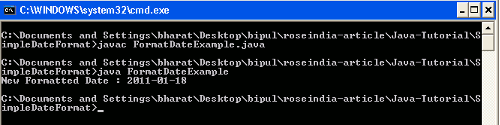
Output
When you will compile and execute the above example you will get the output as follows :