
Microsoft Harrier-OSS-v1 example - Load Model and Generate Embeddings
Microsoft just dropped microsoft/harrier-oss-v1-0.6b model which is a multilingual text embedding model. It supports a wide range of languages, including but not limited to: Arabic, Bulgarian, Catalan, Czech, Danish, German, Greek, English, Spanish, Estonian, Persian, Finnish, French, Hebrew, Hindi, Croatian, Hungarian, Indonesian, Italian, Japanese, Korean, Lithuanian, Latvian, Macedonian, Malay, Dutch, Norwegian, Polish, Portuguese, Romanian, Russian, Slovak, Slovenian, Albanian, Serbian, Swedish, Thai, Turkish, Ukrainian, Urdu, Vietnamese, and Chinese.
In this example we are going to show you how to load the model and perform similarity search on the document. First of all we will load the model, then create text embedding and finally perform the similarity search among the document. This is a kind of models which can be used for retrieval, clustering, semantic similarity, classification, bitext mining, and reranking.
Here is example code:
First of load the model and create a function for generating the text embedding:
from transformers import AutoTokenizer, AutoModel
import torch
import torch.nn.functional as F

# Load model and tokenizer
model_id = "microsoft/harrier-oss-v1-0.6b"

tokenizer = AutoTokenizer.from_pretrained(model_id)
model = AutoModel.from_pretrained(
    model_id,
    torch_dtype=torch.float16 if torch.cuda.is_available() else torch.float32,
    device_map="auto"
)

model.eval()


# Function to get embeddings
def get_embedding(text):
    inputs = tokenizer(
        text,
        return_tensors="pt",
        truncation=True,
        padding=True
    )

    # Move to same device as model
    inputs = {k: v.to(model.device) for k, v in inputs.items()}

    with torch.no_grad():
        outputs = model(**inputs)

    # Mean pooling
    embeddings = outputs.last_hidden_state.mean(dim=1)

    # Normalize embeddings
    embeddings = F.normalize(embeddings, p=2, dim=1)

    return embeddings
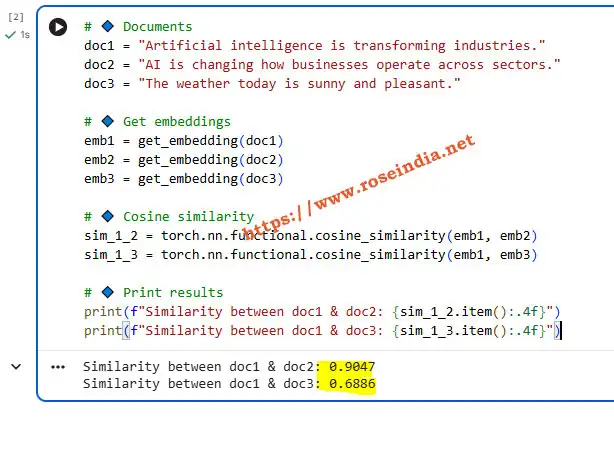
Once the model is loaded next step is to create embeddings and then compare the similarity. Here is the code:
# Documents
doc1 = "Artificial intelligence is transforming industries."
doc2 = "AI is changing how businesses operate across sectors."
doc3 = "The weather today is sunny and pleasant."

# Get embeddings
emb1 = get_embedding(doc1)
emb2 = get_embedding(doc2)
emb3 = get_embedding(doc3)

# Cosine similarity
sim_1_2 = torch.nn.functional.cosine_similarity(emb1, emb2)
sim_1_3 = torch.nn.functional.cosine_similarity(emb1, emb3)

# Print results
print(f"Similarity between doc1 & doc2: {sim_1_2.item():.4f}")
print(f"Similarity between doc1 & doc3: {sim_1_3.item():.4f}")
Here is the screenshot of the output of the program run from Google Colab:
Check Video Tutorial: Microsoft Just Dropped HARRIER Full Test & Real Results!
You can get the source code at Google Colab Source code..
Related Tutorials: