import java.awt.Color;

import java.awt.GradientPaint;

import java.awt.Paint;

import java.awt.Rectangle;


import org.jfree.chart.ChartFactory;

import org.jfree.chart.ChartPanel;

import org.jfree.chart.JFreeChart;

import org.jfree.chart.LegendItem;

import org.jfree.chart.LegendItemCollection;

import org.jfree.chart.axis.SubCategoryAxis;

import org.jfree.chart.plot.CategoryPlot;

import org.jfree.chart.plot.PlotOrientation;

import org.jfree.chart.renderer.category.GroupedStackedBarRenderer;

import org.jfree.data.KeyToGroupMap;

import org.jfree.data.category.CategoryDataset;

import org.jfree.data.category.DefaultCategoryDataset;

import org.jfree.ui.ApplicationFrame;

import org.jfree.ui.GradientPaintTransformType;

import org.jfree.ui.RefineryUtilities;

import org.jfree.ui.StandardGradientPaintTransformer;


public class StackedBarChart1 extends ApplicationFrame {


  StackedBarChart1(String titel) {

  super(titel);


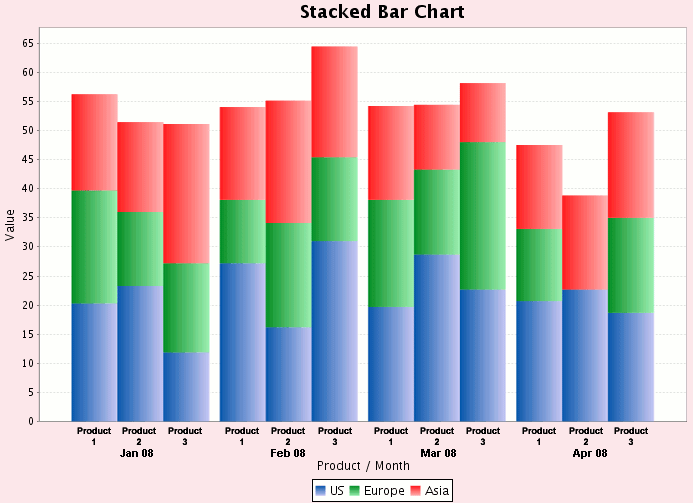
  final CategoryDataset dataset = createDataset();

  final JFreeChart chart = createChart(dataset);

  final ChartPanel chartPanel = new ChartPanel(chart);

  chartPanel.setPreferredSize(

   new java.awt.Dimension(800, 500));

  setContentPane(chartPanel);

  }


  private CategoryDataset createDataset() {

  DefaultCategoryDataset result = new DefaultCategoryDataset();


  result.addValue(20.3, "Product 1 (US)", "Jan 08");

  result.addValue(27.2, "Product 1 (US)", "Feb 08");

  result.addValue(19.7, "Product 1 (US)", "Mar 08");

  result.addValue(20.7, "Product 1 (US)", "Apr 08");

  result.addValue(19.4, "Product 1 (Europe)", "Jan 08");

  result.addValue(10.9, "Product 1 (Europe)", "Feb 08");

  result.addValue(18.4, "Product 1 (Europe)", "Mar 08");

  result.addValue(12.4, "Product 1 (Europe)", "Apr 08");

  result.addValue(16.5, "Product 1 (Asia)", "Jan 08");

  result.addValue(15.9, "Product 1 (Asia)", "Feb 08");

  result.addValue(16.1, "Product 1 (Asia)", "Mar 08");

  result.addValue(14.4, "Product 1 (Asia)", "Apr 08");


  result.addValue(23.3, "Product 2 (US)", "Jan 08");

  result.addValue(16.2, "Product 2 (US)", "Feb 08");

  result.addValue(28.7, "Product 2 (US)", "Mar 08");

  result.addValue(22.7, "Product 2 (US)", "Apr 08");

  result.addValue(12.7, "Product 2 (Europe)", "Jan 08");

  result.addValue(17.9, "Product 2 (Europe)", "Feb 08");

  result.addValue(12.6, "Product 2 (Europe)", "Mar 08");

  result.addValue(14.6, "Product 2 (Europe)", "Mar 08");

  result.addValue(15.4, "Product 2 (Asia)", "Jan 08");

  result.addValue(21.0, "Product 2 (Asia)", "Feb 08");

  result.addValue(11.1, "Product 2 (Asia)", "Mar 08");

  result.addValue(16.1, "Product 2 (Asia)", "Apr 08");


  result.addValue(11.9, "Product 3 (US)", "Jan 08");

  result.addValue(31.0, "Product 3 (US)", "Feb 08");

  result.addValue(22.7, "Product 3 (US)", "Mar 08");

  result.addValue(18.7, "Product 3 (US)", "Apr 08");

  result.addValue(15.3, "Product 3 (Europe)", "Jan 08");

  result.addValue(14.4, "Product 3 (Europe)", "Feb 08");

  result.addValue(25.3, "Product 3 (Europe)", "Mar 08");

  result.addValue(16.3, "Product 3 (Europe)", "Apr 08");

  result.addValue(23.9, "Product 3 (Asia)", "Jan 08");

  result.addValue(19.0, "Product 3 (Asia)", "Feb 08");

  result.addValue(10.1, "Product 3 (Asia)", "Mar 08");

  result.addValue(18.1, "Product 3 (Asia)", "Apr 08");


  return result;

  }


  private JFreeChart createChart(final CategoryDataset dataset) {


  final JFreeChart chart =

   ChartFactory.createStackedBarChart(

 "Stacked Bar Chart", "Category", "Value", dataset,

  PlotOrientation.VERTICAL, true, true, false);


  chart.setBackgroundPaint(new Color(249, 231, 236));


  GroupedStackedBarRenderer renderer =

  new GroupedStackedBarRenderer();

  KeyToGroupMap map = new KeyToGroupMap("G1");


  map.mapKeyToGroup("Product 1 (US)", "G1");

  map.mapKeyToGroup("Product 1 (Europe)", "G1");

  map.mapKeyToGroup("Product 1 (Asia)", "G1");


  map.mapKeyToGroup("Product 2 (US)", "G2");

  map.mapKeyToGroup("Product 2 (Europe)", "G2");

  map.mapKeyToGroup("Product 2 (Asia)", "G2");


  map.mapKeyToGroup("Product 3 (US)", "G3");

  map.mapKeyToGroup("Product 3 (Europe)", "G3");

  map.mapKeyToGroup("Product 3 (Asia)", "G3");


  renderer.setSeriesToGroupMap(map);


  renderer.setItemMargin(0.0);

  Paint p1 = new GradientPaint(

  0.0f, 0.0f, new Color(16, 89, 172), 0.0f, 0.0f, new


Color(201, 201, 244));

  renderer.setSeriesPaint(0, p1);

  renderer.setSeriesPaint(3, p1);

  renderer.setSeriesPaint(6, p1);


  Paint p2 = new GradientPaint(

  0.0f, 0.0f, new Color(10, 144, 40), 0.0f, 0.0f, new


Color(160, 240, 180));

  renderer.setSeriesPaint(1, p2);

  renderer.setSeriesPaint(4, p2);

  renderer.setSeriesPaint(7, p2);


  Paint p3 = new GradientPaint(

  0.0f, 0.0f, new Color(255, 35, 35), 0.0f, 0.0f, new


Color(255, 180, 180));

  renderer.setSeriesPaint(2, p3);

  renderer.setSeriesPaint(5, p3);

  renderer.setSeriesPaint(8, p3);


  renderer.setGradientPaintTransformer(

  new StandardGradientPaintTransformer


(GradientPaintTransformType.HORIZONTAL));


  SubCategoryAxis domainAxis =

  new SubCategoryAxis("Product / Month");

  domainAxis.setCategoryMargin(0.05);

  domainAxis.addSubCategory("Product 1");

  domainAxis.addSubCategory("Product 2");

  domainAxis.addSubCategory("Product 3");


  CategoryPlot plot = (CategoryPlot) chart.getPlot();

  plot.setDomainAxis(domainAxis);

  plot.setRenderer(renderer);

  plot.setFixedLegendItems(createLegendItems());

  return chart;

  }


  private LegendItemCollection createLegendItems() {

  LegendItemCollection result = new LegendItemCollection();

  LegendItem item1 = new LegendItem("US", "US", "US", "US",

  new Rectangle(10, 10), new GradientPaint(0.0f, 0.0f,

  new Color(16, 89, 172), 0.0f, 0.0f,

   new Color(201, 201, 244)));

  LegendItem item2 =

   new LegendItem("Europe", "Europe", "Europe", "Europe",


	new Rectangle(10, 10), new GradientPaint(0.0f, 0.0f,

	   new Color(10, 144, 40), 0.0f, 0.0f,

  new Color(160, 240, 180)));

  LegendItem item3 =

   new LegendItem("Asia", "Asia", "Asia", "Asia",

 new Rectangle(10, 10), new GradientPaint(0.0f, 0.0f,

  new Color(255, 35, 35), 0.0f, 0.0f,

   new Color(255, 180, 180)));


  result.add(item1);

  result.add(item2);

  result.add(item3);


  return result;

  }


  public static void main(final String[] args) {

  final StackedBarChart1 demo =

   new StackedBarChart1("Stacked Bar Chart");

  demo.pack();

  RefineryUtilities.centerFrameOnScreen(demo);

  demo.setVisible(true);

  }

}
|