Home | JSP | EJB | JDBC | Java Servlets | WAP  | Free JSP Hosting  | Spring Framework | Web Services | BioInformatics | Java Server Faces | Jboss 3.0 tutorial | Hibernate 3.0 | XML
 
 
Hot Web Programming Job


Tutorial Categories: Ajax | Articles | JSP | Bioinformatics | Database | Free Books | Hibernate | J2EE | J2ME | Java | JavaScript | JDBC | JMS | Linux | MS Technology | PHP | RMI | Web-Services | Servlets | Struts | UML


Java Tutorials

Core Java
JSP
Servlet
JDBC
Hibernate
Struts 1
Struts 2
JSF
Spring
J2EE
J2ME
Web Services
Ajax
Dojo
MySQL
Latest Comments
Difference between
regarding reflecti
alert is not worki
book
dynamic reports
  All Comments...


Struts Tutorials
*Stuts TOC
*Apache Struts Introduction
* Struts Controller
* Struts Action Class
* Struts ActionFrom Class
* Using Struts HTML Tags
*Struts Validator Framework    
*Client Side Address Validation    
*Struts Tiles
*tiles-defs.xml
*Struts DynaActionForm
*Struts File Upload
*Struts DataSource
*AGGREGATING ACTIONS
*Internationalization
Struts Resources
*Struts Books
*Struts Articles
*Struts Frameworks
*Struts IDE
*Struts Alternative
*Struts Links
*Struts Presentations
*Struts Projects
*Struts Software
*Struts Reference
*Struts Resources
*Other Struts Tutorial
Visit Forum! Post Questions!
Jobs At RoseIndia.net!

Have tutorials?
Add your tutorial to our Java Resource and get tons of hits.

We offer free hosting for your tutorials. and exposure for thousands of readers. drop a mail
roseindia_net@yahoo.com


Join For Newsletter

Powered by groups.yahoo.com
Visit Group! Post Questions!

3D Bar Chart


In this section we are providing you an example to create a 3D Bar Chart.

Description of Program 

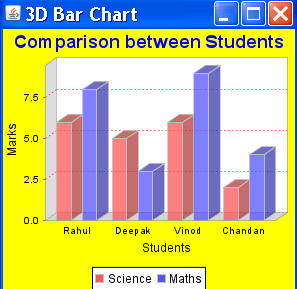
For creating a 3D Bar chart we use the object of DefaultCategoryDataset. After creating the object of DefaultCategoryDataset we add some data in this object by invoking setValue() method. In this example you learn some more interactive features of JFreeChart like set the background color of chart and adjust the color the title etc.

Description of Code

For defining a dataset for a Bar chart we have to create an object of DefaultCategoryDataset type :
        DefaultCategoryDataset dataset = new DefaultCategoryDataset();

After creating the instance of dataset then we have to add the data in the data set by invoking the method setValue(). In this example we show more than one set of bars for the same chart. This can done by the following modification :
        dataset.setValue(6, "Science", "Rahul");
        dataset.setValue(8, "Maths", "Rahul");
        dataset.setValue(5, "Science", "Deepak");
        dataset.setValue(3, "Maths", "Deepak");

First argument specifies the total marks obtained by the student and the second argument specify what will appear in the legend to the meaning of the bar.

        JFreeChart chart = ChartFactory.createBarChart3D("Comparison between Students", "Student", "Marks", dataset, PlotOrientation.VERTICAL, true, true, false);
After added the data in dataset we create the 3D Bar chart by invoking the createBarChart3D() method. This method is a static method of ChartFactory class and its returns the object of JFreeChart type.This method syntax is:

        Public static JFreeChart createBarChart3D(java.lang.String title, java.lang.String categoryAxisLabel, java.lang.String valueAxisLabel, CategoryDataset dataset, PlotOrientation orientation, boolean legend, boolean tooltips, boolean urls);

        chart.setBackgroundPaint(Color.yellow);
Above method is used to set the color of chart background

        chart.getTitle().setPaint(Color.blue); 
Above method is used to set the color of chart title

        CategoryPlot p = chart.getCategoryPlot(); 
Above method is used to get the object of the Plot for Bar Chart

        p.setRangeGridlinePaint(Color.red);
Above method is used to set the color of plot Gridlines

        ChartFrame frame1=new ChartFrame("Bar Chart",chart);
After this we create the object of ChartFrame. It used to display a chart.

Here is code of Program :

import org.jfree.chart.*;
import org.jfree.data.category.*;
import org.jfree.data.general.DefaultPieDataset;
import org.jfree.data.xy.*;
import org.jfree.data.*;
import org.jfree.chart.renderer.category.*;
import org.jfree.chart.plot.*;
import java.awt.*;

public class BarExample2{
public static void main(String arg[]){
  DefaultCategoryDataset dataset = new DefaultCategoryDataset();
  dataset.setValue(6"Science""Rahul");
  dataset.setValue(8"Maths""Rahul");
  dataset.setValue(5"Science""Deepak");
  dataset.setValue(3"Maths""Deepak");
  dataset.setValue(6"Science""Vinod");
  dataset.setValue(9"Maths""Vinod");
  dataset.setValue(2"Science""Chandan");
  dataset.setValue(4"Maths""Chandan");
    JFreeChart chart = ChartFactory.createBarChart3D
    (
"Comparison between Students","Students""Marks"
    dataset, PlotOrientation.VERTICAL, true,true, 
false);
  chart.setBackgroundPaint(Color.yellow);
  chart.getTitle().setPaint(Color.blue)
  CategoryPlot p = chart.getCategoryPlot()
  p.setRangeGridlinePaint(Color.red)
  ChartFrame frame1=new ChartFrame("3D Bar Chart",chart);
  frame1.setVisible(true);
  frame1.setSize(300,300);
  }
}

Output of the Program :

Download this Example


Facing Programming Problem?
Add This Tutorial To:
  Del.icio.us   Digg   Google   Spurl   Blink   Furl   Simpy   Y! MyWeb 

Current Comments

2 comments so far (post your own) View All Comments Latest 10 Comments:

so first - thank you!
Second - a question: do I have a way to add depth to the chart? I mean add bars infront/behind other bars?

Thanks,
Ori

Posted by Ori on Wednesday, 12.26.07 @ 14:31pm | #43835

Hi,

This example is very much helpful.

Regards,
Chetan

Posted by chetan on Wednesday, 06.6.07 @ 20:29pm | #18417

Leave your comment:

Name:

Email:

URL:

Title:

Comments:


Enter Code:


Note: Emails will not be visible or used in any way, and are not required. Please keep comments relevant. Any content deemed inappropriate or offensive may be edited and/or deleted.

No HTML code is allowed. Line breaks will be converted automatically. URLs will be auto-linked. Please use BBCode to format your text.

  JDO Tutorials
  EAI Articles
  Struts Tutorials
  Java Tutorials
  Java Certification

Tell A Friend
Your Friend Name
Search Tutorials


Browse all Java Tutorials
Java JSP Struts Servlets Hibernate XML
Ajax JDBC EJB MySQL JavaScript JSF
Maven2 Tutorial JEE5 Tutorial Java Threading Tutorial Photoshop Tutorials Linux Technology
Technology Revolutions Eclipse Spring Tutorial Bioinformatics Tutorials Tools SQL
 

Home | JSP | EJB | JDBC | Java Servlets | WAP  | Free JSP Hosting  | Search Engine | News Archive | Jboss 3.0 tutorial | Free Linux CD's | Forum | Blogs

About Us | Advertising On RoseIndia.net  | Site Map

India News

Send your comments, Suggestions or Queries regarding this site at roseindia_net@yahoo.com.

Copyright © 2007. All rights reserved.