Stacked Bar Chart Example using JFreeChart Posted on: August 30, 2008 at 12:00 AM
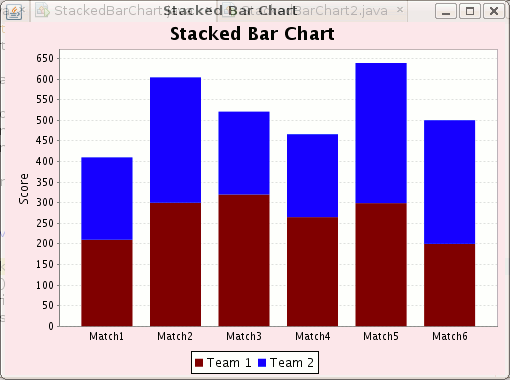
This Example shows you how to create a Stacked bar chart using JFreeChart. Bar chart will represent scores of two team.
Stacked Bar Chart Example using JFreeChart
This Example shows you how
to create a Stacked bar chart using JFreeChart. Bar chart will represent scores
of two team. In the code given
below we have
extended class ApplicationFrame to
create a frame and also pass a string value to the constructor of
ApplicationFrame class by using super keyword that will be name of the
created frame.
Some methods
that are
used in this code :
pack():
This
method invokes the layout manager.
centerFrameOnScreen():
This method is used for the position of the frame in the
middle of the screen.
setVisible():
This method is used for display frame on the screen.
createCategoryDataset():
This
method is used to create the instance of CategoryDataset Interface and
that contains a copy of the data in an array.
createStackedBarChart(): This method is used to create stacked bar chart for given va
lues.
It
takes title, domain axis label, range axis label, dataset, Plot
Orientation, legend, tool tips and urls as
parameters.
setBackgroundPaint(): This method is used to set the
paint used to fill the chart background.
CategoryPlot plot = chart.getCategoryPlot();
plot.getRenderer().setSeriesPaint(0, new Color(128, 0, 0));
plot.getRenderer().setSeriesPaint(1, new Color(0, 0, 255));
return chart;
}
public static void main(final String[] args) {
final StackedBarChart demo =
new StackedBarChart("Stacked Bar Chart");
demo.pack();
RefineryUtilities.centerFrameOnScreen(demo);
demo.setVisible(true);
}
}
Ask Questions? Discuss: Stacked Bar Chart Example using JFreeChart View All Comments
Post your Comment