Core Java| JSP| Servlets| XML| EJB| JEE5| Web Services| J2ME| Glossary| Questions?


Search Tutorials

Latest Questions
Comments
 
Bar Chart Example using JFreeChart 
 

In this code we have extended class ApplicationFrame to create a frame and also pass a string value to the constructor of ApplicationFrame class by using super keyword that will be name of the created frame.


Bar Chart Example using JFreeChart


This Example shows you how to create a bar chart using JFreeChart.
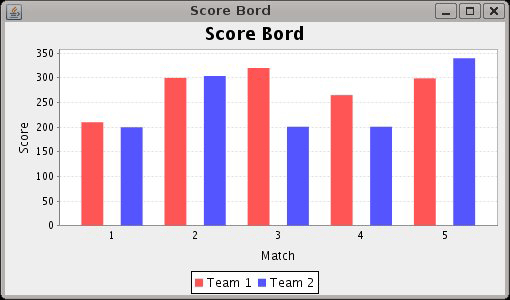
Code given below creates a bar chart of scores of two teams in matches. 

Description of the code:
In this code we have extended class ApplicationFrame to create a frame and also pass a string value to the constructor of ApplicationFrame class by using super keyword that will be name of the created frame.

Some methods that are used in this code :
pack(): This method invokes the layout manager.

centerFrameOnScreen():  This method is used for the position of the frame in the middle of the screen.

setVisible(): This method is used for display frame on the screen.

createCategoryDataset(): This method is used to create the instance of CategoryDataset Interface and that contains a copy of the data in an array.

createBarChart():  This method is used to create bar chart for given values. It  takestitle, category axis label, value axis label, dataset, PlotOrientation, legend, tool tips and urls as parameters.

BarChartDemo1.java:

import 
org.jfree.chart.ChartFactory;
import org.jfree.chart.ChartPanel;
import org.jfree.chart.JFreeChart;

import org.jfree.chart.plot.PlotOrientation;
import org.jfree.data.category.CategoryDataset;
import org.jfree.data.general.DatasetUtilities;
import org.jfree.ui.ApplicationFrame;
import org.jfree.ui.RefineryUtilities;

public class BarChartDemo1 extends ApplicationFrame {

    public BarChartDemo1(String title) {
        super(title);

        final CategoryDataset dataset = createDataset();
        final JFreeChart chart = createChart(dataset);

        final ChartPanel chartPanel = new ChartPanel(chart);
        chartPanel.setPreferredSize(new java.awt.Dimension(500270));
        setContentPane(chartPanel);
    }

    private CategoryDataset createDataset() { 
        final double[][] data = new double[][] {
            {210,300,320,265,299},
            {200,304,201,201,340},
        };
        return DatasetUtilities.createCategoryDataset("Team ""Match ", data);
    }

    private JFreeChart createChart(final CategoryDataset dataset) {

        final JFreeChart chart = ChartFactory.createBarChart(
                "Bar Chart Demo""Category""Score", dataset,
                PlotOrientation.VERTICAL, true, true, false);
        return chart;
    }

    public static void main(final String[] args) {
        BarChartDemo1 chart = new BarChartDemo1("Vertical Bar Chart Demo");
        chart.pack();
        RefineryUtilities.centerFrameOnScreen(chart);
        chart.setVisible(true);
    }
}

Output:


Download code


» View all related tutorials
Related Tags: java c data 3d object dataset io help method char default value chart this set for add e bar section

Leave your comment:

Name:

Email:

URL:

Title:

Comments:


Enter Code:

Audio Version
Reload Image
 

Note: Emails will not be visible or used in any way, and are not required. Please keep comments relevant. Any content deemed inappropriate or offensive may be edited and/or deleted.

No HTML code is allowed. Line breaks will be converted automatically. URLs will be auto-linked. Please use BBCode to format your text.

Add This Tutorial To:
  Del.icio.us   Digg   Google   Spurl   Blink   Furl   Simpy   Y! MyWeb 
Training Courses
Tell A Friend
Your Friend Name
Software Solutions
Least Viewed
Most Rated
Recently Viewed
Search Tutorials


Home | JSP | EJB | JDBC | Java Servlets | WAP  | Free JSP Hosting  | Search Engine | News Archive | Jboss 3.0 tutorial | Free Linux CD's | Forum | Blogs

About Us | Advertising On RoseIndia.net  | Site Map

India News

Indian Software Development Company | iPhone Development Company in India | Flex Development Company in India | Java Training Delhi | Java Training at Noida |

Send your comments, Suggestions or Queries regarding this site at roseindia_net@yahoo.com.

Copyright © 2008. All rights reserved.