
What Is Selenium WebDriver: Architecture And Components
Are you still relying on manual testing to verify the performance of all the components of your application? Yes? We would be sad to say that you are massively falling behind, considering the rise in complexity and demands of the modern application development industry. It is high time to start investing in modern automation testing practices like Selenium WebDriver. Are you a new tester who does not know what is Selenium WebDriver?
Do not worry! We are here for you. Our article will help you understand what is Selenium WebDriver, its architecture, and all of its major components. We will also help you understand some of the major practices and strategies that can help utilize the full potential of this tool.
What Is Selenium WebDriver
Since we are trying to help the new testers understand what is Selenium WebDriver, it is only justified that we begin our discussion from its basics. It is an open-source cross-platform automation tool that will help you to control the WebDrivers, to simulate various forms of user interactions, and understand the fluctuations in the stability.
Why use Selenium WebDriver? You can run all of your test cases in the browser environment without setting up and using a dedicated test engine. This means the proper usage of this tool will ensure that your tests are not only faster but also more accurate compared to other alternatives.
Why Selenium WebDriver
Before we start discussing all the components and architecture of Selenium WebDriver, it is very important to develop a clear understanding about why should we even invest in this tool. To shed more light over this segment, let us go through some of the major reasons that justify the usage of Selenium WebDriver:
- With WebDriver, gone are the days of worrying about browser compatibility. You can use the same tool to run all of your test cases on major browsers. Apart from browser compatibility, Selenium WebDriver also helps you run the same test cases on multiple versions of the same browser.
- It supports various programming languages so that you do not feel restricted and need to learn multiple languages to use only one tool. This is also a great starting step to attract new testers towards it.
- While you're using Selenium WebDriver to run all your automation test cases, you do not need to worry about using the platform or operating system that is compatible with it. It runs on almost all modern desktop platforms.
- It is a very easy process to use integrations with the Selenium WebDriver. The benefit? You can add it with different tools like TestNG, JUnit, and Maven Docker to further expand its capabilities and the scope during the test execution process.
- Finally, it works great with other Selenium tools like Selenium Grid and cloud-based platforms like LambdaTest. This is one of the major areas to not only expand your testing reach but also ensure that your application stays updated to all the rising requirements of the modern industry.
The Architecture Of Selenium WebDriver
If we had to say it in one go, the architecture of Selenium WebDriver is layered, modular, and built for extensibility. Want to learn more? Let us go through the four major components of the Selenium WebDriver architecture:
Test Script Layer
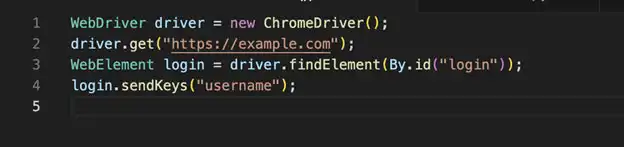
This is the topmost layer of the Selenium WebDriver. Here, you will create the test cases using any of your own programming languages. How? Use the Selenium API using classes like WebDriver and WebElement. You also have to use utility libraries to simulate real-world user actions to further verify the accuracy of the testing infrastructure.
If you want to know more, the following sample code will help you understand how to use this layer to create the test cases for Selenium WebDriver.
Language Binding Layer
The next layer is a language binding layer where Selenium supports multiple languages like Java, Python, and Ruby. You must remember that for every programming language, Selenium has a dedicated layer to support its functions.
The basic rule of this layer is to convert the high-level test commands into standard RESTful API requests. These requests will be responsible for conforming to the WebDriver protocol and subsequently executing the required test cases.
WebDriver Protocol
Before the Selenium 4 update, it used to use the JSON Wire Protocol to communicate with browser drivers. After the update, Selenium uses the W3C WebDriver protocol. What is the benefit? It makes the system more standardized and less prone to errors.
To execute the functions, this protocol uses HTTP over JSON and releases all the forms of user interactions like clicks, commands, navigation, and send keys from the client to the browser driver.
Browser Drivers Layer
But how do your tests talk with the components of browser during testing? You have to use a dedicated browser driver for this. A great reference is that if you want to run your test cases on Google Chrome, you need to use the Selenium ChromeDriver. It is also worth mentioning that the version of these drivers should be similar to the version of the web browser that you're targeting to run the test cases.
After these drivers receive the JSON commands, they will interpret them and execute them in the browser to verify the stability and proper functioning of the application.
Components Of Selenium WebDriver
Let us now divert our attention towards some of the major components of Selenium WebDrivers that you must be aware of to further utilize the efficiency of this testing framework:
WebDriver Interface
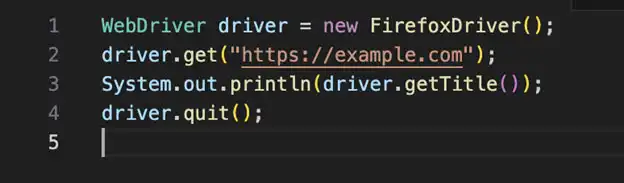
The WebDriver interface is the backbone of the entire infrastructure as it is responsible to extend the browser-specific drivers. It consists of various essential methods which will provide all the required information to the native environment of the web browser so that it can efficiently run all the test cases.
The following code snippet will provide you with additional information about how you can use the WebDriver interface in your test cases:
Browser Drivers
As we already mentioned earlier, the browser drivers are responsible for handling browser-specific interactions like binaries maintained by browser drivers, settings installed and configured correctly, and also implementing automated driver management to simplify the entire execution process.
WebElement Interface
This component basically represents an HTML element which provides methods to click on the web application input in specific fields of the app, and also extract text from text fields that may be present on your web application. While using this component, you can look at elements using strategic locators like ID, name, and class.
Locators In WebDrivers
The locators in Selenium WebDriver are very important to find all the target elements from the huge interface of the application. After locating these elements, you'll be able to implement the required testing steps. Currently, Selenium WebDriver allows you to find elements by their ID, name, XPath locator, and CSS selector options.
Waits In WebDriver
Selenium allows you to implement various WebDriver with methods, like implicit and explicit waits, to pause the test decision process until a specific criteria is met. The implicit wait method pauses the entire test execution process throughout the application, whereas the explicit wait pauses a segment of it that might be targeted to a specific element.
The following code snippet will provide you with adequate information about how you can implement explicit waits while using Selenium WebDriver for running your test cases.

Best Practices for Using Selenium
Let us now go through some of the best practices that we highly suggest the testers to integrate within their testing environment while using all the components of Selenium, including the Selenium WebDriver:
- To ensure the proper maintenance and scalability of your testing information, we would suggest using various design patterns like Page Object Models. This approach will help you separate the test data from the test scripts. It will also have a very important role in improving the overall readability of the test scripts.
- Due to the increasing use of dynamic elements in modern applications, we would recommend the testers to use explicit waits instead of implicit waits. This will allow you to pause the test execution for a specific segment of the application until the target element becomes visible and interactable. After this, the system will automatically resume the test cases.
- If you take our advice, we would always ask you to avoid Thread.sleep() as it can lead to flaky test cases. The use of this WebDriver method will also cause various errors in the test reports, like false positives and false negatives.
- You should start using cloud-based platforms like LambdaTest to initiate Selenium testing on real devices. If you're a new tester who does not know what is Selenium and what is Selenium WebDriver, you might not know about this as well. LambdaTest is an AI-native test orchestration and execution platform that lets you perform manual and automation testing at scale with over 3000+ browsers, OS combinations, and 5000+ real devices.
- It is very important to start investing in headless testing configuration as it helps save a lot of testing time and resources. In this approach, you will be only initiating the command line of the test environment and not the graphical user interface.
- While you are maintaining all the locator strategies for finding the elements on the application, you must be very careful to maintain them in separate classes or JSON files so they can be easily trackable during the execution process.
- Finally, you must use TestNG or Junit for implementing test assertions and also keeping track of the entire test lifecycle. These tools will also keep track of all the errors that might be found during the execution process so that you can easily implement the debugging steps.
The Bottom Line
Based on everything that we went through in this article, we can easily come to the conclusion that Selenium WebDriver is a very powerful automation framework which changed web app testing in the modern generation. Its modern architecture and support for multiple programming languages, along with smooth integration, makes it one of the most important for modern quality assurance testing processes.
If you're a new tester who does not know what is Selenium WebDriver, it is very important to start learning it right away. All the information about the various architecture and components that we've given in this article, along with the best practices, will be the right step forward towards achieving this knowledge.
Finally, you always have the option to fall back to the huge community of Selenium whenever you feel stuck with any new information or a step in the integration process.