Use of fn:toUpperCase(String) and fn:toLowerCase(String) Tag of JSTL


In this section we will learn how to use <fn:toUpperCase>
and <fn:toLowerCase> Tag of JSTL. These tags are used to change case
of specified string to upper or lower. This takes string type as argument.
| Syntax : |
java.lang.String toLowerCase(java.lang.String) |
changeCase_fnJstlTag.jsp
<%@ taglib uri="http://java.sun.com/jsp/jstl/functions" prefix="fn" %>
<%@ taglib uri="http://java.sun.com/jsp/jstl/core" prefix="c" %>
      <html>
    <head>
        <title>Example of 'fn:toUpperCase' and 'fn:toLowerCase' tag of jstl</title>
    </head>
    <body>
        <form method="POST">
            Enter String here and select case as per your choice.
            <table>
                            <tr>
                    <td>Enter String</td>
                    <td><input type="text" name="string"></td>
                </tr>
                                <tr>
                    <td></td>
                    <td><input type="radio" name="case" value="upper"> Upper Case
                    <input type="radio" name="case" value="lower"> Lower Case  </td>
                </tr>
                                <tr>
                    <td></td>
                    <td><input type="submit" value="change"></td>
                </tr>
            </table>
        </form>
        <c:if test="${pageContext.request.method=='POST'}">
                    <c:set var="string" value="${param.string}"/>
            <font size="5" color="green">
                <c:if test="${param.case=='upper'}">

                    <c:out value="${fn:toUpperCase(string)}"/>

                </c:if>
                <c:if test="${param.case=='lower'}">

                    <c:out value="${fn:toLowerCase(string)}"/>

                </font>
            </c:if>
        </c:if>
    </body>
</html>
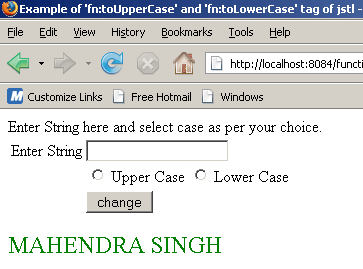
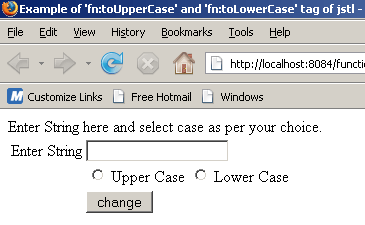
This jsp code shows the following output :
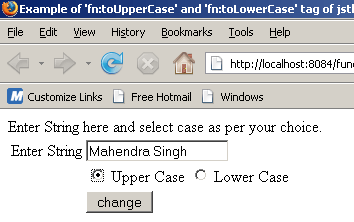
Suppose user enter string 'Mahendra Singh' as the given below and select 'Upper Case' radio button....
when user click on change button. Output will be.....