
Apache Geronimo
 |
|
 |

Apache Geronimo is a open source JavaEE( or J2EE, old name) application server. It is so much capable that it can give commercial servers a hard competition. In short Geronimo is full fledged JavaEE application server which uses Industry respected and Industry proven Apache technologies, very much fast and reliable and yes above all it doesn’t costs you a penny.
It is a J2EE 1.4 certified application server, however it is completely backward compatible with J2EE 1.2 and J2EE 1.3 specifications also.
Geronimo is a modular software and consists of various modules which are further dependent on Other open source software. This makes it very customizable and easily extendable.
Advantages of Using Geronimo
- Complete J2EE 1.4 application server.
- Built on Best available Open Source components.
- Modular Architecture
- Integrated Apache Derby DB and LDAP.
- Web management console.
- Custom distribution can be built easily.
- Uses Apache License, means you can use apache Geronimo to develop commercial applications without reveling your own code.
Geronimo Incorporates following features
- Web Applications Support
It supports Servlet 2.4 and JSP 2.0 specifications. Further it came tightly integrated with other modules. Application container supports SSL connections for secure application development.
- Enterprise Java Bean 2.1
Geronimo bundles powerful EJB container which supports
- Sessions
- Entity
- Message Driven Beans
- Web Services
- EJB Timer Service
- J2EE Connectors 1.5
Geronimo supports J2EE connectors 1.5 which supports effective Inbound and Outbound resource adapters
- J2EE 1.4 Client Application Support
Provides client container for deployment of applications in client managed environments.
- J2EE 1.4 Application Archives support
Supports single EAR file for each deployment. It can also support application dependencies making it easy to maintain and run applications.
- JDBC 3.0
New and improved JDBC 3.0 is now built into heart of Geronimo. Provides high performance Database connection. JDBC 3.0 now supports Metadata APIS, Named Parameter in callable statements and some modified data types.
- JMS 1.1
Supports new Java Messaging Services (JMS 1.1). It allows components to create, send, receive and read messages.
- JavaMail 1.3
Supports Java mail API supporting POP and IMAP servers.
- LDAP Support
Authentication and Authorizations are supported through JACC 1.0 api. JACC supports LDAP (Lightweight Directory Access Protocol).
Geronimo Components
Already discussed that Geronimo is built on various open source components. In this section we will take an overview of those.
- Tomcat (http://tomcat.apache.org/)
A popular Web application container for Geronimo.
| Do not confuse Geronimo with Tomcat, Tomcat only provides a Servlet Container suitable for hosting web applications while Geronimo is designed to implement the entire J2EE (or JavaEE) framework including Servlet container, Java Messaging etc. |
- OpenEJB (http:// www.openejb.org )
Open Source EJB container for Geronimo.
- JETTY (http:// jetty .mortbay.org )
Alternative Application Server for tomcat.
- ActiveMQ (http://www.activemq.org)
JMS (Java Messaging Service) provider.
- TranQL (http://tranql.codehaus.org/)
Provides database connection pooling adapters.
- HOWL (http://how1.objectweb.org)
Provides transaction logging and recovery facilities.
- AXIS (http://ws.apache.org/axis/)
Provides Web Services support.
- Derby (http://db.apache.org/derby/)
High Performance Embedded database server from Apache server foundation.
- CGLib (http://cglib.sourceforge.net)
Byte code manipulation library.
Class Library for currency handling.
- Jakarta Commons (http://jakarta.apache.org/commons/)
Provides Common Utilities function, part of Original Apache Jakarta project.
- MX4J (http://mx4j.sourceforge.net/)
Implements Java Messaging Extensions (JMX).
- Velocity (http://jakarta.apache.org/velocity/)
Provides powerful template engine for Geronimo, part of Oringal Apache Jakarta Project.
- XML Beans (http://xmlbeans.apache.org/)
Provides a set of powerful XML languages bindings.
Now you might have got an idea about what Apache Geronimo has to provide. Built on world class components.
Further in this article we will se how to install and run a basic application on Geronimo server. In later series of this article we will also cover some advanced stuffs like building your own distribution out of Geronimo and things like that. 0
Installing and Running Geronimo
Installation is very much straight forward.
1. Download latest Apache Geronimo Distribution from following location:-
http://www.apache.org/dyn/closer.cgi/geronimo/1.0/geronimo-tomcat-j2ee-1.0.zip 1
2. Extract this file into C:\Apache\Geronimo directory.
After the extraction of files you will have following directory structure created on your hard drive.
 2
2
3. Start the server by issuing following command.
C:\>cd apache
C:\Apache\>cd geronimo 3
C:\Apache\Geronimo\> java –jar bin/server.jar
For a successful server start you can following messages
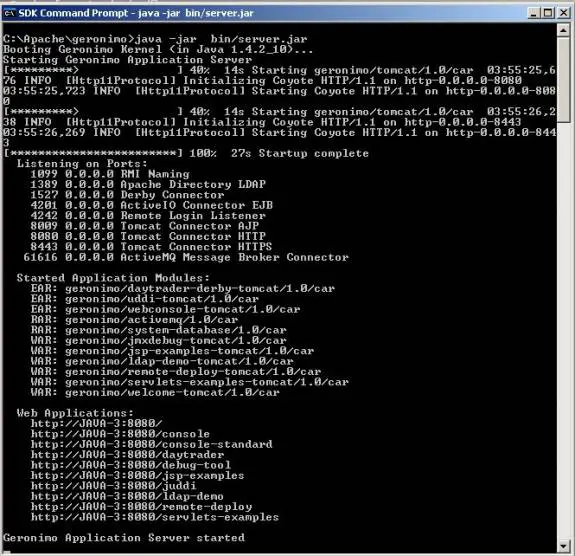 4
4
Please note that this step requires a few special things to be confirmed.
- Make sure you have JDK version 1.4 is installed and is in System path, otherwise you won’t be able to run java command.
- Port number 8080 should be open. If you have not installed previous Tomcat installation. Please do it now to in order to prevent conflict with Germonio version of Tomcat, also if some proxy server or any other application is using port no 8080 please shut it down.
If you are unable to shutdown the application which are using mentioned ports, then you have to change the port settings for Apache Geronimo itself.
Open config.xml file from directory ‘C:\Apache\geronimo\var\config’. 5
<gbean name="TomcatWebConnector">
<attribute name="host">0.0.0.0</attribute>
<attribute name="port">8080</attribute> 6
<attribute name="redirectPort">8443</attribute>
</gbean>
Change port value to required value. Save changes and restart the server. 7
If any other component’s port number is bugging you can change those also. Just look for <attribute name="port">8080</attribute> under gbean name property.
Building J2EE HelloWorld Application
Download the sample helloworld application from following URI.
http://java.sun.com/j2ee/1.4/docs/tutorial/doc/index.html 8
Install ant. Ant is very popular open source build tool for Java based applications. Download ant from http://ant.apache.org/. Install it and set the path variables accordingly.
Extract hello1.zip into folder of your choice.
Step 1: Issue following commands to build the examples using ant. 9
C:\> cd hello1
C:\> ant
This will build application in the current folder. 0
Step 2: Modify web.xml file to include id propery as shown in code below.
<?xml version="1.0" encoding="UTF-8"?> <web-app xmlns="http://java.sun.com/xml/ns/j2ee" version="2.4" xmlns:xsi="http://www.w3.org/2001/XMLSchema-instance" xsi:schemaLocation="http://java.sun.com/xml/ns/j2ee http://java.sun.com/xml/ns/j2ee/web-app_2_4.xsd" id="hello1" > <display-name>hello1</display-name> </web-app>Step 3: Now you need to create a Geronimo Specific web application descriptor. It is almost same as Web.xml file but also includes some specifc objects.
<?xml version="1.0" encoding="UTF-8"?> <web-app xmlns="http://geronimo.apache.org/xml/ns/web" configId="j2eetutorialhello1" parentId="org/apache/geronimo/Server" > <context-root>/j2eetutorialhello1</context-root> <context-priority-classloader>false</context-priority-classloader> </web-app>Please note that the xmlns directs to the XML schema. From time to time due to rapid changes in Geronimo application server architecture this Schema can also be changed. So make sure you are using the right syntax. 1
Step 4: Now you need to create a WAR file, for single file deploymnet purposes.
C:\> cd hello1/build C:\> jar -cf ../j2eehello1.war *Step5: Everything done now. Now you want to start the server and deploy the application.
Change to home directory of Gerenomio. And issue following commands 2 C:\> java -jar bin/server.jar
This command will start the server.
Then enter following command for the deployment
$ java -jar bin/deployer.jar --user system --password manager deploy " j2eehello1.war" Distributed j2eetutorialhello1Point your browser to http://localhost:8080/j2eetutorialhello1/ 3
And you will get popular hello world written inside the browser.
In next series of article we will explain how to configure and write advanced application with Apache Geronimo.
Kunal Deo
Open Source Developer 4
|
|
|