
| Implement mechanisms for efficient inter-component calls | ||
|---|---|---|
| Prev | Chapter 1. Design, build and test reusable enterprise components | Next |


Bean Interfaces and Implementation
According to the 2.0 specification, the implementation classes for entity beans that use CMP are now abstract classes.
Session beans and entity beans in 2.0 can have two types of interfaces: a remote interface and a local interface.
Local Interface
The local interfaces for session and entity beans provide support for light weight access from enterprise beans that are local clients. That is, the bean uses a local interface if the bean wants to provide tight coupling with its clients with pass-by-reference semantics. The local interface is a standard Java interface that does not inherit from RMI.
Remote interface
A bean that needs to have remote capabilities - the bean inherits from RMI and interacts with distributed clients - uses a remote interface. A bean can have both a local and a remote interface - that is, it can provide both a local and a remote client view.
Typically, however, a bean will be designed to provide only one or the other interface. Similarly, a bean can have a remote home interface and/or a local home interface.
In the 2.0 specification, a bean typically uses its remote interface to expose its methods across the network tier. A bean uses the local interface to expose its methods to other beans that reside within the same container. It is thus possible to directly access a bean through its local interface without the overhead of a remote method call.
Local interfaces provide the foundation for container managed relationships among entity beans and session beans. The bean uses the local interface to maintain its references to other beans. For example, entity beans use local interfaces to maintain relationships to other entity beans. They also allow session and entity beans to be tightly coupled with their clients. Using local interfaces, beans can also expose their state and use pass-by-reference to pass their state between related bean instances.
Adding references to enterprise beans
You can add different types of references to an enterprise bean, including EJB references (local and remote), resource references, security role references, and resource environment references.
An EJB reference is a logical name used by a client (or another bean) to locate the home interface of an enterprise bean. It is a best practice to use an EJB reference for any enterprise bean that you need to reference. Using an EJB reference will allow you to safely write Java code to lookup the home interface of the target enterprise bean without the worry of the binding changing for the target enterprise bean. This is necessary if you need to install the same EJB module on the same server with different bindings.
In addition, for looking up local home interface, you are required to use an EJB local reference.
At deployment, the EJB reference is bound to the enterprise bean's home in the target operational environment. The container makes the application's EJB references available in a JNDI naming context. Resource environment reference elements contain declarations of an enterprise bean's reference to an administered object associated with a resource in the application client's environment. Resource environment references are available only for J2EE 1.3 application clients. For EJB 2.0, the created resource reference has WebSphere Application Server extensions for isolation policy and connection policy.
To add references to an enterprise bean:
In the J2EE Hierarchy view, right-click the desired EJB module and select Open With > Deployment Descriptor Editor from the pop-up menu.
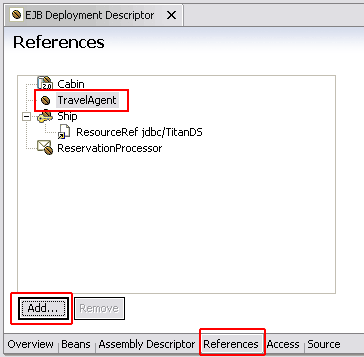
On the References page of the editor select the enterprise bean that you want to add a reference to (the referencing bean) - TravelAgent, and click the Add button. The Add Reference wizard opens.
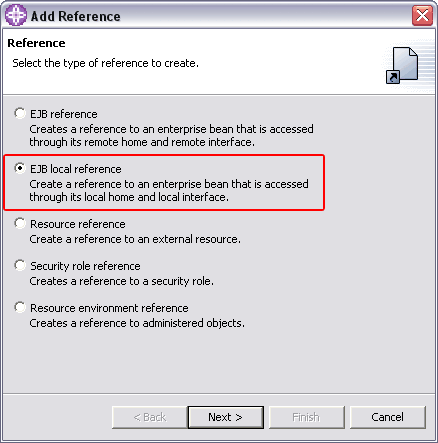
Select the type of reference that you want to create (EJB local reference), and click Next.
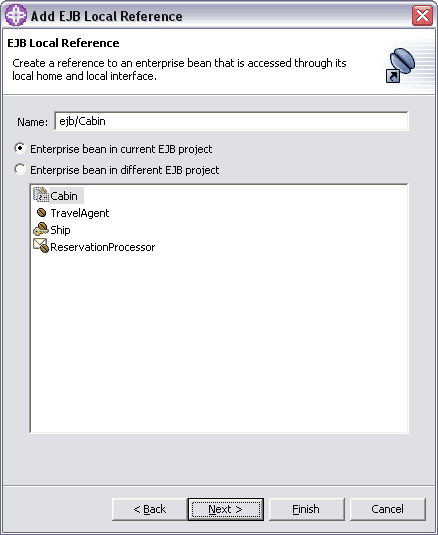
Select the location of the enterprise bean that you want to reference (the referenced bean).
Note: Local references can reference enterprise beans in the same EJB project or in the same application. Remote references can also reference enterprise beans in another application.
When you select an enterprise bean in another EJB project within the same application or another application, the Java JAR dependencies are automatically set up. If you select an enterprise bean in another application and the preference to create EJB client projects is turned on, you will be prompted to create an EJB client project for the EJB project of the selected enterprise bean if one does not already exist. The EJB client project is added as a Java utility JAR to all applications that the source bean projects belongs to. A Java JAR dependency for the source EJB project is also added to the utility JAR file, which is the target EJB client project.
Select the enterprise bean that you are referencing (Cabin), and update the Name field or accept the default (recommended).
Name - ejb/Cabin
Click Next to review your selections and enter a description for the reference.
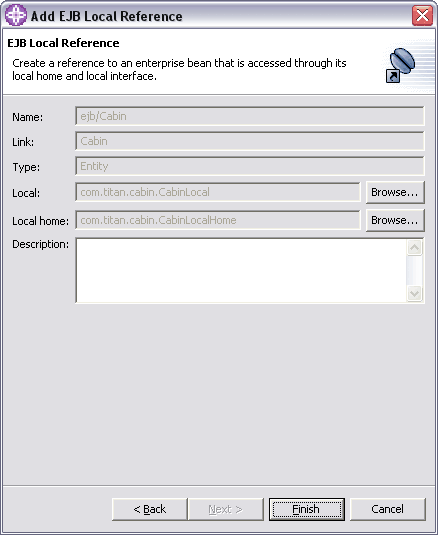
Click Finish.
The reference is added to the bean that you selected and is displayed on the References page of the EJB deployment descriptor editor.
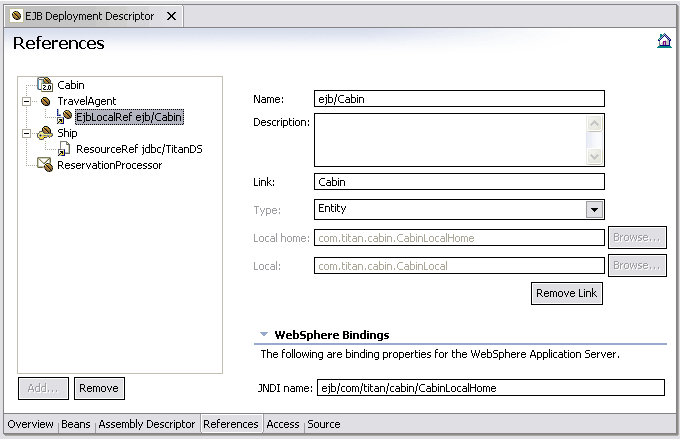
<session id="TravelAgent">
	<ejb-name>TravelAgent</ejb-name>
	...
	<ejb-local-ref id="EJBLocalRef_1122033021884">
		<ejb-ref-name>ejb/Cabin</ejb-ref-name>
		<ejb-ref-type>Entity</ejb-ref-type>
		<local-home>com.titan.cabin.CabinLocalHome</local-home>
		<local>com.titan.cabin.CabinLocal</local>
		<ejb-link>Cabin</ejb-link>
	</ejb-local-ref>
</session>
Repeat the same steps and add a reference to (the referencing bean) - TravelAgent for Ship (referenced) bean:
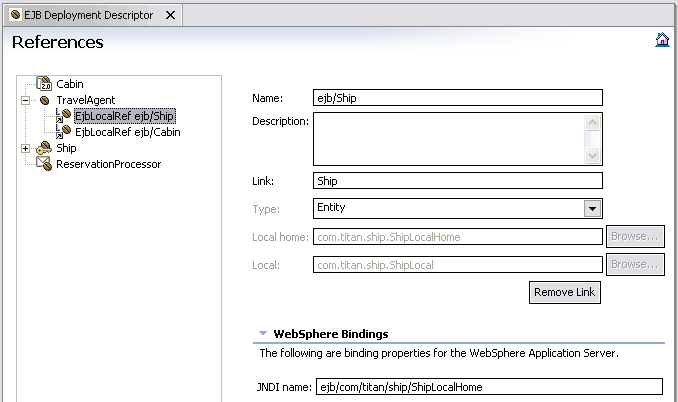
<session id="TravelAgent">
	<ejb-name>TravelAgent</ejb-name>
	...
	<ejb-local-ref id="EJBLocalRef_1122300603538">
		<ejb-ref-name>ejb/Ship</ejb-ref-name>
		<ejb-ref-type>Entity</ejb-ref-type>
		<local-home>com.titan.ship.ShipLocalHome</local-home>
		<local>com.titan.ship.ShipLocal</local>
		<ejb-link>Ship</ejb-link>
	</ejb-local-ref>
</session>
Visit http://java.boot.by for the updates.
| Prev | Up | Next |
| Access container and server services from enterprise components | Home | Test and debug enterprise components |