


Creating an EJB project
An EJB project is used to organize the resources contained in an EJB module.
An EJB module is used to assemble one or more enterprise beans into a single deployable unit. It is deployed in a standard Java archive (JAR) file. An EJB module can be used as a standalone application, or it can be combined with other modules to create a J2EE enterprise application. An EJB module is installed and run in an enterprise bean container. An EJB project must be referenced by an enterprise application project (defined as a module in an EAR) in order to be deployed successfully and run on a server.
An EJB module contains the following:
One or more deployable enterprise beans.
A deployment descriptor, stored in an Extensible Markup Language (XML) file. This file declares the contents of the module, defines the structure and external dependencies of the beans in the module, and describes how the enterprise beans are to be used at run time.
To create a new EJB project:
In the J2EE perspective, select File > New > EJB Project. The New EJB Project wizard opens.
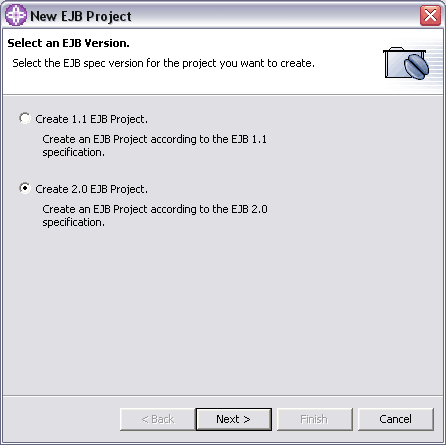
Select the EJB specification version to which you want your EJB project to adhere, and click Next.
If you plan on using EJB 2.0 enterprise beans, you must specify an EJB 2.0 project. You can add EJB 1.1 enterprise beans to an EJB 2.0 project. An EJB 2.0 project must exist in a J2EE 1.3 enterprise application project.
Your available options may differ depending on the J2EE Preferences that you have defined.
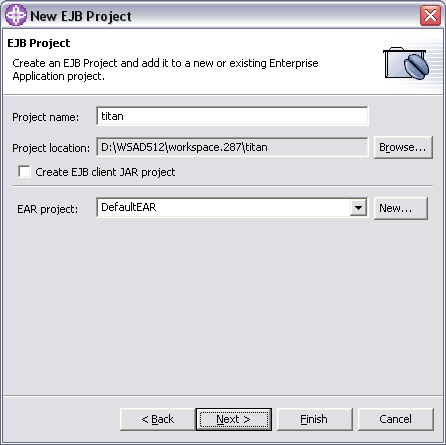
In the Project name field, type a name for the EJB project. To change the default Project location, click the Browse button to select a new location. If you specify a non-default project location that is already being used by another project, the project creation will fail.
In the Target server drop-down menu, select the application server that you want to target for your development. NOTE: This option is only available if you enabled server targeting support on the J2EE preferences page.
Select the Create an EJB client JAR project check box if you want the client interface classes for your enterprise beans to be kept in a separate EJB client project and there is a need to reference these client interfaces from within another application. This EJB client JAR file will be added to the enterprise application as a project utility JAR file.
In the EAR project combination box, type a new project name or select an existing enterprise application project from the drop-down list. Or, click the New... button to launch the New Enterprise Application Project wizard.
NOTE: If you type a new EAR project name, the EAR project will be created in the default location with the lowest compatible J2EE version based on the version of the project being created. If you want to specify a different version or a different location for the enterprise application, you must use the New Enterprise Application Project wizard.
Click Next to specify module and JAR file dependencies on the next page of the wizard. If you are creating a new enterprise application project, or if you have no dependencies to specify, click Finish to create the default EJB project.
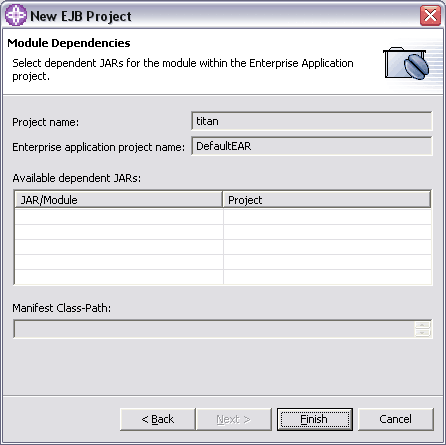
On the Module Dependencies page, select dependent JAR files or modules within the associated enterprise application project, then click Finish. The manifest class-path is updated with the appropriate JAR files, and the new EJB project is created. This page of the wizard is not available if you are creating a new enterprise application project.
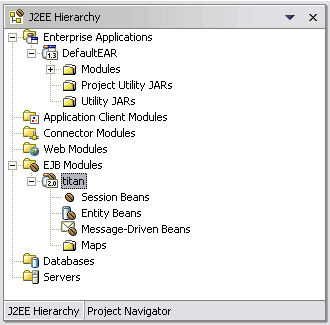
Session beans
Session beans are non-persistent enterprise beans. They can be stateful or stateless. A stateful session bean acts on behalf of a single client and maintains client-specific session information (called conversational state) across multiple method calls and transactions. It exists for the duration of a single client/server session. A stateless session bean, by comparison, does not maintain any conversational state. Stateless session beans are pooled by their container to handle multiple requests from multiple clients.
Creating session beans
You can use a wizard to create a session bean and add it to your project.
To create an enterprise bean, you must first have an EJB project defined.
To create a session bean:
In the J2EE perspective, click File > New > Enterprise Bean. The Create an Enterprise Bean wizard appears.
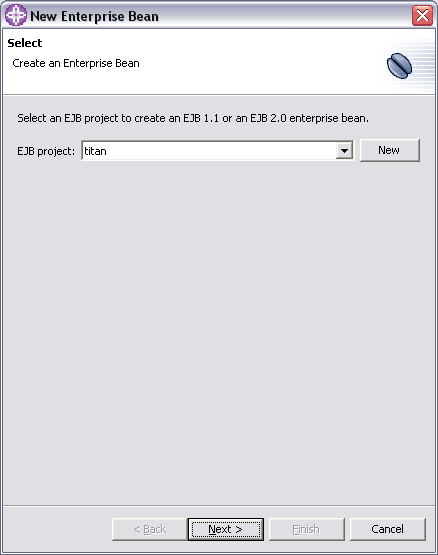
Select the EJB project that you want to add the bean to.
Select the Session Bean radio button.
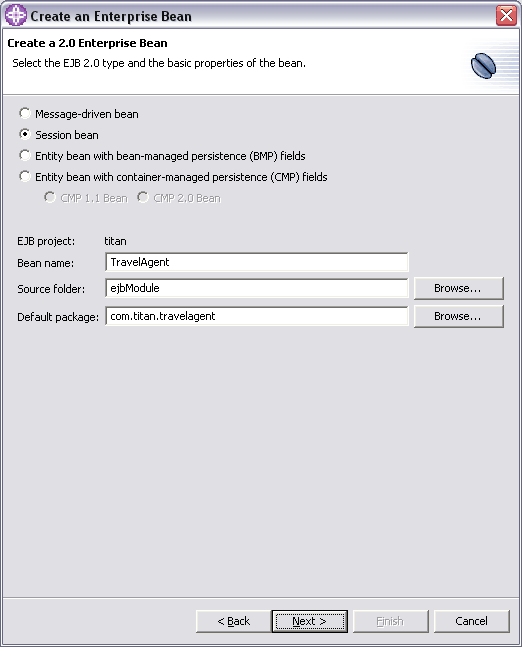
In the Bean name field, type in the name that you want to assign to the enterprise bean. When you type the Bean name, the Bean class field, the Home interface field, and Remote interface field are updated. For example, if you type "TravelAgent" in the Bean name field, the Bean class field is updated with "TravelAgentBean". You can choose to override the default entries. These fields are on the next page of the wizard. The Bean name should begin with a capital letter.
Note: You can use Unicode characters for the bean's name, but Unicode characters are not supported for enterprise bean packages/classes associated with enterprise beans.
Select the Source folder for your enterprise bean. Do one of the following: 0
If the folder that appears in the Source folder field is the folder that you want to use, then accept the source folder location without modification.
Click Browse to select a different source folder from a list.
The Default package field shows the name of the current root directory that is associated with the selected EJB project. Do one of the following: 1
If the package that appears in the Source folder field is the package that contains (or will contain) the enterprise bean class, then accept the package name without modification. If you define a different package root, but use package names that already exist in the project, the classes will be created in those packages. Packages cannot be defined in two package roots. Type new package name - com.titan.travelagent.
Click Browse to select the package from a list of those packages that reside in the specified project.
Click Next to specify additional information for the new bean, or click Finish to create a enterprise bean with default settings. 2
Select one of the following session types for the new bean:
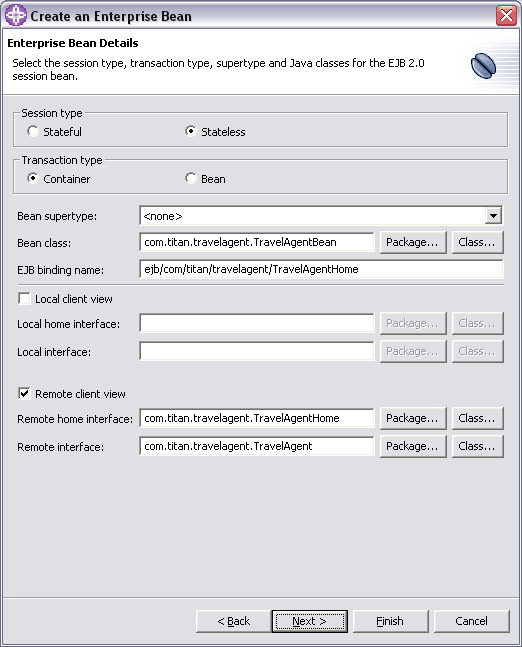
Stateful: A stateful session bean maintains client-specific session information, or conversational state, across multiple method calls and transactions. An instance of a stateful session bean has a unique identity that is assigned by the container at create time.
Stateless: A stateless session bean does not maintain conversational state. Instances of a stateless session bean have no conversational state. All instances of a stateless session bean have the same object identifier, which is assigned by the container. 3
Select one of the following transaction types for the new bean:
Container: Specifies that the transaction demarcation is performed by the container.
Bean: Specifies that the transaction demarcation is performed by the bean. 4
If you want the new bean to inherit from an existing bean in the same EJB project, select a Bean supertype. The Bean supertype drop-down box only displays a value of none if there are no beans in the EJB project with the selected Bean type.
In the Bean class field, enter the desired Package or Class. By default, the Bean class package takes on the name of the Bean name (as well as the Home interface package and the Remote interface package). A bean class can be a new class (class will be generated), or an existing class in the project class path. Click the Class... button to open a dialog that lists the classes in the project that correspond to the Bean type. The name of the bean class appears blue for existing classes with source. The name of the bean class appears red for existing binary classes.
The EJB binding name field is updated with the home interface name of the selected client view. The remote client view takes precedence over local client view if both client views are selected. You may choose to override the default entry. 5
If you do want to specify a local home interface and local interface, select this check box.
In the Local home interface and Local interface fields, select the desired Package or Class. By default, the Home interface class package takes on the name of the default package and Bean name.
The Remote client view check box is selected by default. If you do not want to specify a home interface and remote interface, deselect this check box. 6
In the Remote home interface and Remote interface fields, select the desired Package or Class. By default, the Remote interface class package takes on the name of the default package and Bean name.
Click Next to specify additional information for the new bean, or you can click Finish to create an enterprise bean with default settings.
In the Bean superclass field, type or select the desired class. This field is disabled if a bean supertype is selected. 7
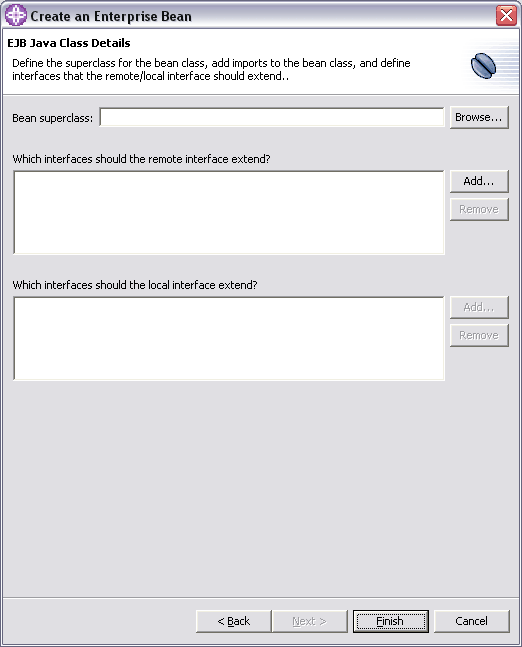
If you want to add an interface for the remote interface to extend, or if you want to remove an interface that is extended by the remote interface, do one of the following:
If you want to add an interface for the remote interface to extend, then beside the Which interfaces should the remote interface extend? list box, click Add and select the interface that you want to extend.
If you want to remove an interface that the remote interface extends, then in the Which interfaces should the remote interface extend? list box, select the interface that you want to remove and click Remove. 8
Click Finish. The new enterprise bean appears under the selected EJB project.
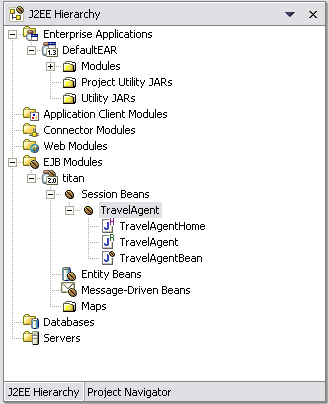
Add the following methods declarations to the remote interface of TravelAgent session bean:
public interface TravelAgent extends javax.ejb.EJBObject {
	public void sendReservation() throws java.rmi.RemoteException;
	public void createCabins() throws java.rmi.RemoteException;
	public void createShips() throws java.rmi.RemoteException;
	public void listCabins() throws java.rmi.RemoteException;
	public void listShips() throws java.rmi.RemoteException;
	public void cleanup() throws java.rmi.RemoteException;
}
Add the following code to the com.titan.travelagent.TravelAgentBean class in order o implement business methods: 9
javax.naming.Context ic = null;
javax.jms.QueueConnectionFactory qConnFactory = null;
javax.jms.QueueConnection qConn = null;
javax.jms.Queue queue = null;
javax.jms.QueueSession qSession = null;
javax.jms.QueueSender qSender = null;
javax.jms.MapMessage message = null;
String fName = "jms/ReservationQueueFactory";
String qName = "jms/ReservationQueue";
public void sendReservation() {
	try {
		ic = new javax.naming.InitialContext();
		qConnFactory = (javax.jms.QueueConnectionFactory) ic.lookup(fName);
		queue = (javax.jms.Queue) ic.lookup(qName);
	} catch (Exception e) {
		System.err.println("TravelAgentBean: JNDI lookup failed " + e);
	}

	try {
		qConn = qConnFactory.createQueueConnection();
		qSession = qConn.createQueueSession(false, javax.jms.Session.AUTO_ACKNOWLEDGE);
		qSender = qSession.createSender(queue);
		message = qSession.createMapMessage();
		message.setString("name", "Mikalai Zaikin");
		message.setString("cruise", "Hawaii");
		qSender.send(message);
		qConn.close();
		System.out.println("TravelAgentBean: Cruise reservation sent");
	} catch (Exception e) {
		System.err.println("TravelAgentBean: Error on sending message " + e);
	}
}
public void createCabins() {
	CabinLocalHome home = null;
	try {
		ic = new javax.naming.InitialContext();
		home = (CabinLocalHome) ic.lookup("java:comp/env/ejb/Cabin");
	} catch (Exception e) {
		System.err.println("TravelAgentBean: JNDI lookup failed " + e);
	}

	try {
		CabinLocal cab = home.create(new Integer(1));
		cab.setName("Master Suite");
		cab.setDeckLevel(1);
		cab.setShipId(1);
		cab.setBedCount(3);

		cab = home.create(new Integer(2));
		cab.setName("Suite");
		cab.setDeckLevel(2);
		cab.setShipId(1);
		cab.setBedCount(5);

		System.out.println("TravelAgentBean: cabins created");
	} catch (CreateException ce) {
		System.err.println("TravelAgentBean: can not create cabin " + ce);
	}
}
public void createShips() {
	ShipLocalHome home = null;
	try {
		ic = new javax.naming.InitialContext();
		home = (ShipLocalHome) ic.lookup("java:comp/env/ejb/Ship");
	} catch (Exception e) {
		System.err.println("TravelAgentBean: JNDI lookup failed " + e);
	}

	try {
		ShipLocal ship = home.create(new Integer(1), "Nordic Prince");
		ship.setCapacity(300);
		ship.setTonnage(5000.0);

		ship = home.create(new Integer(2), "Bohemian Rhapsody");
		ship.setCapacity(400);
		ship.setTonnage(6000.0);

		System.out.println("TravelAgentBean: ships created");
	} catch (CreateException ce) {
		System.err.println("TravelAgentBean: can not create ship " + ce);
	}
}
public void listCabins() {
	CabinLocalHome home = null;
	try {
		ic = new javax.naming.InitialContext();
		home = (CabinLocalHome) ic.lookup("java:comp/env/ejb/Cabin");
	} catch (Exception e) {
		System.err.println("TravelAgentBean: JNDI lookup failed " + e);
	}

	try {
		for (int i = 1; i < 3; i++) {
			CabinLocal cab = home.findByPrimaryKey(new Integer(i));
			System.out.println("TravelAgentBean : Cabin # " + i);
			System.out.println(" name : " + cab.getName());
			System.out.println(" deck level : " + cab.getDeckLevel());
			System.out.println(" ship ID : " + cab.getShipId());
			System.out.println(" bed count : " + cab.getBedCount());
		}
	} catch (FinderException fe) {
		System.err.println("TravelAgentBean: can not find cabin " + fe);
	}
}
public void listShips() {
	ShipLocalHome home = null;
	try {
		ic = new javax.naming.InitialContext();
		home = (ShipLocalHome) ic.lookup("java:comp/env/ejb/Ship");
	} catch (Exception e) {
		System.err.println("TravelAgentBean: JNDI lookup failed " + e);
	}

	try {
		for (int i = 1; i < 3; i++) {
			ShipLocal ship = home.findByPrimaryKey(new Integer(i));
			System.out.println("TravelAgentBean : Ship # " + i);
			System.out.println(" name : " + ship.getName());
			System.out.println(" tonnage : " + ship.getTonnage());
			System.out.println(" capacity : " + ship.getCapacity());
		}
	} catch (FinderException fe) {
		System.err.println("TravelAgentBean: can not find ship " + fe);
	}
}
public void cleanup() {
	ShipLocalHome home = null;
	try {
		ic = new javax.naming.InitialContext();
		home = (ShipLocalHome) ic.lookup("java:comp/env/ejb/Ship");
	} catch (Exception e) {
		System.err.println("TravelAgentBean: JNDI lookup failed " + e);
	}

	try {
		for (int i = 1; i < 3; i++) {
			home.remove(new Integer(i));
		}
	} catch (RemoveException re) {
		System.err.println("TravelAgentBean: can not remove ship " + re);
	} catch (Exception e) {
		System.err.println("TravelAgentBean: exception during ship removal " + e);
	}

	System.out.println("TravelAgentBean: ships removed");

	CabinLocalHome cabHome = null;
	try {
		cabHome = (CabinLocalHome) ic.lookup("java:comp/env/ejb/Cabin");
	} catch (Exception e) {
		System.err.println("TravelAgentBean: JNDI lookup failed " + e);
	}

	try {
		for (int i = 1; i < 3; i++) {
			cabHome.remove(new Integer(i));
		}
	} catch (RemoveException re) {
		System.err.println("TravelAgentBean: can not remove cabin " + re);
	} catch (Exception e) {
		System.err.println("TravelAgentBean: exception during cabin removal " + e);
	}
	System.out.println("TravelAgentBean: cabins removed");
}
Visit http://java.boot.by for the updates.
| Prev | Up | Next |
| Part I. Exam Objectives | Home | Design and develop message-driven EJBs |
