In this section, you will learn how to create TextArea on the frame. This program uses the TextArea class of java.awt package. Here, we are going to create TextArea object. TextArea object is a multiline region. It displays text only. You can read and
TextArea Frame in Java


Introduction
In this section, you will learn how to create TextArea on the frame. This program uses the TextArea class of java.awt package. Here, we are going to create TextArea object. TextArea object is a multiline region. It displays text only. You can read and edit the text only.
Description of this program:
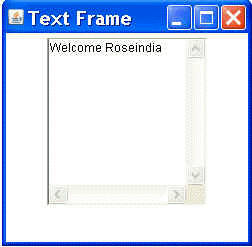
This java program displays the text area using java AWT package. First of all, We have to define class named "TextAreaFrame" under the java awt package. Inside this class we are going to create TextArea field by using "TextArea("Welcome Roseindia",10,20)" constructor.
TextArea("Welcome Roseindia",10,20): This constructs a new text area with "Welcome Roseindia" string as text. Both vertical and horizontal scrollbars will be visible for this text area according to the size specified in the above constructor i.e.10 for horizontal and 20 for vertical.
Here is the code of this Program:
import java.awt.*;
|
Output this program: