In this section, you will learn how to create arcs diagram in java awt package. The Java program uses Arcs2D class, arcs2D is the abstract superclass for all objects that store a 2D arc defined by a bounding rectangle, start angle, angular extent and a cl

Arcs Drawing In Java


Introduction:
In this section, you will learn how to create arcs diagram in java awt package. The Java program uses Arcs2D class, arcs2D is the abstract superclass for all objects that store a 2D arc defined by a bounding rectangle, start angle, angular extent and a closure type. Here, you wll see in the given following example that provides you the complete code of the program.
Program Description:
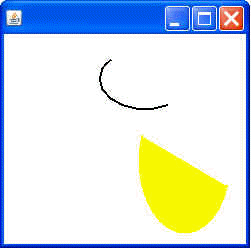
The following program shows a frame title with "Arcs Draw". In this program you will also see how to show arcs diagram on the frame. There is two diagram you will see on frame, blank and color fill diagram. In this program we are using the BasicStroke() method. You can learn about this method in the previous program. Here, this program is using the "Arcs2D.Double" class. This class represent an arc defined by a bounding rectangle and closure type.
Here is the code of this program:
import java.awt.*;
|
Output of this program: