In this section, you will learn how to create Cubic diagram. The Java2D API provides you several classes that defines common Geometry object as a coordinate component. The Java Drawing program depends on the Java2D API class, and this class is support b

Cubic Diagram In Java


Introduction
In this section, you will learn how to create Cubic diagram. The Java2D API provides you several classes that defines common Geometry object as a coordinate component. The Java Drawing program depends on the Java2D API class, and this class is support by the "java.awt.geom" package.
Program Description:
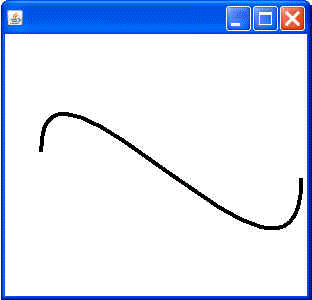
In this program, We are using CubicCurve2D class for cubic curve component. The CubicCurve2D class creates a cubic diagram. The CubicCurve2D class also implements the shape interface. We are going to use cubicCurve2D Class to define a cubic parameter as a (x ,y) coordinate and this class is only the abstract superclass for all objects which is stored in a 2D cubic curve segment.
In this program we are passing parameter like (x1, y1, ctrlx1 , ctrly1, ctrlx2, ctrly2, x2, y2) as a coordinate space. The parameter are defined to set cubic diagram point x-axis and y-axis direction and the ctrlx1 or ctrly1 sets the x and y axis. All the parameters are explained below :
x1- The x1 point is the x coordinate used to set the start point of this cubicCurve2D
y1- A y1point is the used for y coordinate to set the start point of this cubicCurve2D
ctrlx1- The ctrl x coordinate is used to set the first control point of this cubicCurve2D
ctrl y1- A ctrl y coordinate is used to set the first control point of this cubicCurve2D
ctrlx2- the ctrl x coordinate to set the second control point of this
cubicCurve2D.
ctrly2- The ctrl y coordinate is used to set the
second control point of this CubicCurve2D
x2- A point is the x coordinate used to set the second point of this
CubicCurve2D
y2- A point is the y coordinate used to set the second point of this
cubicCurve2D.
Here is the code of this program:
import java.awt.*;
import java.awt.event.*;
import java.awt.geom.*;

public class Cubic extends Frame{
  Stroke drawingStroke = new BasicStroke(4);
  CubicCurve2D cubic= new  CubicCurve2D.Double(40,150, 40, 05, 300, 350, 300, 180);

  public void paint(Graphics g){
    Graphics2D ga = (Graphics2D)g;
    ga.setStroke(drawingStroke);
    ga.draw(cubic);
    }
  public static void main(String args[]){
    Frame frame = new Cubic();
    frame.addWindowListener(new WindowAdapter(){
      public void windowClosing(WindowEvent we){
        System.exit(0);
      }
    });
    frame.setSize(310, 300);
    frame.setVisible(true);
  }
}
Output of this program: