In this section, you will learn how to create Drop-Down List by using Java AWT package.
-In-Java-950x650.webp)
Choice Option (Combo) In Java


In this section, you will learn how to create Drop-Down List by using Java AWT package.
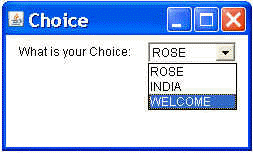
Here, you will see in the output of the program that is given ahead for the illustration of the topic. This tells you about the procedure of constructing a drop down list in java by using java awt.
There is a program with complete java code that can be copied and paste in your java application for creating a combo box with some items, has been explained here:
Program Description:
Following program uses the Choice class for creating a Drop-Down List. This program is also using add() method of the Choice class for add item to the list like "ROSE", "INDIA" and "WELCOME".
Choice():- This is the default constructor of Choice class. This creates simply a drop-down list.
Here is the code of this program:
import java.awt.*;
|
Output this program: