Custom Iterator Tag in JSP


Example program to make custom iterator tag in JSP
This example will demonstrate you how you can make a custom iterator tag in JSP? You can make your own custom tag in JSP which will have functionality as you want to do with them. You can make an "Iteration Tag" as well. We have made a Custom Iterator Tag here which will iterate for the number of times, in its attribute "counts". For this purpose we have made an IteratorTag class which extends "BodyTagSupport" class .
Full code for "IteratorTag.java" is given as following :
package tags;
|
In "IteratorTag.java" class, whole iteration is being managed through following three methods:
doStartTag() : When it is called then it checks the value of attribute "counts" if counts is greater than zero then it means that tag have to iterate more and it returns "EVAL_BODY_TAG" i.e tag has to evaluate tag body content and when it equals to zero means that tag has to do no more working.
public int doStartTag() throws JspException {
|
doEndTag() : Working of doEndTag() is that it is taking the content to write between starting and closing tag. It is writing the content to JSP output page. This is performing its working in following manner:
public int doEndTag() throws JspException {
|
Since bodyContent.writeOut() throws IOException so it is mandatory to handle this exception in your function.
doAfterBody() : This method is decrementing counter each time when tag body content evaluates.
To use this custom tag as your JSP tag you have to make a Tag lib directory file which consists of following information related to this tag.
- Tag lib version
- JSP version
- shortname or prefix which we will use to call this tag.
- Tag name
- tagclass
- bodycontent :since this tag consists of some body so it has value "JSP" not "empty".
- attribute: Iterator tag consists of attribute "counts" so it is necessary to define.
Full taglib.tld file code is as follows:
taglib.tld
| <?xml version="1.0" encoding="ISO-8859-1" ?> <!DOCTYPE taglib PUBLIC "-//Sun Microsystems, Inc.//DTD JSP Tag Library 1.2//EN" "http://java.sun.com/dtd/web-jsptaglibrary_1_2.dtd"> <taglib> <tlibversion>1.0</tlibversion> <jspversion>1.1</jspversion> <shortname>custom</shortname> <tag> <name>iterator</name> <tagclass>tags.IteratorTag</tagclass> <bodycontent>JSP</bodycontent> <attribute> <name>counts</name> <required>true</required> </attribute> <info>Iterator Tag</info> </tag> </taglib> |
Now you can use your custom tag in your JSP file as follows:
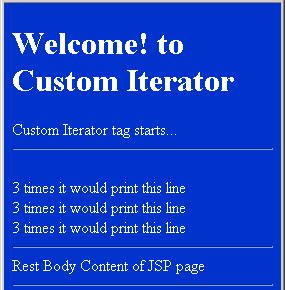
CustomIterator.jsp: In this JSP, 'counts' attribute is set to the value '3' so the content in the tag is printed 3 times on the page.
| <%@ taglib uri="/WEB-INF/taglib.tld" prefix="custom" %> <html> <head> <title>Custom Iterator Tag</title> </head> <body bgcolor="#0033cc"> <font color="white"> <H1>Welcome! to Custom Iterator </H1> Custom Iterator tag starts... <br><hr> <custom:iterator counts="3"> <br>3 times it would print this line </custom:iterator> <br><hr> Rest Body Content of JSP page </font> </body> </html> |
To run this program follow these steps:
- Create and save IteratorTag.java
- Compile and put IteratorTag.class into classes folder of your web application folder.
- Create taglib.tld file and place it into WEB-INF folder.
- Create and save CustomIterator.jsp
- Start Tomcat web server and type following URL in
your browser's address bar:
http://localhost:8080/Example/CustomIterator.jsp
Output: