JSP forward


This section illustrates you how you can use JSP forward action to forward to servlet.
Create jsp Page: To create a jsp page, following steps are to be performed.
1) Creating a web application folder(servlets-examples) which should have some logical or meaningful name. This folder should be created under the webapps folder. The path will be C:\apache tomcat\webapps\ servlets-examples.
2) Create a new folder (jsp) under the web application folder.
3) Following are the tag libraries that you will have to use in the jsp page.
a) Directive - Here you can import packages, define error handling pages or declare the session information. Syntax: <%@ directive attribute="value".
b) Declarative - Here you can embed java code. Variables and functions are defined here.. Syntax :<%! java code %>
c) Scriplets - Here you can embed java code. Syntax : <% java code %>.
d) Expressions - Here whatever you will write, displayed as a String. Syntax : <%="Welcome"%>
4) Copy the jsp page under the web application folder.
5) Run the Tomcat Server
6) Open the web browser and type the url.
http://localhost:8080/servlets-examples/jsp/page.jsp
Now following example illustrates you how to use servlet with jsp. There are four files
1) jspToServlet.jsp
2) MyServlet.java
3) page.jsp
4) output.jsp
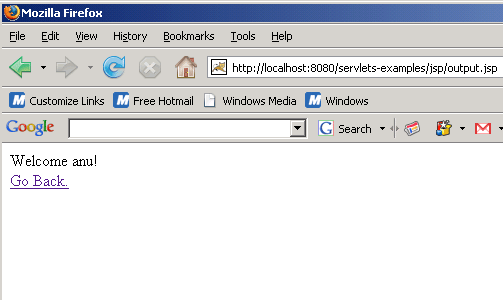
At first, run the jspToServlet.jsp page. This jsp page calls the servlet MyServlet.java by the expression <jsp:forward page="/servlet_name">. This servlet then calls the jsp page page.jsp and you will see a form is displayed on the browser. It contains username and password. As you will enter the username and password and submit it, a welcome message will appear on the browser which comes from the output.jsp.
Here is the code of jspToServlet.jsp
| <%@page contentType="text/html" import="java.util.*" %> <html> <body> <jsp:forward page="/MyServlet"/> </body> </html> |
This will call the servlet MyServlet.java.
Here is the code of MyServlet:
| import java.io.*; import java.net.*; import javax.servlet.*; import javax.servlet.http.*; public class MyServlet extends HttpServlet { public void doGet (HttpServletRequest request,HttpServletResponse response) { try { request.setAttribute ("servletName", "MyServlet"); getServletConfig().getServletContext().getRequestDispatcher("/jsp/page.jsp").forward(request, response); } catch (Exception ex) { ex.printStackTrace (); } } } |
This servlet then calls jsp page page.jsp that contains username and password.
Here is the code of page.jsp
| <%@page contentType="text/html" import="java.util.*" %> <html> <body><head><title>Use Servlet with Jsp</title></head> <form action="output.jsp" method="post"> <table border="0" cellspacing="0" cellpadding="0"> <tr> <td>User Name: </td> <td><input type="text" size="20" name="txtUserName" /> </tr> <tr> <td>Password: </td> <td><input type="password" size="20" name="txtPassword" /> </tr> <tr> <td> </td> <td><input type="submit" value="Submit" name="page" /></td> </tr> </table> </form> </body> </html> |
Output will be displayed as

Now here is the code of output.jsp
| <%@page language="java" %> <% String userName = request.getParameter("txtUserName"); String password = request.getParameter("txtPassword"); if(userName == null) userName = ""; if(password == null) password = ""; if(!userName.equals("") && !password.equals("")){ session.setAttribute("SessionUser", userName); session.setAttribute("SessionPassword", password); out.println("Welcome " + userName + "!"); out.println("<br/><a href=passValue.jsp> Go Back.</a>"); } else if(userName.equals("")){ out.println("<font color=red><b>User name is required.</b></font>"); out.println("<br/><a href=passValue.jsp>Go back!</a>"); } else if(password.equals("")){ out.println("<font color=red><b>Password is required.</b></font>"); out.println("<br/><a href=passValue.jsp>Go back!</a>"); } %> |
After entering username and password, following output will be displayed.