
Core Java| JSP| Servlets| XML| EJB| JEE5| Web Services| J2ME| Glossary| Questions?


Search Tutorials

Latest Questions
Comments
 
Zoom Out Excel 
 

In this program we are going to make a java program through which we can zoom out(+) an excel sheet.


zoom out excel


In this program we are going to make a java program through which we can zoom out(+) an excel sheet. This means you can make an excel sheet larger than their original size . 

The package we need to import is java.io.*,java.util.* ,org.apache.poi.hssf.usermodel.HSSFSheet, org.apache.poi.usermodel.HSSFRow, org.apache.poi.usermodel.HSSFCell and org.apache.poi.hssf.usermodel. HSSFWorkbook.

setZoom(int,int):
This method is used to set the zoom ratio of the excel sheet e.g. setZoom(4,3) means zoom the sheet to 125%.

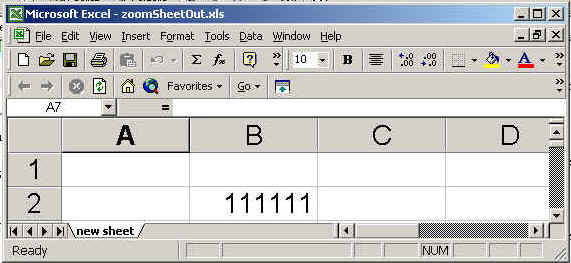
In this example, we are creating the sheet and set the zoom ratio 200%.This means the output of the sheet will be zoomed out 100% of their original size. In other words we can say the size of excel sheet will be expanded by 100%. 
 
The code of the program is given below:

<%page import="org.apache.poi.hssf.usermodel.HSSFSheet"%>
<%page import="org.apache.poi.hssf.usermodel.HSSFWorkbook"%>
<%page import="org.apache.poi.hssf.usermodel.HSSFRow"%>
<%page import="org.apache.poi.hssf.usermodel.HSSFCell"%>
<%page contentType="application/vnd.ms-excel" %>
<%page import="java.io.*" %>
<%page import="java.util.*" %>
<%
try{
  HSSFWorkbook hwb = new HSSFWorkbook();
  HSSFSheet sheet = hwb.createSheet("new sheet");
  HSSFRow row = sheet.createRow((short)1);
  HSSFCell cell = row.createCell((short)1);
  cell.setCellValue(111111);  
  sheet.setZoom(6,3);
 FileOutputStream fileOut = new FileOutputStream
(
"c:\\excel\\zoomSheetOut.xls");
   hwb.write(fileOut);
   fileOut.close();
 out.println("Your excel file has been generated");

        catch Exception ex ) {
          
        }%>

The output of the program is given below:
Download this example.


» View all related tutorials
Related Tags: java c excel apache script import model setup io client method user print arguments type ip port sets anchor cli

Leave your comment:

Name:

Email:

URL:

Title:

Comments:


Enter Code:

Audio Version
Reload Image
 

Note: Emails will not be visible or used in any way, and are not required. Please keep comments relevant. Any content deemed inappropriate or offensive may be edited and/or deleted.

No HTML code is allowed. Line breaks will be converted automatically. URLs will be auto-linked. Please use BBCode to format your text.

Add This Tutorial To:
  Del.icio.us   Digg   Google   Spurl   Blink   Furl   Simpy   Y! MyWeb 
Training Courses
Tell A Friend
Your Friend Name
Software Solutions
Least Viewed
Most Rated
Recently Viewed
Search Tutorials


Home | JSP | EJB | JDBC | Java Servlets | WAP  | Free JSP Hosting  | Search Engine | News Archive | Jboss 3.0 tutorial | Free Linux CD's | Forum | Blogs

About Us | Advertising On RoseIndia.net  | Site Map

India News

Indian Software Development Company | iPhone Development Company in India | Flex Development Company in India | Java Training Delhi | Java Training at Noida |

Send your comments, Suggestions or Queries regarding this site at roseindia_net@yahoo.com.

Copyright © 2008. All rights reserved.