JavaScript getAttribute method


JavaScript method getAttribute() is used to get the value of an attribute in an object. Most of the times it is used with the document.getElementById() method.
Syntax:
| elementObject.getAttribute("attributeName", flag); |
Where "attributeName" is the name of the attribute whose attribute we have to retrieve and flag is the value which customizes the functionality of this getAttribute() method. The flag value may be 0, 1 or 2 and it is optional.
| Flag Value | Description |
| 0 | It is the default value and performs the non case sensitive search |
| 1 | It performs the case sensitive property search |
| 2 | It returns the property value as it is set in the script or html code |
Description of code:
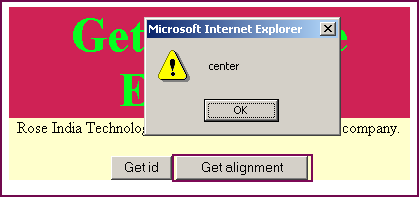
| <html> <body> <script language="JavaScript"> function getID(){ var id = document.getElementById("divId").getAttribute("id"); alert(id); } function getAlignment(){ var align = document.getElementById("divId").getAttribute("align"); alert(align); } </script> <div style="background: #cf2255; width:'100%';" align="center"> <font color="#05ff20" size="12pt"> <b>Get Attribute Example</b> </font> </div> <center> <div id="divId" align="center" style="background: #ffffcc; width:'100%';"> <p>Rose India Technologies Pvt. Ltd. is a global services company.</p> <input type="button" value=" Get id " onclick="getID();"> <input type="button" value=" Get alignment " onclick="getAlignment();"> </div> </center> </body> </html> |
Output :