
In this Tutorial we want to describe you a code that helps you to understand array to string in JavaScript. The code create HTML Page 'Array to String'.

JavaScript array to string


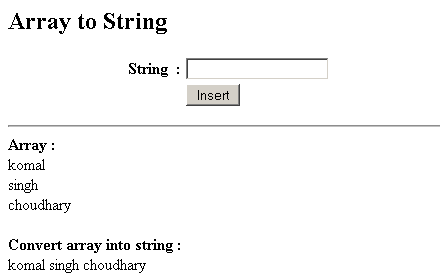
In this Tutorial we want to describe you a code that helps you to understand array to string in JavaScript. The code create HTML Page 'Array to String'. The page label string, text field and a insert button. On clicking a button, a function push is invoked that include conditional operator if the value of text field is null, this show an alert message box "Name is empty". If we insert some value in the text field, then this value is assigned into a array. The for loop execute and run the script till the length of i is less than array length. The variable string store the concatenated value of array and string.
array. join( ) - This method is used to place all the element in array into string.
document.getElementById - This is used to return the element on the specific Id.
Finally the code display you the element of array into a string on your supporting browser.
javascript array to string.java|
<html> <head> <title>Array to String</title> <script> var array = new Array(); function push(val){
       if(val=="")
        alert("Name is emplty")
         else{
          array[array.length]=val;
          var string = "<hr><b>Array :</b>";
          for(i = 0; i < array.length; i++) {
          string = string + "<br>" + array[i];
              }
          string = string +"<br><br><b>Convert array
          into string :</b><br>"+
           array.join(" ");
document.form1.string.value = ""
document.getElementById('myDiv').innerHTML = string;
}
}
</script>
</head>
<body>
<h2>Array to String</h2>
<form name="form1">
<table width="407">
<tr>
<td width="154" align="right"><b>String</b></td>
<td width="9"><b> :</b></td>
<td width="224">
<input type="text" name="string"/></td>
</tr>
<tr>
<td width="154" align="right"> </td>
<td width="9"> </td>
<td width="224">
<input type="button" Value=" Insert "
onclick="push(this.form.string.value)"/>
             </td>
            </tr>
          </table>
       </form>
      <div id="myDiv"></div>
    </body>
</html>
|
Output

Download code
