
Select Tag<html:select>:


html:select Tag : Creates a HTML <select> element, associated
with a bean property specified by our attributes.
Note:
- This tag is only valid when nested inside a form tag body.
- This tag operates in two modes, depending upon the state of the
multiple attribute, which affects the data type
of the associated property you should use:
* multiple="true" IS NOT selected - The corresponding property should be a scalar value of any supported
data type.
* multiple="true" IS selected - The corresponding property should be an array of any supported data type. - The ActionForm bean associated with this form must include a
statement resetting the scalar property to a
default value (if multiple is not set), or the array property to zero length (if multiple is set) in the reset() method.
Which facilitate to recognize cases where no selection .
| Name | Description |
| multiple | If set to any arbitrary value, the rendered select element will support multiple selections. |
| name | This attribute specifies the name of
the bean whose properties are consulted to determine which option should be
pre-selected when rendering this input field. If not specified, the bean
associated with the enclosing <html:form>
tag is utilized. |
| property | The "property" attribute specifies the Name of the request parameter that will be included with this submission, set to the specified value. |
| size | The number of available options displayed at one time. |
| value | The value to compare with for marking an option selected. |
Example Illustrating the use of the Select<html:select> & <html:option>
tag.
Here you will learn to use the Struts Html <html:select> tag.
We will cover an example that will show a working of<html:select>tag.
Example code
Creating an FormBean Class :
Develop a simple Form Bean class SelectTagActionForm.java.
package ActionForm;

import java.util.List;

import javax.servlet.http.HttpServletRequest;

import org.apache.struts.action.ActionErrors;


import org.apache.struts.action.ActionMapping;

import org.apache.struts.action.ActionMessage;

public class SelectTagActionForm extends org.apache.struts.action.ActionForm{


  private String singleSelect;


  public String getSingleSelect() {

  return singleSelect;

  }

  public void setSingleSelect(String string) {


  singleSelect = string;

  }

  public SelectTagActionForm() {

  super();

  }


}
Develop a simple action class SelectTagAction.java :
package action;

import ActionForm.SelectTagActionForm;


import java.util.ArrayList;

import java.util.List;

import javax.servlet.http.HttpServletRequest;

import javax.servlet.http.HttpServletResponse;


import org.apache.struts.action.Action;

import org.apache.struts.action.ActionForm;


import org.apache.struts.action.ActionMapping;

import org.apache.struts.action.ActionForward;


public class SelectTagAction extends Action {

  private final static String SUCCESS = "success";


  public ActionForward execute(ActionMapping mapping, ActionForm  form,

 HttpServletRequest request, HttpServletResponse response)

 throws Exception {


 if(form!=null){

 SelectTagActionForm selectTagActionForm=(SelectTagActionForm)form;

 selectTagActionForm.getSingleSelect();


  }

  return mapping.findForward(SUCCESS);

  }

}
Defining form Bean in struts-config.xml file :
Add the following entry in the struts-config.xml file for Form Bean.
Defining the form bean :
<form-bean name="SelectTagActionForm" type="ActionForm.SelectTagActionForm"/>
Developing the Action Mapping in the struts-config.xml :
Here, Action mapping helps to select the From Bean And the Action class
etc, for specific requests.
|
<action input="/" name="SelectTagActionForm" path="/SelectTagAction" scope="session" type="action.SelectTagAction" validate="false"> <forward name="success" path="/HtmlSelectTagOutPut.jsp"/> </action> |
Developing the HtmlSelectTag.jsp page :
<%@page contentType="text/html"%>


<%@page pageEncoding="UTF-8"%>

<%@ taglib uri="http://jakarta.apache.org/struts/tags-bean" prefix="bean" %>

<%@ taglib uri="http://jakarta.apache.org/struts/tags-html" prefix="html" %>


<%@ taglib uri="http://jakarta.apache.org/struts/tags-logic" prefix="logic"%>


<!DOCTYPE HTML PUBLIC "-//W3C//DTD HTML 4.01 Transitional//EN"


"http://www.w3.org/TR/html4/loose.dtd">

<html>

  <head>

  <meta http-equiv="Content-Type" content="text/html; charset=UTF-8">

  <title>JSP Page</title>


  </head>

  <body bgcolor="#999933">


  <h3><font color="#FFFF33">HTML SELECT TAG DEMO.......</font></h3>


  <th align="right"><font color="#FFFF33"><b>Single Select Allowed:</b>


    </font>


            </th>

 <html:form action="SelectTagAction" method="POST">

 <table border="2">

 <tr><td>


  <html:select name="SelectTagActionForm" property="singleSelect" size="5">


  <html:option value="0">select 0</html:option>

  <html:option value="1">select 1</html:option>


  <html:option value="2">select 2</html:option>

  <html:option value="3">select 3</html:option>

  <html:option value="4">select 4</html:option>


  <html:option value="5">select 5</html:option>

  <html:option value="6">select 6</html:option>

  <html:option value="7">select 7</html:option>


  <html:option value="8">select 8</html:option>

  <html:option value="9">select 9</html:option>


  </html:select><br/><br/>


  </td></tr>

  <tr><td>

  <html:submit/>

  </td></tr>

  </table>

  </html:form>

  </body>


</html>
Developing the HtmlSelectTagOutPut.jsp page :
<%@page contentType="text/html"%>

<%@page pageEncoding="UTF-8"%>


<%@ taglib uri="http://jakarta.apache.org/struts/tags-bean" prefix="bean" %>

<%@ taglib uri="http://jakarta.apache.org/struts/tags-html" prefix="html" %>


<%@ taglib uri="http://jakarta.apache.org/struts/tags-logic" prefix="logic"%>


<!DOCTYPE HTML PUBLIC "-//W3C//DTD HTML 4.01 Transitional//EN"


"http://www.w3.org/TR/html4/loose.dtd">

<html>

  <head>

  <a href="HtmlSelectTag.jsp">Go Back......</a><br/>

  <meta http-equiv="Content-Type" content="text/html; charset=UTF-8">


  <title><font color="#FFFF33">OUT PUT</font></title>

  </head>

  <body bgcolor="#999933">

  <h3><font color="#FFFF33">OUT PUT</font></h3>


  <h3><font color=""><font color="#FFFF33">Selected Value is.......

                </font>

           </h3>


  <bean:write name="SelectTagActionForm" property="singleSelect"/>

  </body>

</html>
Add the following line in the index.jsp to call the form.
<a href="HtmlSelectTag.jsp">HtmlSelectTagDemo</a><br/>
|
Building and Testing the Example :
Build, deploy and Test the application .
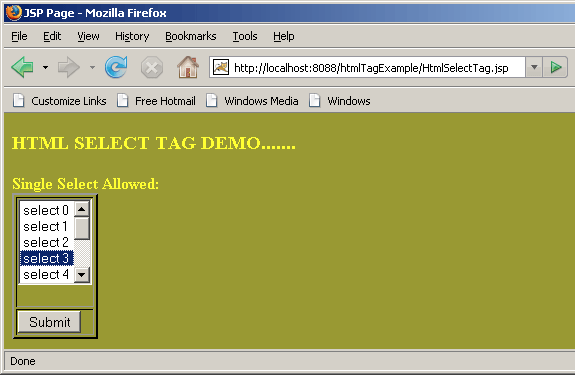
Open the browser and navigate to the HtmlSelectTag.jsp page.
Your browser displays the following page.
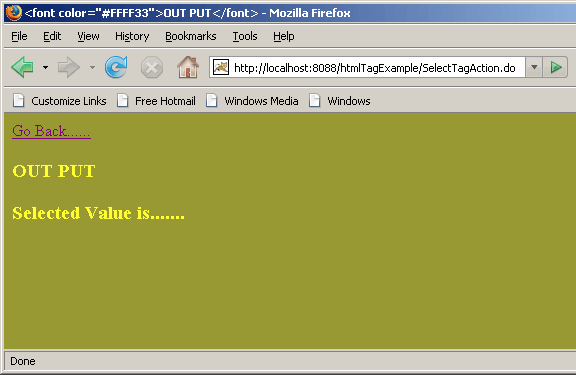
Don't select the option on the HtmlSelectTag.jsp page, and see the output.
 |
Output without selecting option...
 |
Now select any option to the HtmlSelectTagOutPut.jsp .
 |
Output when selecting a option...
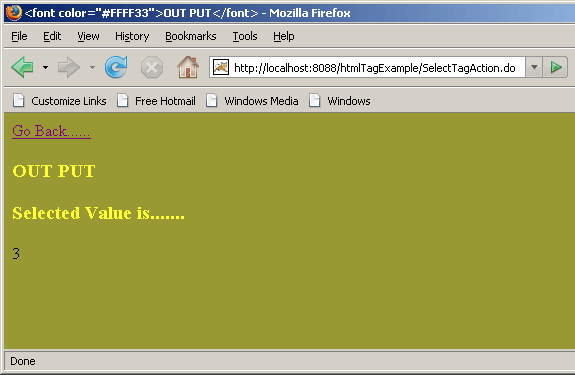 |
Above actions displays the working of <html:select> with <html:option>tag.
