
Include Tag:


bean:include Tag - is used to load the response from a dynamic application request and make it available as a bean.
This tag performs an internal dispatch to the specified application component (or external URL) and makes the response data available from that request as a bean of type String.
Include tag works similar to that of the standard <jsp:include> tag, except
that the response data is stored in a page scope attribute instead of being written to the output stream. If the current
request is part of a session, the generated request for the include be part of the same
session.
| Name | Description |
| anchor |
Optional anchor tag ("#xxx") to be added to the generated hyperlink. Specify this value without any "#" character. |
| forward |
This attribute specifies the logical name of a global |
| href |
This attribute specifies the absolute URL (including the appropriate protocol prefix such as "http:") of the resource to be included. Because this URL could be external to the current web application, the session identifier will not be included in the request. |
| id |
This attribute specifies , the name of the scripting variable (and associated page scope attribute) that will be made available with the value of the specified web application resource. |
| page |
Page attribute specifies Module-relative URI (starting with a '/') of the web application resource to be included. |
Example Illustrating the use of the Include<bean:include>
tag.
Here you will learn to use the Struts Html bean:include tags.
We will cover an example that will show a working of<bean:include>
tags
Example code :
Creating an Action Class
: Not Required here.
Creating Form Bean
: Not Required here.
Defining the global-forwards
: Not Required here.
Developing the Action Mapping in the struts-config.xml : Not Required
here.
Developing the beanIncludeTag.jsp page:
<%@page contentType="text/html"%>

<%@page pageEncoding="UTF-8"%>

<%@ taglib uri="http://jakarta.apache.org/struts/tags-bean" prefix="bean" %>

<%@ taglib uri="http://jakarta.apache.org/struts/tags-html" prefix="html" %>

<%@ taglib uri="http://jakarta.apache.org/struts/tags-logic" prefix="logic" %>

<html>

  <head>

  <title>Demo Of struts-bean:include Tag</title>

  </head>

 <body bgcolor="#999933">

  <div align="center">

  <h2><font color="#33FF33">struts-bean:include Tag Demo</font></h2>

  </div>

  <bean:include id="IncludePageOutput"
page="/IncludePage.jsp" />

  <table border="2">

  <tr><td><p><font color="#33FF33">

  Display the contents returned by invoking


</p>


</font>

  </td>

   </tr>


  <tr><td>

  <pre><bean:write name="IncludePageOutput"/></pre>

  </td></tr>

  </body>

</html>
Add the following line in the index.jsp to call the form.
<a href="beanIncludeTag.jsp">beanIncludeTagDemo</a><br/>
|
Building and Testing the Example:
Build , deploy and Test the application .
Open the browser and navigate to the beanIncludeTag.jsp page
Your browser displays the following page beanIncludeTag.jsp and see the output .
Output :
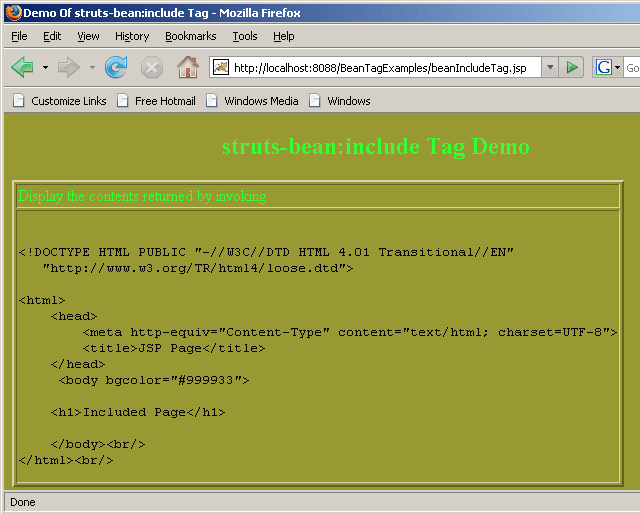 |
Above actions displays the working of beanIncludeTag..
