JSTL: forEach and status


It is not a good programming practice to use directive to set the attribute in a bean or a map when we are using the jstl. Instead of using directive we can use the <c:set> tag of jstl.
In this program we are going to use the tag <c: set>. By using this tag we are setting an attribute variable var. If there is not a page- scoped attribute named movies, then this tag creates one, it will assume that the value attribute is not null. If the value is null then it will delete the var attribute. The var tag is required. The attribute scope is optional in this tag. In <c: forEach> tag we have used some attributes like var which will help us to iterate the values i.e. movies. The attribute items which will help us to get the attribute. The varStatus attribute makes a new variable that holds an instance of javax.servlet.jsp.jstl.core.LoopTagStatus. Use <c:out> to display the result to the browser.
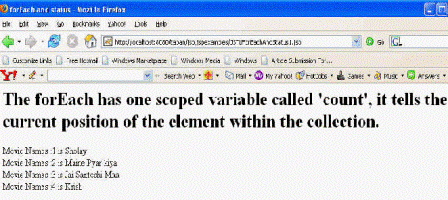
The forEach has one scoped variable called count. The LoopTagStatus class has a count property which gives us the current value of the iteration counter.
The code of the program is given below:
<%@ taglib prefix="c"    uri="http://java.sun.com/jstl/core" %>

        <c:set var="movies" value="Sholay, Maine Pyar kiya, Jai Santoshi Maa, Krish" scope="page" />

        <html>

  <head>

    <title>forEach and status</title>

  </head>

  <body>

    <h1>The forEach has one scoped variable called 'count', it tells the

	current position of the element within the collection. </h1>

    <c:forEach items="${pageScope.movies}" var="currentName" varStatus="status" begin="0" end="3" step="1">

      Movie Names :<c:out value="${status.count}" /> is

        <c:out value="${currentName}" /> <br />

    </c:forEach>

  </body>

        </html>
The output of the program is given below: