Home Jsp Simple-jsp-example Setting Colors in JSP


Setting Colors in JSP
Posted on: February 8, 2008 at 12:00 AM
In Jsp also we can set the background color which we want, the font color can be changed. The table can be coloured .

Setting Colors in JSP


In Jsp also we can set the background color which we want, the font color can be changed. The table can be coloured . By using the colors code we can give colors according to our wish. 

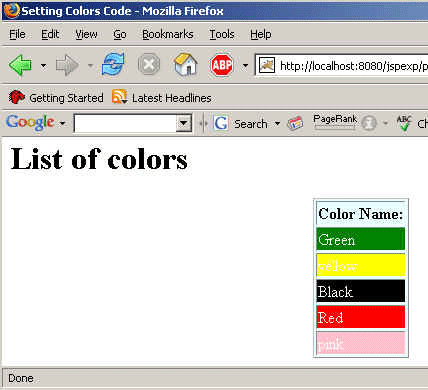
To make a program over this we are firstly declaring a array of String type and pass the names of various colors as an array in the variable named colors. This array we are declaring inside the declaration tag. To access the array, use scriptlet tag which is used for processing the business logic. Use for loop for the accessing the array of colors. Now to print the array use the expression tag which is used for presentation logic. This way the output will be displayed to you. 


Here is the code of the program:

<%!
  String[] colors = {"Green", "yellow", "Black", "Red", "pink"};
%>
<HTML>
  <HEAD><TITLE>Setting Colors Code</TITLE></HEAD>
  <BODY>
    <H1>List of colors</H1>
    <TABLE BORDER="1" align="center" bgcolor="#E8FDFF"
     weight="50%" height="40%">
      <TH>Color Name:</TH>
      <% for (int i=0; i<colors.length; i++) { %>
        <TR><TD bgcolor="<%=colors[i] %>">
     <font color="white"><%= colors[i]%></font></TD></TR>
      <% } %>
    </TABLE>
  </BODY>
</HTML>

Output of the code:

Download this example.

Related Tags for Setting Colors in JSP:
cstringoopidearraystlprocessscriptbusinessiocolorsmakevariablesedcolorprintoutputtypelogicloopdisplayipexpressiontagnameusingintriathisiddeclarationlogooprocessingforprogramtoexpressrampresentationnamesprocssisheilcanputsplvarusepefirstceinnopassasmntoutplaytrsidsidecaletispclesscriptletbusovernamedmeprowhichsspesscolatratiokisirllivpressprerayandarcodcodeccstrxpwisvavariousscrssrocriringriprdthstaccessabablatidispeclplprocesprndodeonogrolo


More Tutorials from this section

Ask Questions?    Discuss: Setting Colors in JSP  

Post your Comment


Your Name (*) :
Your Email :
Subject (*):
Your Comment (*):
  Reload Image


Ask Questions?

If you are facing any programming issue, such as compilation errors or not able to find the code you are looking for.

Ask your questions, our development team will try to give answers to your questions.