Setting and Getting Data in jsp through the Session


In this example you will learn how to make Form with
the help of html in jsp. By this example you can easily learn how we can get
data from one page to another page. You can retrieve data from one
page to another page only when the session is true . If you
disable the session in your code, some thing like this: <%@
page language="java" session="false"%> when
the Session value is false, no one can retrieve data from any Form. Please
remember that the default value of the Session is true.
Program Description:
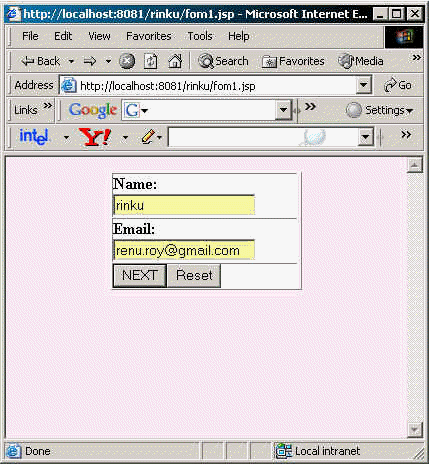
In this program first page that appears to the user displays name and email
which user have to fill. There are two buttons labeled "next" and
"reset" to go in the next page and clear the current form entries
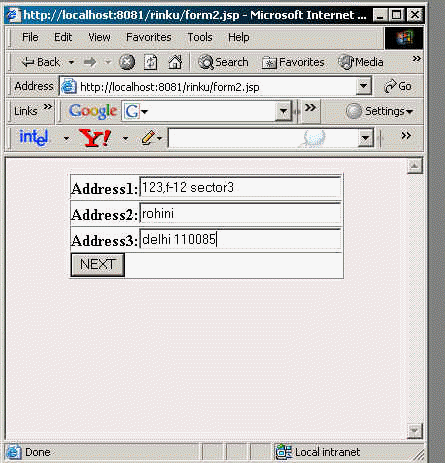
respectively. In the next page there are three address lines to fill and the
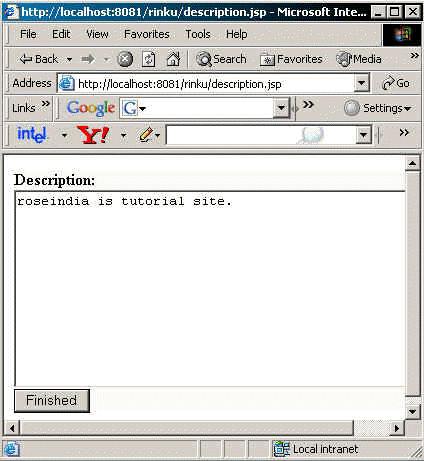
"next" button to go in the next page. In the third page a text area is
shown, labeled "description" where the user can write whatever he/she
wants to describe and one more button, labeled "finish". On clicking
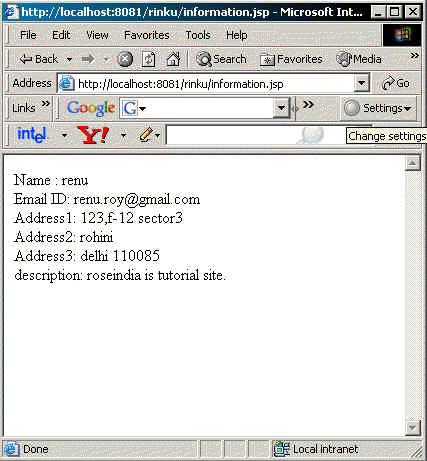
the finish button a new page comes where the user is thanked to complete the
previous pages. In this page there is a link "click here" to see all
the information filled by the user in previous pages.
Code Description: In the code of the pages we have used getParameter()
method to get the parameters from the previous page and setAttribute() of the
session object to set the attribute to the session so that we can access these
attributes later in the forthcoming pages. These attributes can be used as
global which can be used anywhere in the application. To set the attribute we
pass the name of attribute as a string by which this attribute will be known in
the session and the name of attribute that has been specified in the previous
page. To get these attributes from session we use getAttribute() method of the
session object and pass the name of attribute which we have specified during
setting this attribute in setAttribute(). It returns the attribute in the form
of Object so we need to typecast it in the String object. Finally you will get
all attributes in the "information.jsp" where you can show them in the
required format.
Code for form1.jsp :
<html>
     <body bgcolor="#FFEAF4">
        <center>
        <form action="form2.jsp" method="post">
	   <table border="1" cellpadding="0" cellspacing
="0" height="30%" width="50%">
	       <tr bgcolor="#FBFBFB">
      		   <td><B>Name:</B><br><input type="text"
 name="name" value="" size="20" /><td>
		</tr>
		<tr bgcolor="#FBFBFB">
		   <td><B>Email:</B><br><input type="text"
 name="mail" value="" size="20" /></td>
		</tr>
		<tr bgcolor="#FBFBFB">
		   <td><input type="submit" value="NEXT"
/><input type="reset" value="Reset" /></td>
		</tr>
	   </table>
	</form>
	</center>
    </body>
</html>
form1.jsp page :
form2.jsp :
<%
String name = request.getParameter("name");
session.setAttribute("theName", name);
      String email = request.getParameter("mail");
session.setAttribute("theemail", email);
%>
      <html>
  <body bgcolor="#FFEAF4">
    <center>
      <form action="description.jsp" method="post">
    <table border="1" cellpadding="0" cellspacing="0"
               decolor=""#E2FEFD height="30%" width="50%">
	<tr bgcolor="#FBFBFB">
	<td>
        <B>Address1:</B>
        <input type="text" name="Address1" value="" size="30" />
        </td>
	</tr>

	<tr bgcolor="#FBFBFB">
	<td><B>Address2:</B><input type="text"
        name="Address2" value="" size="30" /></td>
	</tr>

	<tr bgcolor="#FBFBFB">
	<td><B>Address3:</B><input type="tex
t" name="Address3" value="" size="30" /></td>
	</tr>

	<tr bgcolor="#FBFBFB">
	<td><input type="submit" value="NEXT" /></td>
	</tr>

    </table>
     </form>
   </center>
  </body>
</html>
form2.jsp page :
description.jsp :
<%
       String address1 = request.getParameter("Address1");
   session.setAttribute("address1", address1);
         String address2 = request.getParameter("Address2");
     session.setAttribute("address2", address2);
  String address3 = request.getParameter("Address3");
     session.setAttribute("address3", address3);
     %>
 <html>
  <body bgcolor="#FFFFFF">
  <form action="result.jsp" method="post">
  <table border="0" cellpadding="0" cellspacing="0" height="30%" width="50%">
      <tr bgcolor="#FBFBFB">
      <td><B>Description:</B><br><textarea name="description" rows="12"
      cols="50"colspan="2"></textarea>
      </td>
      </tr>
      <tr bgcolor="#FBFBFB">
      <td colspan="2"><input type="submit" value="Finished" /></td>
      </tr>
</table>
</form>
</body>
</html>
description.jsp :
result.jsp :
<%
   String description =
      request.getParameter("description");
      session.setAttribute("description", description);
      out.println("Thanks for completing the wizard.");
      <%
         String description =
      request.getParameter("description");
      session.setAttribute("description", description);
      out.println("Thanks for completing the wizard.");
      %>
      Plz, <a href="information.jsp">click here </a>for
      showing details.
%>
information.jsp :
<%
	out.println("Name : " + (String)session.getAttribute("theName") + "<br/>");
	out.println("Email ID: " + (String)session.getAttribute("theemail") + "<br/>");
	out.println("Address1: " + (String)session.getAttribute("address1") + "<br/>");
	out.println("Address2: " + (String)session.getAttribute("address2") + "<br/>");
	out.println("Address3: " + (String)session.getAttribute("address3") + "<br/>");
	out.println("description: " + (String)session.
getAttribute("description") + "<br/>");
%>
information.jsp page :