getQueryString() Method Of The Request Object


This section describes the getQueryString() method of the request object. Here, you will learn more about the getQueryString() method of the request like what's the need of the method and how to implement it into your JSP application code. You can directly copy the code and paste it into your JSP application code.
This method of the request object is used for getting the query string which is the values with the attribute of the html from where the jsp page is referenced. There all attribute of the form with form attributes is available in the query string.
Here is the JSP code of the getQueryString.jsp file:
<html> <head><title>getQueryString() method of request object.</title></head> <body> <form method="get"> <table border="0" cellspacing="0" cellpadding="0"> <tr> <td>User Name: </td> <td><input type="text" size="20" name="txtUserName" /> </tr> <tr> <td>Password: </td> <td><input type="password" size="20" name="txtPassword" /> </tr> <tr> <td> </td> <td><input type="submit" value="Submit" name="B1" /></td> </tr> </table> </form> <% if(request.getQueryString() != null) out.println(request.getQueryString()); %> </body> </html>
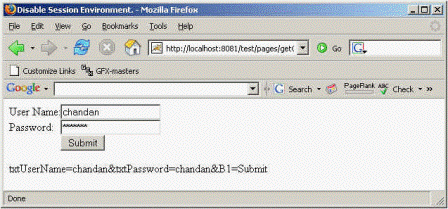
Output for the above JSP file: