JavaScript method createElement()


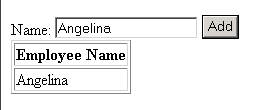
This section illustrates you the use of JavaScript method createElement(). This method creates an instance of the element for the specified tag. It works only on Internet Explorer. In the given example, we let the user enter the name. As the user clicks the button, the name will get added to the specified table. Following code adds the text (i.e. entered name) into the container (i.e. table).
|
element2.appendChild(text); element1.appendChild(element2); table.tBodies(0).appendChild(element1); |
Here is the code:
| <html> <script> function addValue(a) { var element1 = document.createElement('tr'); var element2 = document.createElement('td'); var text = document.createTextNode(a); var table = document.getElementById('t'); element2.appendChild(text); element1.appendChild(element2); table.tBodies(0).appendChild(element1); } </script> Name: <input type="text" name="a"> <input type="button" value="Add" onClick='javascript:addValue(a.value)'> <table id="t" border="1"> <tr><th>Employee Name</th></tr> </table> </html> |
Output will be displayed as:

As you enter the name and click the button, the entered name will get added to the table: