
Writing Calculator Stateless Session Bean
|
|


In this EJB tutorial we will learn how to Write Staleles Session Bean for multiplying the values entered by user. We will use ant build tool to build ear file. We will deploy our application using WebLogic console.
Enterprise Bean remote interface
All remote interfaces must extend
javax.ejb.EJBObject. Remote interface is the client view of session bean.
Methods defined in the remote interface are accessible to the client. In our
example we have defined the
public int
multiply(int a, int b)
method for calling from JSP. Here is code of our Remote Interface:
package examples;
|
Enterprise Bean Home interface
All home interfaces must extend javax.ejb.EJBHome. 'create()' method of home interface of the application enables the client to create and remove the session object.
package examples;
|
Enterprise Bean class
All Bean class are defined as public and implements the
javax.ejb.SessionBean. In the bean class we have implemented the code for
public int multiply(int a, int b)
Besides this method other required methods which is to be implemented are:
-
ejbCreate()
-
ejbRemove()
-
ejbActivate()
-
ejbPassivate()
-
setSessionContext(SessionContext aContext)
Here is the code for our Calculator Session Bean:
/*
|
Jar Descriptor File
For creating example.jar ejb-jar.xml and weblogic-ejb-jar.xml files are required which explains the content of jar file.
ejb-jar.xml file:
| <?xml version="1.0" encoding="UTF-8"?> <!DOCTYPE ejb-jar PUBLIC "-//Sun Microsystems, Inc.//DTD Enterprise JavaBeans 2.0//EN" "http://java.sun.com/dtd/ejb-jar_2_0.dtd"> <ejb-jar > <description>EJB Examples</description> <display-name>EJB Examples</display-name> <enterprise-beans> <!-- Session Beans --> <session > <description>Shopping Cart Session Bean</description> <display-name>Shopping Cart Session Bean</display-name> <ejb-name>ShoppingCart</ejb-name> <home>examples.ShoppingCartHome</home> <remote>examples.ShoppingCart</remote> <ejb-class>examples.ShoppingCartStatefulSessionBean</ejb-class> <session-type>Stateful</session-type> <transaction-type>Container</transaction-type> </session> <session > <description>EJB Test Session Bean</description> <display-name>EJB Test Session Bean</display-name> <ejb-name>TestSessionBean</ejb-name> <home>examples.TestSessionBeanHome</home> <remote>examples.TestSessionBean</remote> <local-home>examples.TestSessionBeanLocalHome</local-home> <local>examples.TestSessionBeanLocal</local> <ejb-class>examples.MyTestSessionBean</ejb-class> <session-type>Stateless</session-type> <transaction-type>Container</transaction-type> <env-entry> <env-entry-name>testSessionBean</env-entry-name> <env-entry-type>java.lang.String</env-entry-type> <env-entry-value>Test Bean</env-entry-value> </env-entry> </session> <session > <description>EJB Calculator Session Bean</description> <display-name>EJB Calculator Session Bean</display-name> <ejb-name>CalculatorBean</ejb-name> <home>examples.CalculatorBeanHome</home> <remote>examples.CalculatorBean</remote> <local-home>examples.CalculatorBeanLocalHome</local-home> <local>examples.CalculatorBeanLocal</local> <ejb-class>examples.CalculatorSessionBean</ejb-class> <session-type>Stateless</session-type> <transaction-type>Container</transaction-type> <env-entry> <env-entry-name>CalculatorBean</env-entry-name> <env-entry-type>java.lang.String</env-entry-type> <env-entry-value>Calculator bean</env-entry-value> </env-entry> </session> </enterprise-beans> <!-- Relationships --> <!-- Assembly Descriptor --> <assembly-descriptor > <method-permission > <description>Session Bean</description> <unchecked/> <method > <description>Session Bean</description> <ejb-name>ShoppingCart</ejb-name> <method-name>*</method-name> </method> </method-permission> <!-- transactions --> <container-transaction > <method > <ejb-name>ShoppingCart</ejb-name> <method-name>*</method-name> </method> <trans-attribute>Supports</trans-attribute> </container-transaction> </assembly-descriptor> </ejb-jar> |
Above deployment descriptor defines remote, home and bean class
for the bean and assigns a name 'CalculatorBean'
to the session bean. Please note that bean of Stateless type and is defined by:
<session-type>Stateless</session-type>
weblogic-ejb-jar.xml file:
| <?xml version="1.0" encoding="UTF-8"?> <!DOCTYPE weblogic-ejb-jar PUBLIC "-//BEA Systems, Inc.//DTD WebLogic 6.0.0 EJB//EN" "http://www.bea.com/servers/wls600/dtd/weblogic-ejb-jar.dtd"> <weblogic-ejb-jar> <description>Session Bean Example</description> <weblogic-enterprise-bean> <ejb-name>ShoppingCart</ejb-name> <stateful-session-descriptor> </stateful-session-descriptor> <reference-descriptor> </reference-descriptor> <jndi-name>ShoppingCart</jndi-name> </weblogic-enterprise-bean> <weblogic-enterprise-bean> <ejb-name>TestSessionBean</ejb-name> <stateless-session-descriptor> </stateless-session-descriptor> <reference-descriptor> </reference-descriptor> <jndi-name>TestSessionBean</jndi-name> <local-jndi-name>TestSessionBeanLocal</local-jndi-name> </weblogic-enterprise-bean> <weblogic-enterprise-bean> <ejb-name>CalculatorBean</ejb-name> <stateless-session-descriptor> </stateless-session-descriptor> <reference-descriptor> </reference-descriptor> <jndi-name>CalculatorSessionBean</jndi-name> <local-jndi-name>CalculatorBeanLocal</local-jndi-name> </weblogic-enterprise-bean> </weblogic-ejb-jar> |
The WebLogic deployment descriptor assigns jndi name 'CalculatorSessionBean' to the 'CalculatorBean' bean.
Writing JSP and Web/Ear component
Our JSP file access the session bean and uses it for the calculation and displays the result.
For this purpose we are using calculator.jsp which displays a form to accept two numbers from the user and submits the form data to calculator.jsp. Here is our calculator.jsp:
| <%@page language="java" import="examples.*,javax.naming.*,javax.rmi.PortableRemoteObject"%> <%! private CalculatorBean beanRemote=null; public void jspInit(){ //Look up home interface try { CalculatorBeanHome calculatorBean; InitialContext ctx = new InitialContext(); Object objref = ctx.lookup("CalculatorSessionBean"); calculatorBean = (CalculatorBeanHome)PortableRemoteObject.narrow(objref, CalculatorBeanHome.class); beanRemote=calculatorBean.create(); } catch (Exception NamingException) { NamingException.printStackTrace(); } } public void jspDestroy(){ try { //calculatorBean.remove(); beanRemote.remove(); }catch(Exception e){ } } %> <html> <head> <title>Calculator Bean</title> </head> <body> <form method="POST" action="calculator.jsp"> <div align="center"> <center> <table border="0" cellpadding="0" cellspacing="0" width="400"> <tr> <td colspan="2" width="398"><b><font size="5">Calculator</font></b></td> </tr> <tr> <td width="86"><b>Calculate</b></td> <% String val1 = request.getParameter("val1"); String val2 = request.getParameter("val2"); if(val1==null) val1="10"; if(val2==null) val2="5"; %> <td width="310"><input type="text" name="val1" size="8" value="<%=val1%>"> <b>* </b><input type="text" name="val2" size="8" value="<%=val2%>"><input type="submit" value="Calculate" name="B1"></td> </tr> <% if(request.getParameter("val1")!=null){ int result=0; try{ result=beanRemote.multiply(Integer.parseInt(val1),Integer.parseInt(val2)); }catch(Exception e){ System.out.println(e.getMessage()); } %> <tr> <td width="86"><b>Result</b></td> <td width="310"><b> = <%=result%></b></td> </tr> <% } %> <tr> <td width="396" colspan="2"></td> </tr> </table> </center> </div> </form> </body> </html> |
Web-Component Descriptor File
For creating war file we need web.xml, which is same as in previous lesson.
J2EE Enterprise Archive (ear) Descriptor File
For creating example.ear application.xml, file is required which explains the content of enterprise archive, which is same as in previous lesson.
Building ear file using ant build tool 0
I am assuming that you have ant build tool installed on your development environment. Download the source for from here and extract in your favorite directory. Open command prompt and navigate to the directory <extracted directory>/sessionbean/code and type ant there. Ant build tool will compile, package and create example.ear in the <extracted directory>/sessionbean directory. Here is the code of our ant build file:.
Deploying the Application on Web Logic 6.0 Server
Please refer to previous lesson for deploying the application on WebLogic Server. 1
Testing the application
To test the application open browser and type http://localhost:7001/example/index.jsp,
following page should be displayed:

Click on the link "Calculator Links", it should display the form to enter the two values: 2
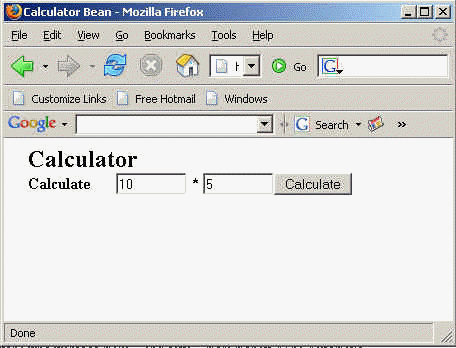
Click on the Calculate button to view the result. Following should be displayed:
 3
3
In this lesson we learnt how to develop, build, deploy and test Calculator Session Bean on Web Logic Server.
