
As mentioned earlier, Filter streams are special streams which filter input and output bytes and manipulate data reading from an underlying stream.
Overview of I/O Data Streams


As mentioned earlier, Filter streams are special streams which filter input and output bytes and manipulate data reading from an underlying stream. Apart from this, it allows the user to make a chain using multiple input stream so that, the operations that are to be applied on this chain, may create a combine effects on several filters. By using these streams, there is no need to convert the data from byte to char while writing to a file. These are the more powerful streams than the other streams of Java.
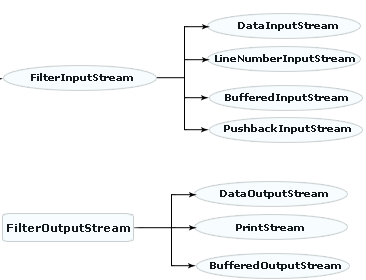
The class hierarchy of the Filter I/O streams derived from I/O streams can be shown as:
In this section we will learn about the Data I/O streams derived from the Filter I/O streams.
DataStreams:
Data streams are filtered streams that perform binary I/O operation on primitive data type values ( boolean, char, byte, short, int, long, etc.) as well as on String values. If you need to work with data that is not represented as bytes or characters then you can use Data Streams. These streams filter an existing byte stream so that each primitive data types can be read from or written to the stream directly.
These Data Streams are as follows:
- DataInputStream
- DataOutputStream
DataInputStream:
This is a class derived from FilterInputStream class that allows you to read binary represented data of Java primitive data types from an underlying input stream in a machine-independent way. It reads only Java primitive data types and doesn't read the object values. A data input stream is created with the constructor of DataInputStream class. The specified argument that is to be filtered within the constructor should be an existing input stream (such as a buffered input stream or a file input stream).
The constructor of DataInputStream is written as:
DataInputStream (java.io.InputStream in);
The read( ) method is used to read the data according to its types. For example, the readInt( ) method reads the int type of value while the readFloat() method reads the fraction value. The readLine( ) Methods reads the string per line from a file.
DataOutputStream:
This is a class derived from FilterOutputStream class that allows you to write binary represented data of Java primitive data types reading from an underlying output stream in a machine-independent way. It writes only Java primitive data types and doesn't write the object values. A data output stream is created with the constructor of DataOutputStream class. The specified argument that is to be filtered within the constructor should be an existing output stream (such as a buffered output stream or a file output stream).
The constructor of DataOutputStream is written as:
DataOutputStream (java.io.OutputStream out);
The write( ) method is used to write the data according to its types. For example, the writeInt( ) method writes the int type of value while the writeFloat() method writes the fraction value. The writeUTF( ) method writes the string per line to a file.
Lets see an example that shows the implementation of reading and writing operations through the Data I/O streams.
|
import java.io.*; class ReadWriteData { public static void main(String args[]) { int ch=0; int[] numbers = { 12, 8, 13, 29, 50 }; try { System.out.println("1. write Data"); System.out.println("2. Read Data"); System.out.println("Enter your choice "); BufferedReader br=new BufferedReader(new InputStreamReader(System.in)); ch=Integer.parseInt(br.readLine()); switch(ch){ case 1: FileOutputStream fos = new FileOutputStream("datafile.txt"); BufferedOutputStream bos = new BufferedOutputStream(fos); DataOutputStream out =new DataOutputStream (bos); for (int i = 0; i < numbers.length; i ++) { out.writeInt(numbers[i]); } System.out.print("write successfully"); out.close(); case 2: FileInputStream fis = new FileInputStream("datafile.txt"); BufferedInputStream bis=new BufferedInputStream(fis); DataInputStream in =new DataInputStream (bis); while (true){ System.out.print(in.readInt()); } default: System.out.println("Invalid choice"); } } catch (Exception e) { System.err.println("Error in read/write data to a file: " + e); } } } |
Output of the Program:
| C:\nisha>javac ReadWriteData.java C:\nisha>java ReadWriteData 1. write Data 2. Read Data Enter your choice 1 write successfully128132950 C:\nisha> |
This program uses both DataInputStream and DataOutputStream to read and write data to the specified file respectively. If the user enters the choice as 1 then the specified data is written to a file through the object of DataOutputStream class using the writeInt( ) method. On the other hand, if the user enters the choice as 2 then the written data is read from the file through the object of DataInputStream class using the ReadInt( ).
Here, another output is shown when the user enters the choice as 2.
| C:\nisha>javac ReadWriteData.java
C:\nisha>java ReadWriteData C:\nisha> |
