Java - XPath Tutorial


Showing all elements of an XML file using Java xpath
In this example we have created an XML file "person.xml" first, which is necessary to execute XPath query on to it. This "persons.xml" contains information related to name, age, gender of different persons.
Here is the full source code for persons.xml file as follows :
persons.xml
<?xml version="1.0" ?>
|
Now we have declared a class XPathDemo and in this class we are parsing the XML file with JAXP. First of all we do need to load the document into DOM Document object. We have placed that persons.xml file in that current working directory.
DocumentBuilderFactory domFactory = |
Above lines of code parses "persons.xml" file and creates a Document object. Next we have created XPath object with the use of XPathFactory.
XPath xpath = XPathFactory.newInstance().newXPath();
|
Now we compile the path with the use of compile() method.
Finally we will evaluate XPath expression and then we can print all those
elements.
Here is the example code for XPathDemo.java as follows:
XPathDemo.java
import org.w3c.dom.*;
|
To run this example follow these steps as mention below :
- First create and save an XML file "persons.xml"
- Create XPathDemo.java and compile it.
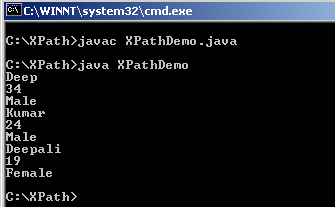
- Execute XPathDemo you will get the following output on your console
Output: