--Ads--
Search from Database In Servlet


In this section, we have developed an Employee Search application. We created
three file search.jsp, viewSearch.jsp and Search.java.
Brief description of the flow of the
application:
- User opens search.jsp in the browser and
enter the search text and click on the "Search" button.
- Search.java retrieves data from the
database according to the Search text.
- viewSearch.jsp display the search data from
database on the browser.
Step 1: Create a web page ("search.jsp") to Search the user.
<html>
<head>
</head>
<body>
<br><br><br><br><br><br>
<form method="post" name="frm" action="search">
<table border="0" width="300" align="center" bgcolor="#CDFFFF">
<tr><td colspan=2 style="font-size:12pt;color:#00000;" align="center">
<h3>Search Employee</h3></td></tr>
<tr><td ><b>Employee Name</b></td>
<td>: <input  type="text" name="emp_name" id="emp_name">
</td></tr>
<tr><td ><b>Department</b></td>
<td>: <input  type="text" name="emp_dept" id="emp_dept">
</td></tr>
<tr><td ><b>Email</b></td>
<td>: <input  type="text" name="email" id="email">
</td></tr>
<tr><td colspan=2 align="center">
<input  type="submit" name="submit" value="Search"></td></tr>
</table>
</form>
</body>
</html> |
Step:2Create a
Servlet ("Search.java") to retrieve the data.
import java.io.*;

import javax.servlet.*;

import javax.servlet.http.*;

import javax.sql.*;

import java.sql.*;

import java.util.*;


public class Search extends HttpServlet{


 public void doPost(HttpServletRequest request,

  HttpServletResponse response)

	  throws ServletException,IOException{

  response.setContentType("text/html");

  PrintWriter out = response.getWriter();


  System.out.println("MySQL Connect Example.");

  Connection conn = null;

  String url = "jdbc:mysql://localhost:3306/";

  String dbName = "userdetails";

  String driver = "com.mysql.jdbc.Driver";

  String userName = "root";

  String password = "root";


  Statement st;

  try {

  Class.forName(driver).newInstance();

  conn = DriverManager.getConnection(url+dbName,userName,password);

  System.out.println("Connected to the database");

  String  emp_name  = request.getParameter("emp_name");

  String  emp_dept  = request.getParameter("emp_dept");

  String  email  = request.getParameter("email");


  ArrayList al=null;

  ArrayList emp_list =new ArrayList();

  String query =

  "select * from employee where employee_name='"+emp_name+"' or


department='"+emp_dept+"' or email='"+email+"'


order by employee_name";

  System.out.println("query " + query);

  st = conn.createStatement();

  ResultSet  rs = st.executeQuery(query);


  while(rs.next()){

  al  = new ArrayList();


  al.add(rs.getString(1));

  al.add(rs.getString(2));

  al.add(rs.getString(3));

  al.add(rs.getString(4));

  al.add(rs.getString(5));

  al.add(rs.getString(6));

  al.add(rs.getString(7));

  al.add(rs.getString(8));

  al.add(rs.getString(10));

  System.out.println("al :: "+al);

  emp_list.add(al);

  }


  request.setAttribute("empList",emp_list);


 System.out.println("empList " + emp_list);


  // out.println("emp_list " + emp_list);


  String nextJSP = "/viewSearch.jsp";

  RequestDispatcher dispatcher =

   getServletContext().getRequestDispatcher(nextJSP);

  dispatcher.forward(request,response);

  conn.close();

  System.out.println("Disconnected from database");

  } catch (Exception e) {

  e.printStackTrace();

  }

  }

}
|
RequestDispatcher dispatcher = getServletContext().getRequestDispatcher(nextJSP);
dispatcher.forward(request,response);
The ServletContext.getRequestDispatcher()
method takes a String argument describing a path
within the scope of the ServletContext. This
path must be relative to the root of the ServletContext
and begin with a '/'. The method uses the path to look up
a Servlet, using the Servlet path matching rules, wraps it with a RequestDispatcher object, and returns
the resulting object. If no Servlet can be resolved based on the given path, a RequestDispatcher is
provided that returns the content for that path.
Step 4:
"web.xml" to mapping the Servlet ("Search.java")
<?xml version="1.0" encoding="ISO-8859-1"?>
<web-app xmlns="http://java.sun.com/xml/ns/javaee"
xmlns:xsi="http://www.w3.org/2001/XMLSchema-instance"
xsi:schemaLocation="http://java.sun.com/xml/ns/javaee http://java.sun.com/xml/ns/javaee/web-app_2_5.xsd"
version="2.5">
<display-name>Welcome to Tomcat</display-name>
<description>
Welcome to Tomcat
</description>
<servlet>
<servlet-name>searchServlet</servlet-name>
<servlet-class>Search</servlet-class>
</servlet>
<servlet-mapping>
<servlet-name>searchServlet</servlet-name>
<url-pattern>/search</url-pattern>
</servlet-mapping>
</web-app>
|
Step 4:
"viewSearch.jsp" to display the data.
<%@ page import="java.util.*" %>

    <html>

    <head>

    </head>

    <body>


    <br><br><br><br><br><br>

    <table width="700px" align="center"

	style="border:1px solid #000000;">

    <tr>

    <td colspan=8 align="center"

		style="background-color:ffeeff">

	<b>Employee Record</b></td>

    </tr>

    <tr style="background-color:efefef;">

    <td><b>Employee Name</b></td>

    <td><b>Username</b></td>

    <td><b>Email</b></td>

    <td><b>Contact No</b></td>

    <td><b>Address</b></td>

    <td><b>Country</b></td>

    <td><b>State</b></td>

    <td><b>Department</b></td>


    </tr>

    <%

    int count=0;

    String color = "#F9EBB3";


    if(request.getAttribute("empList")!=null)

    {

 ArrayList al = (ArrayList)request.getAttribute("empList");

	Iterator itr = al.iterator();


	while(itr.hasNext()){


		if((count%2)==0){


			color = "#eeffee";


		}

		else{

			 color = "#F9EBB3";

		}

		count++;

		ArrayList empList = (ArrayList)itr.next();

		%>

    <tr style="background-color:<%=color%>;">

    <td><%=empList.get(0)%></td>

    <td><%=empList.get(1)%></td>

    <td><%=empList.get(3)%></td>

    <td><%=empList.get(4)%></td>

    <td><%=empList.get(5)%></td>

    <td><%=empList.get(6)%></td>

    <td><%=empList.get(7)%></td>

    <td><%=empList.get(8)%></td>

    </tr>

		<%

	}

    }

    %>


    <%

    if(count==0){

	%>

    <tr>

    <td colspan=8 align="center"

	style="background-color:eeffee"><b>No Record</b></td>

    </tr>

	<%

    }

    %>

    </table>

    </body>

    </html>
|
|
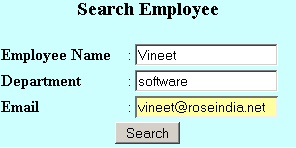
Output of this Program:
search.jsp to search the Employee
After search the result.

If no record in the database then display No Record.

Download the application
