--Ads--
Snooping Headers


In this program we are going to going to make a servlet
which will retrieve all the Http request header.
To make a program over this firstly we need to make one
class named GettingSnoopingHeader. In HttpRequest there are too
many headers. To retrieve all the headers firstly we need to call the getWriter()
which returns PrintWriter object and helps us to display all the headers.
To get a header names call the method getHeaderNames() of the request object
which will return the Enumeration of the headers. Now to retrieve all the
headers from the Enumeration use the method hasMoreElements(). This method
checks whether there are more headers or not. To display the output on your
browser use the PrintWriter object.
The code of the program is given below:
import java.io.*;

import java.util.*;

import javax.servlet.*;

import javax.servlet.http.*;


public class HeaderSnoopServlet extends HttpServlet{

  protected void doGet(HttpServletRequest request, HttpServletResponse

    response)throws ServletException, IOException {

  PrintWriter pw = response.getWriter();

  pw.println("Request Headers are");

  Enumeration enumeration = request.getHeaderNames();

  while(enumeration.hasMoreElements()){

  String headerName = (String)enumeration.nextElement();

  Enumeration headerValues = request.getHeaders(headerName);

  if (headerValues != null){

  while (headerValues.hasMoreElements()){

  String values = (String) headerValues.nextElement();

  pw.println(headerName + ": " + values);

  }

  }

  }

  }

}
|
web.xml file for this program:
<?xml version="1.0" encoding="ISO-8859-1"?>

<!--<!DOCTYPE web-app

 PUBLIC "-//Sun Microsystems, Inc.//DTD Web Application 2.3//EN"

 "http://java.sun.com/dtd/web-app_2_3.dtd"> -->


<web-app>

 <servlet>

  <servlet-name>Hello</servlet-name>

  <servlet-class>HeaderSnoopServlet</servlet-class>

 </servlet>

 <servlet-mapping>

 <servlet-name>Hello</servlet-name>

 <url-pattern>/HeaderSnoopServlet</url-pattern>

 </servlet-mapping>

</web-app>
|
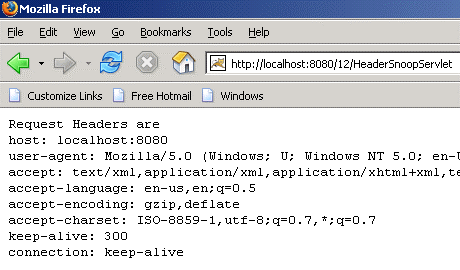
The output of the program is given below:
Download
this example: