--Ads--
Creating Dynamic Tree component in RCFaces


This example will illustrate you that how you can
create a dynamic tree component with the use of RCFaces core tag v:tree.
In this example we have created a tree with the root node named
"server" and then further it has one child node "IBMServer"
and it also has few other child nodes for its components like memory, RAM, and SMPS.
To create this tree we have used the RCFaces core tag v:tree.
It has some attributes which are described as below:
| Attribute |
Description |
| id |
A String that specifies the
identifier for this component |
| value |
String holding the current
value for component |
| height |
height value for component |
| width |
width value for component |
| checkable |
A boolean value indicating whether
the component can be checked or not |
| selectionListener |
executed when the node is selected |
| defaultImageURL |
An url string for the default
image |
| defaultExpandedImageURL |
An url string pointing to the
default image for an expanded node |
| hideRootExpandSign |
A boolean value indicating
whether the expand sign should be visible or not |
Here we need a TreeDemo.java file
which is responsible for creating tree and its child nodes. Here is the code for
TreeDemo.java as given below:
package com.roseindia.rcfaces.tree;


import java.util.ArrayList;

import java.util.Arrays;

import java.util.Iterator;

import java.util.List;

import java.util.ListIterator;


import javax.faces.model.SelectItem;

import javax.faces.model.SelectItemGroup;


import org.rcfaces.core.item.BasicImagesSelectItem;

import org.rcfaces.core.item.BasicSelectItemGroup;


public class TreeDemo {


  private static String imageURL;


  public String getImageURL(){

  return "images/error.gif";

  }


  public void setImageURL(String imageURL){

  this.imageURL= imageURL;

  }


  private static final List servers = new ArrayList();

  static {

  Server server = new Server();

  server.setName("IBM Server");


  ServerComponent comp1 = new ServerComponent();

  comp1.setName("Memory");


  Description desc1 = new Description();

  desc1.setFirstname("512MB");

  desc1.setId(0);


  comp1.setDescriptions(Arrays.asList(new Description[] { desc1}));


  ServerComponent comp2 = new ServerComponent();

  comp2.setName("RAM");


  Description desc2 = new Description();

  desc2.setFirstname("64MB");

  desc2.setId(0);


  comp2.setDescriptions(Arrays.asList(new Description[] { desc2 }));


  ServerComponent comp3 = new ServerComponent();

  comp3.setName("SMPS");


  server.setServerComponents(Arrays.asList

  (new ServerComponent[] { comp1, comp2, comp3 }));

  servers.add(server);

  }


  private static SelectItemGroup serversItem;


  {

  serversItem = new SelectItemGroup("Servers");

  List ch1 = new ArrayList();

  ListIterator it = servers.listIterator();

  while(it.hasNext()) {

  Server server = (Server) it.next();

  SelectItemGroup serverItem = new SelectItemGroup(server.getName());

  ch1.add(serverItem);

  List ch2 = new ArrayList();

  for (ListIterator it2 = server.getServerComponents()

  .listIterator(); it2.hasNext();) {

  ServerComponent comp = (ServerComponent) it2.next();

  BasicSelectItemGroup compItem =

  new BasicSelectItemGroup(comp.getName());

  ch2.add(compItem);

  List ch3 = new ArrayList();

  for (ListIterator it3 = comp.getDescriptions()


.listIterator(); it3.hasNext();) {

  Description descp = (Description) it3.next();

  BasicImagesSelectItem descpItem = new BasicImagesSelectItem(

  String.valueOf(descp.getId()), descp.getFirstname());

  descpItem.setImageURL("images/card.gif");

  ch3.add(descpItem);

  }

  compItem.setSelectItems((SelectItem[])

   ch3.toArray(new SelectItem[ch3.size()]));

  }

  serverItem.setSelectItems((SelectItem[])

   ch2.toArray(new SelectItem[ch2.size()]));

  }

  serversItem.setSelectItems((SelectItem[])

   ch1.toArray(new SelectItem[ch1.size()]));

  }


  public SelectItem getServers() {

  return serversItem;

  }


  public static class ServerComponent {

  private List descriptions = new ArrayList();


  private String name;


  public List getDescriptions() {

  return descriptions;

  }


  public void setDescriptions(List descriptions) {

  this.descriptions = descriptions;

  }


  public String getName() {

  return name;

  }


  public void setName(String name) {

  this.name = name;

  }


  }


  public static class Description {

  private int id;


  private String firstname;


  public int getId() {

  return id;

  }


  public void setId(int id) {

  this.id = id;

  }


  public String getFirstname() {

  return firstname;

  }


  public void setFirstname(String firstname) {

  this.firstname = firstname;

  }


  }


  public static class Server {

  private String name;


  private List serverComponents = new ArrayList();


  public List getServerComponents() {

  return serverComponents;

  }


  public void setServerComponents(List serverComponents) {

  this.serverComponents = serverComponents;

  }


  public String getName() {

  return name;

  }


  public void setName(String name) {

  this.name = name;

  }

  }

}
|
Compile this java file and put the class file into the /WEB-INF/classes
folder and we need to do entry of this bean file into the faces-config.xml
file. Given below is the few lines of code that you should mention in your faces-config.xml.
<?xml version="1.0"?>
<faces-config>
<managed-bean>
<description>TreeDemo</description>
<managed-bean-name>treeDemo</managed-bean-name>
<managed-bean-class>
com.roseindia.rcfaces.tree.TreeDemo
</managed-bean-class>
<managed-bean-scope>
request
</managed-bean-scope>
</managed-bean>
</faces-config> |
TreeDemo.jsp
<%@ taglib uri="http://java.sun.com/jsf/html" prefix="h"%>

<%@ taglib uri="http://java.sun.com/jsf/core" prefix="f"%>

<%@ taglib uri="http://rcfaces.org/core" prefix="v"%>

<%@ taglib uri="http://rcfaces.org/html" prefix="vh"%>

<f:view>

  <html>

  <head>

  <vh:init />

  </head>

  <body>

  <h:form id="myForm">

  <h1>Tree -Example</h1>

  <br/>

  <table>

  <tr>

  <td>

  <v:tree id="myTree"

  width="200"

  height="250"

  defaultImageURL="images/docs.gif"

  defaultExpandedImageURL="#{treeDemo.imageURL}"

  preloadedLevelDepth="2" >

  <f:selectItems value="#{treeDemo.servers}" />

  </v:tree>

  </td>

  </tr>

  </table>

  <hr />

  </h:form>

  </body>

  </html>

</f:view>
|
To run this example download the source code and start
your Tomcat Server, deploy the project and type the following URL into your
address bar:
http://localhost:8080/RCFExample/TreeDemo.jsf
Output:
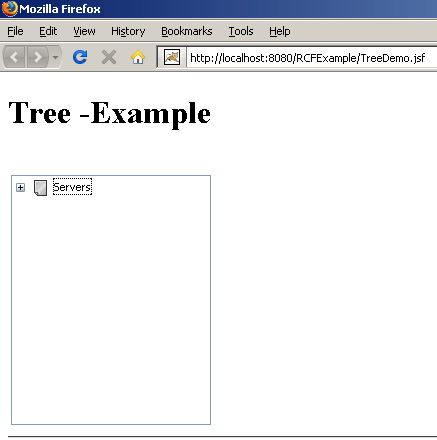
After expanding the root node you will get the output
as follows:

Download Source Code