JavaScript Open Modal Window
|
|
In this section, you will learn how to open Modal window in JavaScript.
As we have already discussed about the window.open() method of Window object which is used to open a new window. It lets the user interact with both of the windows i.e. original window and new opened window. Here we are going to open a popup window which remains in front of the original window and does not allow any user to communicate with the original window until the new window is closed. This can be done by using the method showModalDialog() of the window object.
Here is the code:
| <html> <h2>Open Modal Window</h2> <script anguage="JavaScript"> function openWindow(){ window.showModalDialog("http://www.roseindia.net"); } </script> <button onclick="openWindow();">Click Here to Open Modal Window</button> </html> |
Output will be displayed as:
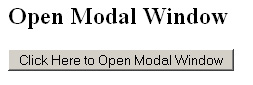
On clicking the button, a new window will get open which does not allow the user to interact with the original window until the new window has closed.


