In Java the bitwise and bit shift operators are used to manipulate the contents of variables at a bit level according to binary format.

Bitwise and Bit Shift Operators


In Java the bitwise and bit shift operators are used to manipulate the contents of variables at a bit level according to binary format. These operators perform bitwise and bit shift operations on integral type variables. There are different types of bitwise and bit shift operators available in the Java language summarized in the table.
| Symbol | Name of the Operator | Example |
| ~ | Unary bitwise complement | ~op2 |
| & | Bitwise AND | op1 & op2 |
| | | Bitwise inclusive OR | op1 | op2 |
| ^ | Bitwise exclusive OR | op1 ^ op2 |
| << | Signed left shift | op1 << op2 |
| >> | Signed right sift | op1 >> op2 |
| >>> | Unsigned right shift | op1 >>> op2 |
Lets understand these operators in brief :
I. Unary Bitwise Complement ("~") :
The unary bitwise complement ("~") operator takes a single bit and inverts the level of that bit pattern and can be applied to any of the integral types. In this case, the value of a bit which is 0 become 1 and vice versa. For example the value 7 to a variable "x" is represented in binary as 0111. But after applying "~" operator, the operation will be performed on each bit pattern which will return 1000 to the variable and the value 8 in the decimal format. Lets use the table to understand bitwise complement operation.
| Operand | Result |
| 0 | 1 |
| 1 | 0 |
| 1 | 0 |
| 0 | 1 |
II. Bitwise AND (&):
The Bitwise AND (&) operator performs the bitwise AND operation on each parallel pair of bits of two operands. The result is 1, if corresponding bits are 1 in both operands. Otherwise, the result is 0. Lets understand the AND operations using truth table:
(AND)
| A | B | Result |
| 0 | 0 | 0 |
| 1 | 0 | 0 |
| 0 | 1 | 0 |
| 1 | 1 | 1 |
III. Bitwise inclusive
OR ( | ):
The Bitwise inclusive
OR ( | ) operator performs the bitwise inclusive OR
operation on each parallel pair of bits of two operands. In each pair, the
result is 1, if either first or second bit is 1 (or both are
1).
Otherwise the result is 0. Lets see the table of using inclusive
operations.
Lets understand the inclusive OR operations using truth table:
(OR)
| A | B | Result |
| 0 | 0 | 0 |
| 1 | 0 | 1 |
| 0 | 1 | 1 |
| 1 | 1 | 1 |
IV. Bitwise exclusive OR (^):
The Bitwise exclusive OR (^)
performs the exclusive or (XOR) operation i.e. The
result in each position is 1 if the two bits are different, and 0
if they are the same. Lets understand the exclusive
OR operations using truth table:
| A | B | Result |
| 0 | 0 | 0 |
| 1 | 0 | 1 |
| 0 | 1 | 1 |
| 1 | 1 | 0 |
Bit Shifts Operators:
The computer processor has the registers including a fixed number of available bits for storing numerals. So it is possible to "shift out" some bits of the register at one end, and "shift in" from the other end. The number of bits are shifted within the range mode of 32.
The bit shifts operators are used to perform bitwise operations on the binary representation of an integer instead of its numerical value. In this operation, the bit shifts operators don't operate the pairs of corresponding bits rather the digits are moved, or shifted in a computer register either to the left or right according to the distance specified by a number.
Sign Bit:
A sign bit is found in the left most position of the number and is know as most significant bit (MSB) which indicates the status of a number i.e. the number is positive or negative. If the value of the sign bit is 0 then the number is positive; otherwise the number is negative, if the value of the sign bit is 1.
Now lets understand these operators in brief.
I. Signed Left Shift ("<<")
:
The signed left shift ("<<") operator
shifts
a bit (or bits) to the left by the distance specified
in the right operand. In this case, the leftmost digit is shifted at the
end
of the register, and a new 0 is shifted into the rightmost position.
No matter, the number is positive or negative; In both of case the
leading bit position is always filled with a zero.
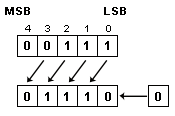
This diagram shows that, all bits of the upper position were shifted to the left by the distance of 1; and the Zero was shifted to the right most position. Thus the result is returned as 11100.
Another expression "2<<2";
shifts all bits of the number 2 to the left placing a zero to
the right for each blank place. Thus the value 0010 becomes 1000
or 8 in decimal.
II. Signed Right Shift (">>")
:
The signed right shift (">>") operator
shifts a bit (or bits) to the right by the distance
specified in the right operand and fills the left most bit by the sign bit. In this case the rightmost
bit (or bits) is shifted out, and a new 0 is filled with the sign bit
into the high-order bits to the left position if the left operand is
positive; otherwise 1, if the left operand is negative. This technique is
known as sign extension.

This diagram shows that, all bits of the upper position were shifted to the right distance specified by 1; Since the sign bit of this number indicates it as a positive number so the 0 is shifted to the right most position. Thus the result is returned as 00011 or 3 in decimal.
Another expression "2>>2";
shifts all bits of the number 2 to the right placing a zero
to the left for each blank place. Thus the value 0010
becomes 0000 or 0 in decimal.
When signed left or signed
right shifting operation is performed then the sign bit is ignored
i.e. all the bits except the sign bit can be moved but the sign bit stays the
same. Thus a signed left or signed right shift (<< and >>) operator
never causes a number to change its sign. A positive number will always stay
positive and a negative number will always stay negative. But the result for a
negative number is different.
For example, if we take a negative number as -50 then this value is
represented in binary as 11001110 then the
expression "-50>>2";
will return the result as 11110011 or
-13 in decimal. 0
III. Unsigned Right
Shift (">>>")
The unsigned right shift (">>>")
operator behave like the signed right shift operator. i.e. it shifts a bit
(or bits) to the right. But unlike ">>" operator, this operator
always shifts zeros into the leftmost position by the distance specified
in the right operand. So the result of applying the >>>operator
is always positive.
For example, the expression "14>>>2"; shifts all bits of the number 14 to the right placing a zero to the left for each blank place Thus the value 1110 becomes 0011 or 3 in decimal. 1
An unsigned shift operation of a negative number generally returns the result in a positive number, because any unsigned right shift operation replaces the leading sign bit with a zero which indicates a positive number.
Lets have an example where two variables "x" and "y" contain the value 11 and 12 respectively. Thus the binary value for each variable are as :
x = 1 0 1 1
y = 1 1 0 0 2
public class BitwiseOperators {
|
Output of the Program: 3
| C:\nisha>java BitwiseOperators a & b : 8 a | b : 15 a ^ b : 7 ~a : -12 a << b : 45056 a >> b : 0 a >>> b : 0 |