
A Java Compiler javac is a computer program or set of programs which translates java source code into java byte code.
Java Compiler


To commence with Java programming, we must know the significance of Java Compiler. When we write any program in a text editor like Notepad, we use Java compiler to compile it. A Java Compiler javac is a computer program or set of programs which translates java source code into java byte code.
The output from a Java compiler comes in the form of Java class files (with .class extension). The java source code contained in files end with the .java extension. The file name must be the same as the class name, as classname.java. When the javac compiles the source file defined in a .java files, it generates bytecode for the java source file and saves in a class file with a .class extension.
The most commonly used Java compiler is javac, included in JDK from Sun Microsystems.
Following figure shows the working of the Java compiler:
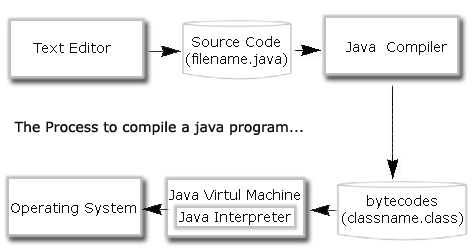
Once the byte code is generated it can be run on any platform using Java Interpreter (JVM). It interprets byte code (.class file) and converts into machine specific binary code. Then JVM runs the binary code on the host machine.
How to use Java Compiler
When you run javac command on the command prompt, it shows the following output.
C:\>javac
Usage: javac <options> <source files>
       where possible options include:
  -g                         Generate all debugging info

  -g:none                    Generate no debugging info

  -g:{lines,vars,source}     Generate only some debugging info

  -nowarn                    Generate no warnings

  -verbose                   Output messages about what the compiler is doing

  -deprecation               Output source locations where deprecated APIs are used

  -classpath <path>          Specify where to find user class files and annotation processors

  -cp <path>                 Specify where to find user class files and annotation processors

  -sourcepath <path>         Specify where to find input source files

  -bootclasspath <path>      Override location of bootstrap class files

  -extdirs <dirs>            Override location of installed extensions

  -endorseddirs <dirs>       Override location of endorsed standards path

  -proc:{none,only}          Control whether annotation processing and/or compilation is done.

  -processor <class1>[,<class2>,<class3>...]Names of the annotation processors to run; bypasses
                             default discovery process

  -processorpath <path>      Specify where to find annotation processors

  -d <directory>             Specify where to place generated class files

  -s <directory>             Specify where to place generated source files

  -implicit:{none,class}     Specify whether or not to generate class files for
                             implicitly referenced files

  -encoding <encoding>       Specify character encoding used by source files

  -source <release>          Provide source compatibility with specified release

  -target <release>          Generate class files for specific VM version

  -version                   Version information

  -help                      Print a synopsis of standard options

  -Akey[=value]              Options to pass to annotation processors

  -X                         Print a synopsis of nonstandard options

  -J<flag>                   Pass <flag> directly to the runtime system
C:\>
|
Above output shows the different options of javac tool.
Using java compiler to compile java file:
Following example shows how a Compiler works. It compiles the program and
gives the Syntax error, if there is any. Like in this example, we haven't
initialized 'a' and we are using it in the next statement as 'int c=a+b'. That
is why its showing a syntax error.
| class A{ public static void main(String[] args){ int a; int b=2; int c=a+b; System.out.println(c); } } |
| C:\Program Files\Java\jdk1.6.0_01\bin>javac A.java A.java:6: variable a might not have been initialized int c=a+b; ^ 1 error C:\Program Files\Java\jdk1.6.0_01\bin> |
Now, lets tweak this example. In this we have initialized 'a' as 'int a =2'. Hence, no syntax error has been detected.
| class A{ public static void main(String[] args) { int a=2; int b=2; int c=a+b; System.out.println(c); } } |
C:\Program Files\Java\jdk1.6.0_01\bin>javac A.java C:\Program Files\Java\jdk1.6.0_01\bin>java A 4 |