Home | Ajax | BioInformatics | Dojo | EAI | EJB | Hibernate | J2ME | Java | Java Glossary | Java Servlets | JavaScript | Jboss | JDBC | JDO | Jmeter | JSF | JSP | JUnit | Maven | MySQL | Spring Framework | SQL | Struts | Technology | WAP | Web Services | XML


Programming Tutorials: Ajax | Articles | JSP | Bioinformatics | Database | Free Books | Hibernate | J2EE | J2ME | Java | JavaScript | JDBC | JMS | Linux | MS Technology | PHP | RMI | Web-Services | Servlets | Struts | UML


Facing Programming Problem?
Ask Questions?, Browse Latest Questions, Question-Answer Guidelines
Java
  JDO Tutorials
  EAI Articles
  Struts Tutorials
  Java Tutorials
  Java Certification
  Java Applet
Questions
Comments

 'Hello World' file from a servlet (PDF, HTML or RTF).


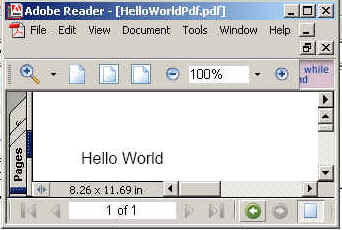
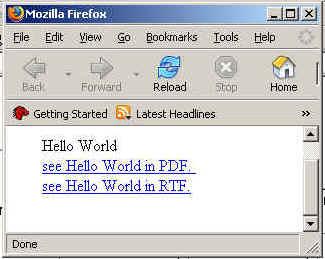
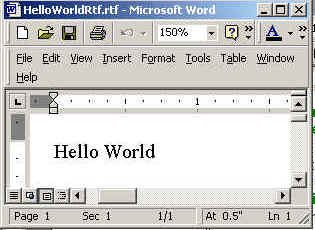
In this program we are going to tell you how we can create three file rtf,pdf and html files.And we are printing here Hello Word on PDF, HTML, And RTF formate.

To make a program over this, firstly we need to import some packages. Remember to make this program the first and foremost thing to remember is to place the iText.jar in WEB-INF/lib of your web application. Without this .jar the application will not run. The packages we were talking about are java.io.* for input output, com.lowagie.text.pdf.*,import java.awt.*;import javax.servlet.*;import javax.servlet.http.*,import com.lowagie.text.*,import com.lowagie.text.rtf.*,import com.lowagie.text.html.*;

Now create a file named helloServletPDF which extends Httpservlet. Remember the name of the file should be such that the reader can easily  understand what the program is going to perform. Inside the class declare a main method inside which we are going to write the logic of our program.

In doGet(HttpServletRequest req,HttpServletResponse res) create Document object  and getParameter  passed by user. Then if parameter passed is equals to "rtf" then  set res.setContentType("text/rtf") and    writer  file on Clint side as with RtfWriter2.getInstance (document,res. getOutputStream()) or if "html" then  set res.setContentType("text/html") and    writer  file on Clint side as with HtmlWriter.getInstance (document,res. getOutputStream()) or if "pdf" then  set res.setContentType("application/pdf") and    writer  file on Clint side as with PdfWriter.getInstance (document,res. getOutputStream()). Finaly close the document.  

The code of the program is given below:

import java.io.*;
import java.awt.*;
import javax.servlet.*;
import javax.servlet.http.*;
import com.lowagie.text.*;
import com.lowagie.text.pdf.*;
import com.lowagie.text.rtf.*;
import com.lowagie.text.html.*;


public class helloServletPDF extends HttpServlet
         {
          public void doGet(HttpServletRequest req, HttpServletResponse res)
    throws IOException, ServletException {
       String str=req.getParameter("Text1");
	   
       Document document=new Document();
	 
     try
       {  
     if(str.equals("pdf"))
          {
           res.setContentType("application/pdf");
           PdfWriter.getInstance(document,res.getOutputStream());
	}
       if(str.equals("rtf"))
         {
         res.setContentType("text/rtf");
         RtfWriter2.getInstance(document,res.getOutputStream());
		    }
       if(str.equals("html"))
          {
            res.setContentType("text/html");
            HtmlWriter.getInstance(document,res.getOutputStream());
			      }
             document.open();
            document.add(new Paragraph("Hello World"));
          }
            catch(DocumentException de) 
               {
            de.printStackTrace();
            System.err.println("document: " + de.getMessage());
        }
         document.close();          

   }
}
The code of the program is given below:Index.Html
<html>
     <head>
           <title>
                Example of servlet to display "Hello Word "
 on PDF,RTF and HTML format using iText
           </title>
     </head>
     <body>
           <p><br><br>
        <center><b>Enter Data Type Format (Only rtf,html or pdf)</b><br>
          <form  action="../helloServletPDF" method="GET" name="upform">
              <input type="text" name="Text1" ><br>
              <input type="submit" name="Submit" value="Submit" >
          </form>
       </center>
     </body>
</html>


The output of the program is given below:
Download this example.


Download this index.html.


Leave your comment:

Name:

Email:

URL:

Title:

Comments:


Enter Code:

Audio Version
Reload Image
 

Note: Emails will not be visible or used in any way, and are not required. Please keep comments relevant. Any content deemed inappropriate or offensive may be edited and/or deleted.

No HTML code is allowed. Line breaks will be converted automatically. URLs will be auto-linked. Please use BBCode to format your text.

Add This Tutorial To:
  Del.icio.us   Digg   Google   Spurl   Blink   Furl   Simpy   Y! MyWeb 

Current Comments

1 comments so far (
post your own) View All Comments Latest 10 Comments:

This site is very very helpful to get idea about Itext
And infact it has solved my problem also.

so i am very thankfull for this

Posted by apurva ranjan on Tuesday, 06.12.07 @ 11:59am | #18971

Latest Searches:
JSP in error page
equilateral triangle p
iterator
Eclipse 3.4 EJB
Photoshop Abstracts Co
rich text
Heap Sort in Java
code to store a string
simple calculator prog
read space character f
java runtime environme
string programe in jav
add the ArrayList to
Create XML file from f
drill down using jfree
simple calculator
save JDBC Connection f
hiding frame in jsp
DOM parsers.
Introduction to Spring
jta
SQL in Privilleages
jQuery To Slide Effect
product of all even nu
sаÑ?¦аÑ??ing
Photoshop Effects Grun
chart in visual basic
display message in app
struts framework
creating portlets usin
insert delete update j
reading from csv file
struts2 select
join tables using SQL
jndi and java lookup
login with custom erro
abstrct path name of f
julian date to georgia
login jsp
square root loop
struts for beginners
visual basic
ั?ะ??ั?ะ?????à
jQuery to Select Multi
pass parameters
spaces in string
strut2
struts2 checkbox
valadations in swings
context attribute of a
the code of ShowTransp
post data from a servl
java udp
java date compare exam
Java Tutorials
java: read string arra
interview question
onetoone association
Removes the key (and i
covert uppercase to lo
Downloading and Instal
jsp export to pdf
Package Examples
c:set
InfoNode (Java Compone
logic iterate
Ñ?Ð??Ñ?Ð??Ñ?Ð??l
insert fields blob
display data from mysq
map iteration in jstl
h:inputtext tag in jsf
struts plugins for mye
PHP User Authenticatio
calling a method from
xslt in struts
<html:optionsCollectio
empty
event JTable
j2me combo
Lucene in Action
Java String toLowerCase Example
Java String toCharArray Example
Java String substring Example
Java String indexOf Example
Java String startsWith Example
Java String hashCode Example
Java String matches Example
Java String length Example
Java String lastIndexOf Example
Java String isEmpty Example
Java String equalsIgnoreCase Example
Java String equals Example
Java String endsWith Example
Java String copyValueOf Example
Java String contentEquals Example
  EAI Articles
  Java Certification
Tell A Friend
Your Friend Name
Search Tutorials


Browse all Java Tutorials
Java JSP Struts Servlets Hibernate XML
Ajax JDBC EJB MySQL JavaScript JSF
Maven2 Tutorial JEE5 Tutorial Java Threading Tutorial Photoshop Tutorials Linux Technology
Technology Revolutions Eclipse Spring Tutorial Bioinformatics Tutorials Tools SQL
 

Home | JSP | EJB | JDBC | Java Servlets | WAP  | Free JSP Hosting  | Search Engine | News Archive | Jboss 3.0 tutorial | Free Linux CD's | Forum | Blogs

About Us | Advertising On RoseIndia.net  | Site Map

India News

Indian Software Development Company | iPhone Development Company in India | Java Training Delhi | Java Training at Noida |

Send your comments, Suggestions or Queries regarding this site at roseindia_net@yahoo.com.

Copyright © 2008. All rights reserved.