The stylistic representation of the outline for the specified shape has been given by the interface Stroke.
Simple Basic Stroke Example


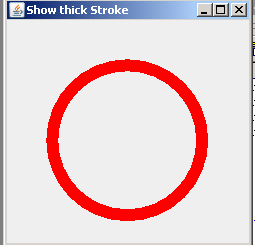
This section illustrates you how to draw the thick stroke.
The stylistic representation of the outline for the specified shape has been given by the interface Stroke. To outline the specified shape rendered with an object of Graphics2D, we have used the BasicStroke class.
The method setStroke() sets the stroke settings for the Graphics2D context, when you draw the shape. The float value pass into the constructor of class BasicStroke shows the thickness of the stroke.
We have defined Ellipse2D class to draw an oval shape. The method g2d.draw(ellipse) draw the oval shape along with the thickness of stroke.
Here is the code of SimpleBasicStrokeExample.java
import java.awt.*;
import java.awt.event.*;
import javax.swing.*;
import java.awt.geom.*;

public class SimpleBasicStrokeExample extends JPanel {
public void initialize() {
  setBackground(Color.white);
  }
  public void paint(Graphics g) {
  Graphics2D g2d = (Graphics2D) g;
    g2d.setStroke(new BasicStroke(12.0f));
    g2d.setPaint(Color.red);
    Ellipse2D ellipse = new Ellipse2D.Double(45,45,150,150);
    g2d.draw(ellipse);
  }
  public static void main(String args[]) {
    JFrame frame = new JFrame("Show thick Stroke");
    SimpleBasicStrokeExample basicStrokeExample = new SimpleBasicStrokeExample();
    frame.getContentPane().add("Center", basicStrokeExample);
    basicStrokeExample.initialize();
    frame.setSize(new Dimension(250, 250));
    frame.show();
  }
}
Output will be displayed as: