Core Java| JSP| Servlets| XML| EJB| JEE5| Web Services| J2ME| Glossary| Questions?


Search Tutorials:
 

Software Solutions and Services


  JDO Tutorials
  EAI Articles
  Struts Tutorials
  Java Tutorials
  Java Certification
  Java Applet
Questions
Comments
 
Progress Bar in Java Swing 
 

In this section, you can learn how to handle progress bar in java swing.
 

Progress Bar in Java Swing


In this section, you can learn how to handle progress bar in java swing. This section shows you how the progress bar starts and stops with the timer. Through the given example you can understand how the progress bar is created for showing your work is in progress.

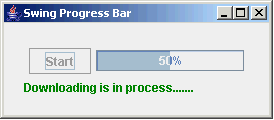
This program shows you a frame in which a button labeled by the string "Start", a progress bar and another is the label which has been used to display some messages. When you click on the "Start" button progress bar is started to progress the completed process in percent and the label which holds the text "Roseindia.net" is change to with the label text "Downloading is in process......" in green color and the button is disabled. When the value of the progress bar is become 100% then the label text of the label is changed with the text "Downloading completed." in red color and "Start" button is enabled.

The label display the information about the Downloading process whether completed or not. But here, nothing is downloading through the program. This message on the label has been used only for showing in output of the program. For completion the process, there are some methods and APIs are used in the program has been explained as follows:

JProgressBar:
This is the class which creates the progress bar using it's constructor JProgressBar() to show the status of your process completion. The constructor JProgressBar() takes two argument as parameter in which, first is the initial value of the progress bar which is shown in the starting and another argument is the counter value by which the value of the progress bar is incremented. Here, the value of the progress bar is incremented by 20.

setStringPainted(boolean):
This is the method of the JProgressBar class which shows the complete process in percent on the progress bar. It takes a boolean value as a parameter. If you pass the true then the value will be seen on the progress bar otherwise not seen.

setValue():
This is the method of the JProgressBar class which sets the value to the progress bar.

Timer():
This the constructor of the Timer class which starts the timer for timing. This constructor takes two argument as parameter first is the interval (in milliseconds) of the timer and second one is the listener object. Time is started using the start() method of the Timer class.

Here is the code of the program:

import java.awt.*;
import java.awt.event.*;
import javax.swing.*;
import javax.swing.text.html.*;

public class SwingProgressBar{
    final static int interval = 1000;
  int i;
  JLabel label;
    JProgressBar pb;
    Timer timer;
    JButton button;

    public SwingProgressBar() {
    JFrame frame = new JFrame("Swing Progress Bar");
        button = new JButton("Start");
        button.addActionListener(new ButtonListener());

    pb = new JProgressBar(020);
        pb.setValue(0);
        pb.setStringPainted(true);

    label = new JLabel("Roseindia.net");
    
    JPanel panel = new JPanel();
        panel.add(button);
        panel.add(pb);

        JPanel panel1 = new JPanel();
        panel1.setLayout(new BorderLayout());
        panel1.add(panel, BorderLayout.NORTH);
    panel1.add(label, BorderLayout.CENTER);
        panel1.setBorder(BorderFactory.createEmptyBorder(20202020));
        frame.setContentPane(panel1);
        frame.pack();
        frame.setVisible(true);
    frame.setDefaultCloseOperation(JFrame.EXIT_ON_CLOSE);

        //Create a timer.
        timer = new Timer(interval, new ActionListener() {
            public void actionPerformed(ActionEvent evt) {
        if (i == 20){
          Toolkit.getDefaultToolkit().beep();
          timer.stop();
          button.setEnabled(true);
          pb.setValue(0);
          String str = "<html>" "<font color=\"#FF0000\">" "<b>" 
"Downloading completed." "</b>" "</font>" "</html>";
          label.setText(str);
        }
        i = i + 1;
                pb.setValue(i);
            }
        });
    }

    class ButtonListener implements ActionListener {
        public void actionPerformed(ActionEvent ae) {
            button.setEnabled(false);
      i = 0;
      String str = "<html>" "<font color=\"#008000\">" "<b>" 
"Downloading is in process......." "</b>" "</font>" "</html>";
      label.setText(str);
            timer.start();
        }
    }
    
    public static void main(String[] args) {
        SwingProgressBar spb = new SwingProgressBar();
    }
}

Download this example.


» View all related tutorials
Related Tags: c memory image class images interface io colors sed color get implementation display icon height value source width int id

Leave your comment:

Name:

Email:

URL:

Title:

Comments:


Enter Code:

Audio Version
Reload Image
 

Note: Emails will not be visible or used in any way, and are not required. Please keep comments relevant. Any content deemed inappropriate or offensive may be edited and/or deleted.

No HTML code is allowed. Line breaks will be converted automatically. URLs will be auto-linked. Please use BBCode to format your text.

Add This Tutorial To:
  Del.icio.us   Digg   Google   Spurl   Blink   Furl   Simpy   Y! MyWeb 

Current Comments

3 comments so far (
post your own) View All Comments Latest 10 Comments:

good for swing devlepoer

Posted by pradeep kumar on Monday, 04.21.08 @ 16:54pm | #57404

hi my question is for SwingProgressBar.
i want to upload the progress bar in jsp. so how?
can i have to make swing applet? how?

Posted by shreyas desai on Wednesday, 03.12.08 @ 12:17pm | #52446

i am a newer java devenloper and i would like to receive more articles of java development, especially about the way and rules to devenlop a good aplication using java with good user interface using swing and awt.
Thanks.

Posted by Sérgio on Tuesday, 10.16.07 @ 15:46pm | #34205

Training Courses
Tell A Friend
Your Friend Name
Website Designing Services
 
Web Designing Packages From $150!
 
Website Designing Company Web Hosting
 
Website Designing Quotation
 
Search Tutorials:


Home | JSP | EJB | JDBC | Java Servlets | WAP  | Free JSP Hosting  | Search Engine | News Archive | Jboss 3.0 tutorial | Free Linux CD's | Forum | Blogs

About Us | Advertising On RoseIndia.net  | Site Map

India News

Indian Software Development Company | iPhone Development Company in India | Flex Development Company in India | Java Training Delhi | Java Training at Noida |

Send your comments, Suggestions or Queries regarding this site at roseindia_net@yahoo.com.

Copyright © 2008. All rights reserved.