
This section provides you a simple way for shading the alternate rows in JTable by using the some Java methods and APIs this alternate rows appear in the color.
Shading Rows in JTable


You have learnt about the JTable components and its column headers in the previous Java section. Now, you will be able to do the shading rows in JTable. But, the question arises what is shading?.
Shading Rows: In JTable component the shading rows are the simplest way of shading alternate rows in JTablecomponent that overrides the prepareRenderer() method.
This section provides you a simple way for shading the alternate rows in JTable by using the some Java methods and APIs this alternate rows appear in the color.
Description of program:
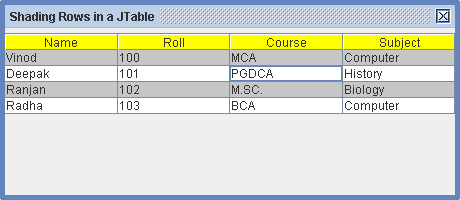
This program creates a table with some data and column with headers by using the setBackground() method that displays a yellow background in the column header. After that you need to shade the alternate rows (even rows) in JTable component that overrides the prepareRenderer() method. This table calls the prepareRenderer method to every cell that is used to display and override method calls the super class and retrieves the prepareRenderer components. It will modify its background color and achieve the shaded rows of a table.
Description of code:
prepareRenderer(TableCellRenderer renderer, int
index_row, int index_col):
This method returns the component under the specified event location. It
prepares the table cell renderer by querying the data model to value and
selection state of the cell at rows or columns. It takes the following
arguments:
renderer:
The TableCellRenderer that have to prepare.
index_row: This is the index of row
of the cell renderer, where '0' denotes the first row.
index_col: This is the index of
column of the cell renderer, where '0' represents the first column.
TableCellRenderer: This is an interface that defines the method for requiring object that have to renderer for cell in a JTable.
Here is the code of program:
import javax.swing.*;
|
output of program:
 |

