
In this section, you will see how to add a new column in JTable.

Appending a Column in JTable


In this section, you will see how to add a new column in JTable. For adding a new column in JTable component you have to need a table model that supports this operations to use some Java methods and APIs.
Description of program:
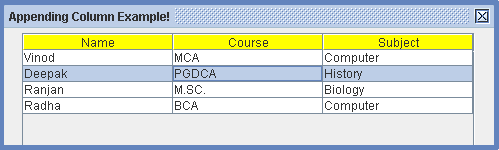
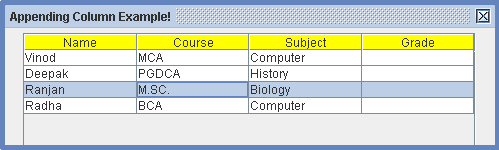
In this program, we will see how to add (append) a new column in JTable. The following program creates a table that contains some data and columns with headers. When it runs first time, it displays a table with three columns and when you will run this program again after removing the comments, you will see the following results. An added column will be displays on the the screen in a JTable. Try it and see the result.
Description of code:
addColumn(Object col_name):
This is the method that is used to add a new column to the model. It takes
column name which have to added in a table.
Here is the code of program:
import javax.swing.*;
|
Output of program:
Before Appending a column:
 |
After Appending a column:
 |

