Home | Ajax | BioInformatics | Dojo | EAI | EJB | Hibernate | J2ME | Java | Java Glossary | Java Servlets | JavaScript | Jboss | JDBC | JDO | Jmeter | JSF | JSP | JUnit | Maven | MySQL | Spring Framework | SQL | Struts | Technology | WAP | Web Services | XML
 
 
Search All Tutorials

 
Programming Tutorials: Ajax | Articles | JSP | Bioinformatics | Database | Free Books | Hibernate | J2EE | J2ME | Java | JavaScript | JDBC | JMS | Linux | MS Technology | PHP | RMI | Web-Services | Servlets | Struts | UML
 
EJB
  JDO Tutorials
  EAI Articles
  Struts Tutorials
  Java Tutorials
  Java Certification
  Java Applet
Questions
Comments

Stateless Session Bean Example


In this part of Enterprise Session Beans, you will learn how to develop, deploy, and run a simple Java EE application named example using stateless session bean. The purpose of example is to performs the mathematical operations such as Addition, Subtraction, Multiplication, and Division.  
The example application consists of an enterprise bean, which performs the calculations, and two types of clients: an application client and a web client.

There are following steps that you have to follow to develop a example JEE application.

  1. Create the enterprise bean: CalculatorBean

  2. Create the web client: WebClient

  3. Deploy example onto the server.

  4. Using a browser, run the web client.

I. Creating the enterprise bean:

The enterprise bean in our example is a stateless session bean called CalculatorBean. The source code for CalculatorBean is in “net/roseindia/ejb3/stateless” directory.

Creating CalculatorBean requires these steps:

(i) Coding the bean’s Remote business interface and Enterprise bean class.

(ii) Compiling the source code with the Ant tool.

 (i) Coding the Business Interface

The business interface defines the business methods that a client can call remotely. The business methods are implemented in the enterprise bean class. The source code for the CalculatorRemote business interface is given below.

package net.roseindia.ejb3.stateless;

import java.math.*;
import javax.ejb.Remote;
import java.lang.annotation.*;
@Remote
public interface CalculatorRemote {
 public float add(float x, float y);
 public float subtract(float x, float y);
 public float multiply(float x, float y);
 public float division(float x, float y);
}

Note that, the @Remote annotation decorating the interface definition. This lets the container know that CalculatorBean will be accessed by remote clients.

II. Coding the Enterprise Bean Class

The enterprise bean class for this example is called CalculatorBean. This class implements the four business methods (add, subtract, multiply, division) that are defined in the CalculatorRemote  business interface. The source code for the CalculatorBean class is given below.

package net.roseindia.ejb3.stateless;

import java.math.*;
import javax.ejb.Stateless;
import javax.ejb.Remote;  

@Stateless(name="CalculatorBean")
@Remote(CalculatorRemote.class)  
public class CalculatorBean implements CalculatorRemote{
  public float add(float x, float y){   
    return x + y;
   }

   public float subtract(float x, float y){
      return x - y;
   }
    public float multiply(float x, float y){
      return x * y;
   }
   public float division(float x, float y){
     return x / y;
   }
}

Note that, the @Stateless annotation decorating the enterprise bean class. This lets the container know that CalculatorBean is a stateless session bean.

Compiling and Packaging the example Example

Now you are ready to compile the remote business interface (CalculatorRemote.java), the enterprise bean class (CalculatorBean.java) and the application client (CalculatorClient.java), then package the compiled classes into an enterprise bean JAR.

II. Creating the calculator Web Client

The web client is contained in the JSP page "WebClient.jsp". A JSP page is a text-based document that contains JSP elements, which construct dynamic content, and static template data, expressed in any text-based format such as HTML, WML, and XML.

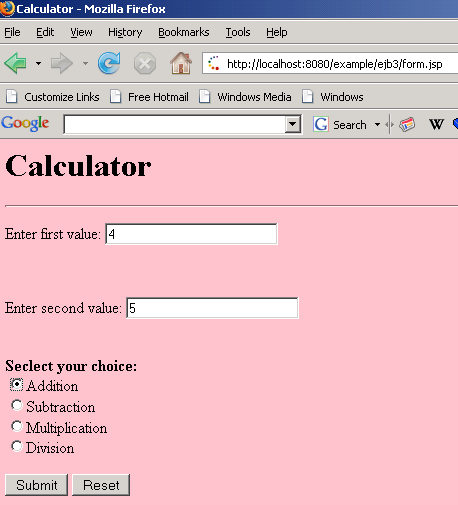
The source code for the “form.jsp” is given below.

<html>
    <head>
        <title>Calculator</title>
    </head>
    <body bgcolor="pink">
        <h1>Calculator</h1>
        <hr>
        <form action="WebClient.jsp" method="POST">
            <p>Enter first value:
            <input type="text" name="num1" size="25"></p>
            <br>
                <p>Enter second value:
            <input type="text" name="num2" size="25"></p>
            <br>
            <b>Seclect your choice:</b><br>
  <input type="radio" name="group1" value ="add">Addition<br>
  <input type="radio" name="group1" value ="sub">Subtraction<br>
  <input type="radio" name="group1" value ="multi">Multiplication<br>
  <input type="radio" name="group1" value ="div">Division<br>
  <p>
            <input type="submit" value="Submit">
            <input type="reset" value="Reset"></p>
        </form>
    </body>
</html>

The following statements given below in “WebClient.jsp” are used for locating the business interface, creating an enterprise bean instance, and invoking a business method.

InitialContext ic = new InitialContext();
CalculatorRemote calculator = (CalculatorRemote)ic.lookup("example/CalculatorBean/remote");

The classes needed by the client are declared using a JSP page directive (enclosed within the <%@ %> characters). Because locating the business interface and creating the enterprise bean are performed only once, this code appears in a JSP declaration (enclosed within the <%! %> characters) that contains the initialization method, jspInit, of the JSP page. A scriptlet (enclosed within the <% %> characters) retrieves the parameters from the request and converts it to a Float object. Finally, a JSP scriptlet invokes the enterprise bean’s business methods, and JSP expressions (enclosed within the <%= %> characters) insert the results into the stream of data returned to the client.

The full source code for the WebClient program is given below.

<%page contentType="text/html; charset=UTF-8" %>
<%page import="com.javajazzup.examples.ejb3.stateless.*, javax.naming.*"%>

 <%!
    private CalculatorRemote calculator = null;
  float result=0;

    public void jspInit() {
        try {
      
            InitialContext ic = new InitialContext();
            
      calculator = (CalculatorRemoteic.lookup("example/CalculatorBean/remote");

      System.out.println("Loaded Calculator Bean");
//CalculatorBean

        catch (Exception ex) {
            System.out.println("Error:"+
                    ex.getMessage());
        }
    }
    public void jspDestroy() {
        calculator = null;
    }
%>
        <%
    try {
            String s1 = request.getParameter("num1");
      String s2 = request.getParameter("num2");
      String s3 = request.getParameter("group1");

System.out.println(s3);

            if s1 != null && s2 != null ) {
                Float num1  = new Float(s1);
        Float num2  = new Float(s2);
        
        if(s3.equals("add"))
          result=calculator.add(num1.floatValue(),num2.floatValue());
        else if(s3.equals("sub"))
          result=calculator.subtract(num1.floatValue(),num2.floatValue());
        else if(s3.equals("multi"))
          result=calculator.multiply(num1.floatValue(),num2.floatValue());
        else
          result=calculator.division(num1.floatValue(),num2.floatValue());
        
         %>
        <p>
        <b>The result is:</b> <%= result %>
        <p>
        
        <%
            }
    }// end of try
    catch (Exception e) {
      e.printStackTrace ();
     //result = "Not valid";
    }
        %>

Note: The Application Server automatically compiles web clients that are JSP pages. If the web client were a servlet, you would have to compile it.

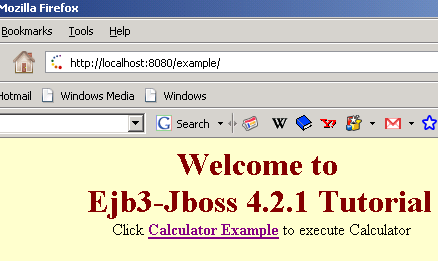
The source code for the “index.jsp” is given below that will actual call the client-design form.

<%@page language="java" %>
<html>
<head>
<title>Ejb3 Stateless Tutorial</title>
</head>

<body bgcolor="#FFFFCC">
<p align="center"><font size="6" color="#800000"><b>Welcome to <br>
Ejb3-Jboss 4.2.0 Tutorial</b></font>
Click <a href="ejb3/form.jsp">Calculator Example</a> to execute Calculator<br></p>
</body>
</html>

III. Deploy example onto the server

To deploy the created example application we are going to use Jboss 4.2.0 Application Server about which you have read in the previous section of this Javajazzup issue. So you first need to download the following tools to deploy this application.

·        JDK 1.5 or Higher

·        apache-ant-1.7.0

·        JBoss 4.2.0

Do the following steps to deploy the example application:

(i)       Make a directory structure. You can Click here to extract the readymade directory structure according to this tutorial.

       (ii)  Create the essential deployment descriptor .xml files.

     build.xml

<?xml version="1.0"?>
<project name="Jboss Tutorials" default="all" basedir=".">

    <target name="init">
                        <!-- Define  -->
        <property name="dirs.base" value="${basedir}"/>
        <property name="classdir" value="${dirs.base}/build/classes"/>      
       
<property name="src" value="${dirs.base}/src"/>
        <property name="web" value="${dirs.base}/web"/>
        <property name="deploymentdescription" value="${dirs.base}/deploymentdescriptors"/>
        <property name="warFile" value="example.war"/>
        <property name="earFile" value="example.ear"/>
        <property name="jarFile" value="example.jar"/>
        <property name="earDir" value="${dirs.base}/build/ear"/>  
     
<property name="warDir" value="${dirs.base}/build/war"/>
        <property name="jarDir" value="${dirs.base}/build/jar"/>

                        <!-- classpath for Project -->
                        <path id="library.classpath">
                                    <pathelement path ="libext/servlet-api.jar"/>
                                    <pathelement path ="libext/ejb3-persistence.jar"/>
                                    <pathelement path ="libext/javaee.jar"/>
                                    <pathelement path ="${classpath}"/>                    </path>

        <!-- Create Web-inf and classes directories -->

        <mkdir dir="${warDir}/WEB-INF"/>
        <mkdir dir="${warDir}/WEB-INF/classes"/>
            <!-- Create Meta-inf and classes directories -->
        <mkdir dir="${earDir}/META-INF"/>
        <mkdir dir="${jarDir}/META-INF"/>
        <mkdir dir="${classdir}"/>
    </target>

    <!-- Main target  -->

    <target name="all" depends="init,build,buildWar,buildJar,buildEar"/>
    <!-- Compile Java Files and store in /build/src directory  -->
    <target name="build" >
          <javac srcdir="${src}" destdir="${classdir}" debug="true" includes="**/*.java" >
                                      <classpath refid="library.classpath"/>
                          </javac>
      </target>

    <!-- Create the web archive File -->

    <target name="buildWar" depends="init">
        <copy todir="${warDir}/WEB-INF/classes">
              <fileset dir="${classdir}" includes="**/*.class" />
        </copy>
        <copy todir="${warDir}/WEB-INF">
              <fileset dir="${deploymentdescription}/web/" includes="web.xml" />
        </copy>

        <copy todir="${warDir}">
              <fileset dir="${web}" includes="**/*.*" />
        </copy>

            <!-- Create war file and place in ear directory -->        <jar jarfile="${earDir}/${warFile}" basedir="${warDir}" />
    </target>

    <!-- Create the jar File -->

    <target name="buildJar" depends="init">
        <copy todir="${jarDir}">
              <fileset dir="${classdir}" includes="**/*.class" />
        </copy>

        <copy todir="${jarDir}/META-INF">
              <fileset dir="${deploymentdescription}/jar/" includes="ejb-jar.xml,weblogic-cmp-rdbms-jar.xml,weblogic-ejb-jar.xml" />
        </copy>

            <!-- Create jar file and place in ear directory -->
        <jar jarfile="${earDir}/${jarFile}" basedir="${jarDir}" />

    </target>
<!-- Create the ear File -->

    <target name="buildEar" depends="init">
        <copy todir="${earDir}/META-INF">
              <fileset dir="${deploymentdescription}/ear" includes="application.xml" />
        </copy>
            <!-- Create ear file and place in ear directory -->
        <jar jarfile="../${earFile}" basedir="${earDir}" />

        <copy todir="C:/jboss-4.2.0.GA/server/default/deploy/">
              <fileset dir="../" includes="${earFile}" />

       </copy>
    </target>
</project>

Put this file in the base (stateless\code)directory.

Application.xml

<?xml version="1.0" encoding="UTF-8"?>

<application xmlns="http://java.sun.com/xml/ns/javaee" xmlns:xsi="http://www.w3.org/2001/XMLSchema-instance" version="5" xsi:schemaLocation="http://java.sun.com/xml/ns/javaee http://java.sun.com/xml/ns/javaee/application_5.xsd">
            <display-name>Stateless Session Bean Example</display-name>
            <module>
            <web>
                        <web-uri>example.war</web-uri>
                        <context-root>/example</context-root>
            </web>
            </module>
            <module>
                        <ejb>example.jar</ejb>
            </module>
</application>

Put this file in the Stateless\code\deploymentdescriptors\ear directory.

web.xml

<?xml version="1.0" encoding="UTF-8"?>

<!DOCTYPE web-app PUBLIC "-//Sun Microsystems, Inc.//DTD Web Application 2.3//EN" "http://java.sun.com/dtd/web-app_2_3.dtd">

<web-app >

</web-app>

Put this file in the Stateless\code\deploymentdescriptors\web directory.
Put all .jsp files in the Stateless\code\web directory.
Put all .java files in the Stateless\code\src directory.

       (iii) Start command prompt, and go to the Stateless\code directory. Then type the command as:
             C:\Stateless\code>ant build.xml

The Ant tool will deploy the example.ear file to the jboss-4.2.0.GA\server\default\deploy directory.

V. Running the example Web Client

Open the web browser and type the following URL to run the application:

               http://localhost:8080/example


Click at the given link as Calculator Example:


Give values to the textbox and choose the desire option button as Addition then clicks the Submit button to get the result.
     The result is: 9.0


Download the full source code

                         
Facing Programming Problem?
Add This Tutorial To:
  Del.icio.us   Digg   Google   Spurl   Blink   Furl   Simpy   Y! MyWeb 

Current Comments

3 comments so far (post your own) View All Comments Latest 10 Comments:

Respected Sir,
I have follow the procedure that you have mentioned here but unable to successfully run the given example.
This may be because of certain xml files are missing. please provide those files.

Posted by Sagar on Thursday, 05.1.08 @ 17:33pm | #58306

Dear Sir,

Some files are missing as this portion of the build fails.

<copy todir="${jarDir}/META-INF">
<fileset dir="${deploymentdescription}/jar/" includes="ejb-jar.xml,weblogic-cmp-rdbms-jar.xml,weblogic-ejb-jar.xml" />
</copy>

It fails beacuse the deploymentdescription}/jar directory and the files inside it are missing.

Please help as I cannot run the application because of these missing files.

Regards
Manu Gupta

Posted by Manu Gupta on Thursday, 04.24.08 @ 22:14pm | #57810

roseindia is simply superb

Posted by sandhya on Tuesday, 03.11.08 @ 02:08am | #52229

Leave your comment:

Name:

Email:

URL:

Title:

Comments:


Enter Code:


Note: Emails will not be visible or used in any way, and are not required. Please keep comments relevant. Any content deemed inappropriate or offensive may be edited and/or deleted.

No HTML code is allowed. Line breaks will be converted automatically. URLs will be auto-linked. Please use BBCode to format your text.

Hot Web Programming Job

Java String toLowerCase Example
Java String toCharArray Example
Java String substring Example
Java String indexOf Example
Java String startsWith Example
Java String hashCode Example
Java String matches Example
Java String length Example
Java String lastIndexOf Example
Java String isEmpty Example
Java String equalsIgnoreCase Example
Java String equals Example
Java String endsWith Example
Java String copyValueOf Example
Java String contentEquals Example
  EAI Articles
  Java Certification
Tell A Friend
Your Friend Name
Search Tutorials


Browse all Java Tutorials
Java JSP Struts Servlets Hibernate XML
Ajax JDBC EJB MySQL JavaScript JSF
Maven2 Tutorial JEE5 Tutorial Java Threading Tutorial Photoshop Tutorials Linux Technology
Technology Revolutions Eclipse Spring Tutorial Bioinformatics Tutorials Tools SQL
 

Home | JSP | EJB | JDBC | Java Servlets | WAP  | Free JSP Hosting  | Search Engine | News Archive | Jboss 3.0 tutorial | Free Linux CD's | Forum | Blogs

About Us | Advertising On RoseIndia.net  | Site Map

India News

Send your comments, Suggestions or Queries regarding this site at roseindia_net@yahoo.com.

Copyright © 2007. All rights reserved.